How do I use the Lo-fi Editorial Bedroom Portrait template?
Choose the primary action to open PicX Studio with the available template settings. Review the model and format, personalize the creative direction, and generate when ready.
A prompt for capturing a realistic, lo-fi bedroom portrait with a late 90s aesthetic, featuring harsh flash and intimate details.
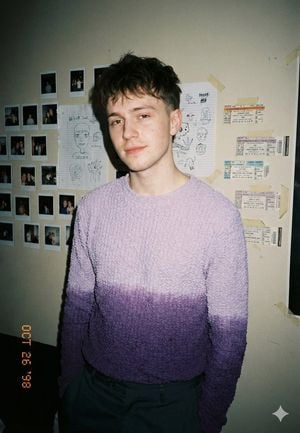
An intimate bedroom portrait of a {argument name="subject" default="young man in his early 20s"}, calm and slightly guarded expression, direct eye contact, standing relaxed. He wears a {argument name="clothing" default="textured knit sweater with a soft purple gradient fade"} and muted casual trousers. The background is a personal room wall covered in taped polaroids, handwritten sketches, and concert ticket stubs. Shot at eye level on a 35mm lens with harsh on-camera flash, hard shadows behind subject, deep depth of field, slight vignetting and flash falloff. Real skin texture, visible blemishes, no retouching, noticeable film grain, subtle date stamp in corner. Muted neutral palette with soft lavender emphasis, natural warm skin tones, moderate contrast. Lo-fi editorial realism, late 90s / early 2000s candid diary aesthetic. No studio lighting, no beauty retouching, no clean minimal background.
Choose the primary action to open PicX Studio with the available template settings. Review the model and format, personalize the creative direction, and generate when ready.
Yes. You can change the subject, setting, lighting, mood, format, and available model controls before creating your image.
This template is free to open and customize. Generation usage is shown in PicX Studio before you create.
Start with GPT Image 2, which is the model associated with this template. You can compare another compatible model for a different finish.
Follow a topic to a crawlable collection of related PicX Studio templates.