How do I use the Mediterranean Alley Realistic Portrait template?
Choose the primary action to open PicX Studio with the available template settings. Review the model and format, personalize the creative direction, and generate when ready.
An ultra-realistic prompt for a woman seated in a vibrant blue Mediterranean alley, capturing high contrast shadows and vivid textures.
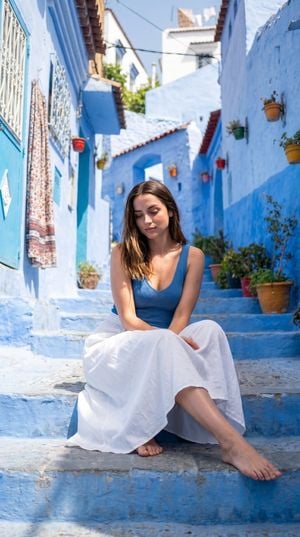
Ultra-realistic photo of a {argument name="subject" default="woman"} seated on stone steps in a {argument name="location" default="vibrant Mediterranean alley with vivid blue-painted walls"}, stairs, and buildings with white accents. She wears a blue fitted sleeveless top and a long flowing white skirt, barefoot, with a calm relaxed expression and eyes slightly downward. Long wavy hair falls naturally over her shoulders. {argument name="lighting style" default="Strong natural sunlight"} creates high contrast shadows and saturated colors. Shot from a slightly low front-facing angle with full body framing, sharp focus on subject against a detailed background of blue walls, hanging patterned fabric, small windows, and plants above. Highly saturated blues contrasted with natural white and skin tones, ultra-realistic textures, crisp shadows, realistic depth.
Choose the primary action to open PicX Studio with the available template settings. Review the model and format, personalize the creative direction, and generate when ready.
Yes. You can change the subject, setting, lighting, mood, format, and available model controls before creating your image.
This template is free to open and customize. Generation usage is shown in PicX Studio before you create.
Start with GPT Image 2, which is the model associated with this template. You can compare another compatible model for a different finish.
Follow a topic to a crawlable collection of related PicX Studio templates.