How do I use the Cinematic Monochrome Male Portrait template?
Choose the primary action to open PicX Studio with the available template settings. Review the model and format, personalize the creative direction, and generate when ready.
A detailed prompt for generating high-contrast, black-and-white editorial portraits of a man with a rain-soaked, cinematic aesthetic.
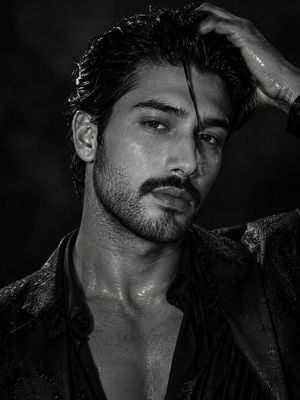
Ultra-realistic black-and-white portrait of a {argument name="subject" default="ruggedly handsome man with a thick, well-groomed mustache, strong angular jawline, defined cheekbones, and piercing light eyes"}. Wet, slicked-back dark hair with a single strand falling over his forehead. One hand runs through his hair, creating a confident, intense pose. His skin glistens with water droplets, giving a rain-soaked, cinematic look. He wears a {argument name="clothing" default="black open-collar shirt beneath a dark blazer"}, revealing part of his chest. Dramatic high-contrast studio lighting, deep shadows, sharp facial details, monochrome editorial fashion photography, luxury magazine cover aesthetic, masculine, mysterious expression, 85mm lens, shallow depth of field, ultra-detailed skin texture, HDR, 8K, photorealistic, Vogue/GQ-inspired, moody atmosphere.
Choose the primary action to open PicX Studio with the available template settings. Review the model and format, personalize the creative direction, and generate when ready.
Yes. You can change the subject, setting, lighting, mood, format, and available model controls before creating your image.
This template is free to open and customize. Generation usage is shown in PicX Studio before you create.
Start with GPT Image 2, which is the model associated with this template. You can compare another compatible model for a different finish.
Follow a topic to a crawlable collection of related PicX Studio templates.