How do I use the Candid Fashion Editorial Portrait template?
Choose the primary action to open PicX Studio with the available template settings. Review the model and format, personalize the creative direction, and generate when ready.
A cinematic fashion editorial portrait of a man in a three-piece suit walking through an overcast grass field with a warm, natural aesthetic.
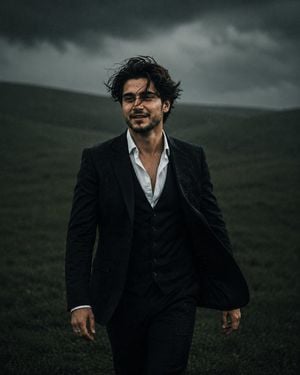
Candid fashion editorial portrait of {argument name="subject" default="handsome young man with medium-length dark brown wavy hair"} blown wildly by wind across his face, genuine full open-mouth laugh showing teeth, confident warm expression, walking directly toward camera mid-stride with arms swinging naturally, wearing {argument name="outfit" default="dark charcoal three-piece suit with waistcoat"}, white dress shirt with collar open two buttons and no tie, silver ring on finger, slight low camera angle shooting upward for added presence, {argument name="background" default="blurred deep green grass field"} filling entire background, soft overcast diffused lighting with warm skin tones, subtle film grain texture, shallow depth of field, vertical 4:5 composition, cinematic male fashion editorial photography --ar 4:5 --v 6
Choose the primary action to open PicX Studio with the available template settings. Review the model and format, personalize the creative direction, and generate when ready.
Yes. You can change the subject, setting, lighting, mood, format, and available model controls before creating your image.
This template is free to open and customize. Generation usage is shown in PicX Studio before you create.
Start with GPT Image 2, which is the model associated with this template. You can compare another compatible model for a different finish.
Follow a topic to a crawlable collection of related PicX Studio templates.