How do I use the Minimalist Editorial Fashion Sketch template?
Choose the primary action to open PicX Studio with the available template settings. Review the model and format, personalize the creative direction, and generate when ready.
Generates a sophisticated fashion sketch using delicate black ink lines and soft monochrome washes against a vibrant background.
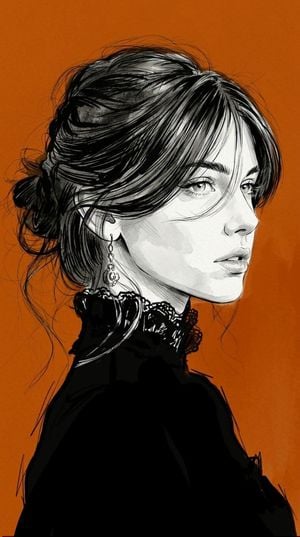
A refined, expressive fashion sketch illustration style, combining elegant, thick black ink lines with soft monochrome wash renderings. Sharp, smooth, confident black brushstrokes blend with loose, gestural sketch lines, featuring line thicknesses varying from ultra-thin hairlines to bold, expressive accents. Soft, controlled shading using subtle, cool gray watercolor strokes and light, graphite-like gradients creates a soft dimension without overwhelming contrast. The color palette remains very limited: crisp white, soft neutral gray, and charcoal black, with carefully placed dark gray accents appearing only on fabrics or specific design elements. The facial rendering is delicate and luminous, with soft, transparent shadows around the eyes, nose, lips, and jawline. Fine crosshatching and feathery strokes are applied sparingly to enhance depth while maintaining a clean look. The hair is rendered using flowing, energetic ink strokes with overlapping strands and a semi-abstract brush texture. The clothing is rendered in solid black! The background is {argument name="background color" default="deep orange"}! The overall technique resembles a {argument name="illustration style" default="luxurious editorial fashion illustration"} created with ink brushes, fineliners, diluted watercolors, and graphite pencils on smooth white paper. Dynamic, unfinished sketch strokes remain visible around the silhouettes, giving the artwork a spontaneous, hand-drawn feel. High negative space, elegant minimalism, a sophisticated balance between precision and expressive sketching, no typography, no logos, no watermarks, vertical composition, 9:16 aspect ratio!
Choose the primary action to open PicX Studio with the available template settings. Review the model and format, personalize the creative direction, and generate when ready.
Yes. You can change the subject, setting, lighting, mood, format, and available model controls before creating your image.
This template is free to open and customize. Generation usage is shown in PicX Studio before you create.
Start with gemini-3-pro-image-preview, which is the model associated with this template. You can compare another compatible model for a different finish.
Follow a topic to a crawlable collection of related PicX Studio templates.