How do I use the Anime Character in Real Photo template?
Choose the primary action to open PicX Studio with the available template settings. Review the model and format, personalize the creative direction, and generate when ready.
A creative prompt for integrating a 2D anime-style character into a photorealistic real-world environment.
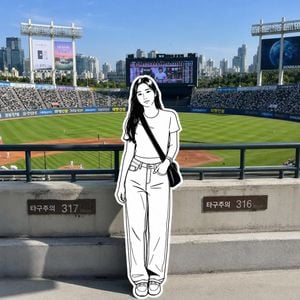
Use the uploaded photo as the exact background reference. Preserve the original real-life environment, architecture, perspective, lighting, colors, shadows, and camera composition.\n\nAdd a {argument name="character style" default="cute, stylish black-and-white hand-drawn anime doodle girl"} naturally into the real photograph. The character should look like a 2D ink illustration placed physically inside the real-world scene, creating a realistic live-action photo + hand-drawn illustration fusion.\n\nCharacter style:\n- Clean black ink line art\n- White/very light interior with minimal shading\n- Cute Korean/Japanese manga-inspired aesthetic\n- Natural, elegant proportions\n- Long flowing dark hair\n- Simple facial features with expressive eyes\n- Clearly visible black outline around the entire character, like a hand-cut sticker\n- Slightly imperfect hand-drawn lines for an authentic sketchbook feel\n- No colors on the character except black and white\n\nCharacter integration:\n- Match the character's scale, perspective, and position to the photograph\n- Make her feet properly contact the ground/stairs\n- Add realistic interaction with the environment through natural shadows and overlapping perspective\n- Keep the background completely photographic and detailed\n- Do not turn the background into anime or illustration\n- The character should appear as if a hand-drawn person has stepped into the real photograph\n\nFor the outfit, use {argument name="outfit" default="casual modern streetwear"} appropriate for the location. Preserve recognizable clothing details such as oversized T-shirts, jeans, sneakers, shoulder bag, jersey numbers, or accessories when specified in the reference image.\n\nComposition:\n- Full-body character when possible\n- Character positioned naturally in the foreground or middle ground\n- Keep the original landmark, stadium, buildings, stairs, trees, sky, advertisements, and surroundings clearly visible\n- Maintain the original photograph's wide-angle composition\n- Bright natural daylight\n- Crisp details\n- Realistic photographic background\n- Strong contrast between the monochrome illustrated character and colorful real environment\n\nOverall aesthetic: cinematic travel photography + Korean street photography + monochrome manga line art + scrapbook/sticker illustration, with seamless perspective and lighting integration.\n\nDo not make the entire image cartoon-like. Only the character should be illustrated; everything else must remain photorealistic.
Choose the primary action to open PicX Studio with the available template settings. Review the model and format, personalize the creative direction, and generate when ready.
Yes. You can change the subject, setting, lighting, mood, format, and available model controls before creating your image.
This template is free to open and customize. Generation usage is shown in PicX Studio before you create.
Start with GPT Image 2, which is the model associated with this template. You can compare another compatible model for a different finish.
Follow a topic to a crawlable collection of related PicX Studio templates.