How do I use the Urban Street Style Selfie template?
Choose the primary action to open PicX Studio with the available template settings. Review the model and format, personalize the creative direction, and generate when ready.
A natural-looking, candid smartphone selfie prompt capturing effortless city fashion and lighting at an overhead perspective.
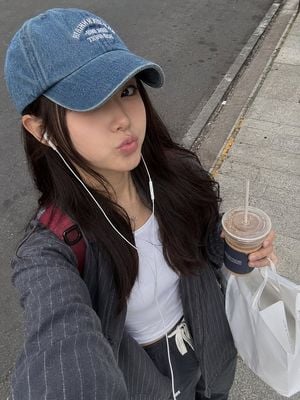
A photorealistic candid street-style selfie of a young woman walking outdoors on a city sidewalk. She has long, dark-brown hair flowing naturally beneath a faded blue denim baseball cap with white embroidered lettering. She wears white wired earphones and looks toward the camera with a playful soft pout. She is dressed in a casual layered outfit: a fitted white top underneath an oversized charcoal-gray pinstriped jacket, with a red backpack strap visible over one shoulder. She holds a clear takeaway iced coffee in one hand and carries a large white shopping bag in the other. The camera is held slightly above eye level, creating a natural overhead selfie perspective. Gray asphalt pavement, curb stones, and subtle urban details form the background. Soft daylight, realistic skin texture, natural hair movement, authentic clothing details, candid smartphone photography, subtle film grain, gentle neutral color grading, shallow depth of field, realistic proportions, high-detail photorealism, effortless everyday fashion aesthetic, vertical 4:5 composition.
Choose the primary action to open PicX Studio with the available template settings. Review the model and format, personalize the creative direction, and generate when ready.
Yes. You can change the subject, setting, lighting, mood, format, and available model controls before creating your image.
This template is free to open and customize. Generation usage is shown in PicX Studio before you create.
Start with GPT Image 2, which is the model associated with this template. You can compare another compatible model for a different finish.
Follow a topic to a crawlable collection of related PicX Studio templates.