
Monochrome Spark Anime Music Jacket
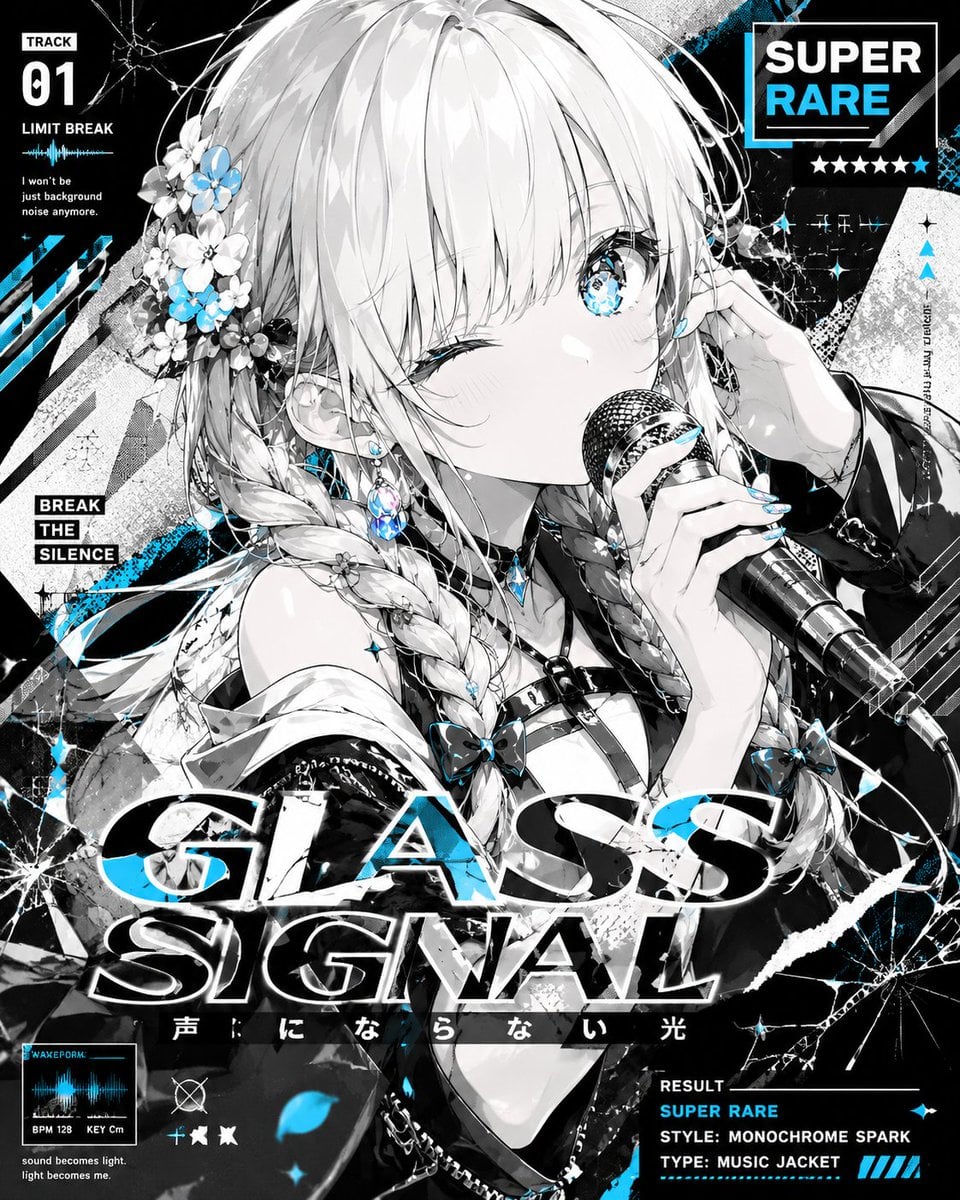
Generates a square super-rare gacha-style anime idol music cover with shattered-glass typography and cyan monochrome accents.
- Prompt included
- Model and format preset
- Free template
The prompt behind this image
Copy the exact prompt behind Monochrome Spark Anime Music Jacket, or open it in the studio and make it yours.
Goal: Create a square anime music-jacket gacha result illustration for {argument name="song title" default="GLASS SIGNAL"}, featuring a monochrome idol singer with electric cyan accents and gritty shattered-glass graphic design. Canvas: Square album-cover format, high-resolution, dense information layout, mostly black, white, and grayscale with vivid cyan highlights. Use dramatic manga line art, glossy rendering, high contrast, halftone texture, distressed print effects, diagonal grunge shapes, cracked glass overlays, sparkles, and music-UI elements. Main subject: A close-up bust portrait of one young anime girl idol centered slightly right, holding a wired handheld microphone near her mouth. She has long pale silver-white hair with thick bangs, two braided twin tails, floral hair ornaments on the left side with small white and cyan flowers, jeweled earrings, a cyan gem necklace, glossy nails, and dark idol/streetwear clothing with straps, zippers, bows, chains, and an off-shoulder jacket. Her expression is confident and intimate: one eye winking, the other open and bright cyan with starry glass-like reflections. Add small blush, delicate eyelashes, and highly detailed hair highlights. Layout and text: Use exactly these visible text blocks and UI labels: top left music info block with "TRACK" above a large "01", then "LIMIT BREAK", a small cyan waveform, and the lyric line "I won't be just background noise anymore". Mid-left stacked label reads "BREAK THE SILENCE". Top right rarity badge: boxed "SUPER" above cyan "RARE", with a row of 6 stars underneath where the final star is cyan. Across the lower middle, huge bold italic cracked typography reads "GLASS" on the first line and "SIGNAL" on the second, black-and-white with cyan edge accents and glass fragments cutting through it. Beneath the title, include small Japanese text {argument name="subtitle text" default="声にならない光"}. Bottom left small audio card labeled "WAVEFORM" with cyan waveform, "BPM 128" and "KEY Cm", plus tiny caption "sound becomes light. light becomes me." Bottom right result panel reads "RESULT", "SUPER RARE", "STYLE: MONOCHROME SPARK", and "TYPE: MUSIC JACKET". Counted graphic elements: Include 1 main character, 1 microphone, 1 top-left track panel, 1 mid-left slogan block, 1 top-right rarity badge, 6 rarity stars, 1 large two-line title, 1 subtitle strip, 1 waveform card, 1 bottom-right result panel, 3 prominent cyan diagonal slash marks near the lower right, and many shattered-glass cracks radiating from the corners. Visual style: Japanese anime CD cover, MV thumbnail, rhythm-game card art, super rare gacha pull screen, monochrome spark theme. The illustration should feel like a secret ultra-stylish music video jacket: sharp, glossy, layered, loud, and premium. Use cyan only for eyes, flowers, gems, waveform, select typography accents, stars, sparkles, and glitch streaks. Constraints: Keep all text legible and integrated as graphic design. Do not add extra characters. Do not change the square album-cover composition. Avoid soft pastel backgrounds; the mood must be black-white-cyan, fractured, energetic, and high-contrast.
How to use Monochrome Spark Anime Music Jacket in 3 steps
- 1Upload ImagePNG, JPG or paste
Add your photo
Upload the photo the template builds on. The prompt, model and format are already set.
- 2…a portrait of your subject in softgolden-hour light, 85mm…
Personalize
Edit the subject and creative details for your destination.
- 3Generate
Generate
Press Generate — your image is created in PicX Studio, so you can compare it with the original and refine one variable at a time.
More like this
Templates with the same subject, style or setup. Open one to see its prompt.











Make it yours
Monochrome Spark Anime Music Jacket works as-is. These are the safest ways to change it without losing the look.
Change one field
Copy a single group, rewrite it, and generate again so you can see what that field is doing.
Keep the frame, change the subject
Hold the composition and light of Monochrome Spark Anime Music Jacket, then swap wardrobe, props or the person for a new take.
| If the result… | Why | Fix |
|---|---|---|
| The result drifts from the preview | Too many fields changed at once. | Reuse Monochrome Spark Anime Music Jacket as-is first, then change one group — subject, light, or setting. |
| The model over-stylizes the scene | The prose prompt leaves finish and camera underspecified. | Add one camera or lighting sentence and stay on GPT Image 2. |
More GPT Image 2 templates
Other prompts made for GPT Image 2.

Six VTuber Japanese Logo Sheet

Realistic Portrait of Woman and Deer

The Vista Modular Condo Poster

AI Model Routing Comparison Infographic

2.5D Anime Art Board

Isometric Productivity Desk Scene

New York Double Exposure Poster

Four-Panel AI Landscape Comparison

Japanese Tatami Lifestyle Magazine Cover

NESCAFÉ Coffee Map Poster
More image prompts
Fresh picks from across the catalog.
Editorial Portrait Close-Up
Medium Shot of Character Interacting with Floating Interface
Hyper-Realistic Cinematic Night Rain Portrait JSON Prompt
Sunlit Anime Bedroom Portrait
Graphic Design Typography Prompt using Nano Banana 2
Candid Morning Bedroom Portrait
Man Texting on City Overlook
Airplane Wing Selfie Prompt (JSON)
X Aiwithlariab Image on Nano Banana 2
Four Editorial Fashion Prompts for Nano Banana 2
Browse template categories
Monochrome Spark Anime Music Jacket questions
How do I use the Monochrome Spark Anime Music Jacket template?
Add your photo if the template asks for one, edit the prompt if you like — the template's model and format are already selected — and press Generate. Your version opens in PicX Studio.
Can I customize the Monochrome Spark Anime Music Jacket template?
Yes. You can change the subject, setting, lighting, mood, format, and available model controls before creating your image.
Is the Monochrome Spark Anime Music Jacket template free?
Opening and editing this template is free. Generating uses credits, shown on the Generate button when you are signed in.
Which AI model should I use?
Start with GPT Image 2, which is the model associated with this template. You can compare another compatible model for a different finish.
Looking for something else? Browse all templates.

Your photo, any look
Thousands of ready templates for every top image and video model, from one credit balance.