
Anime Fan Club Member Card
Generates a luxurious blue-toned anime official fan club membership card with a character portrait and customizable member details.
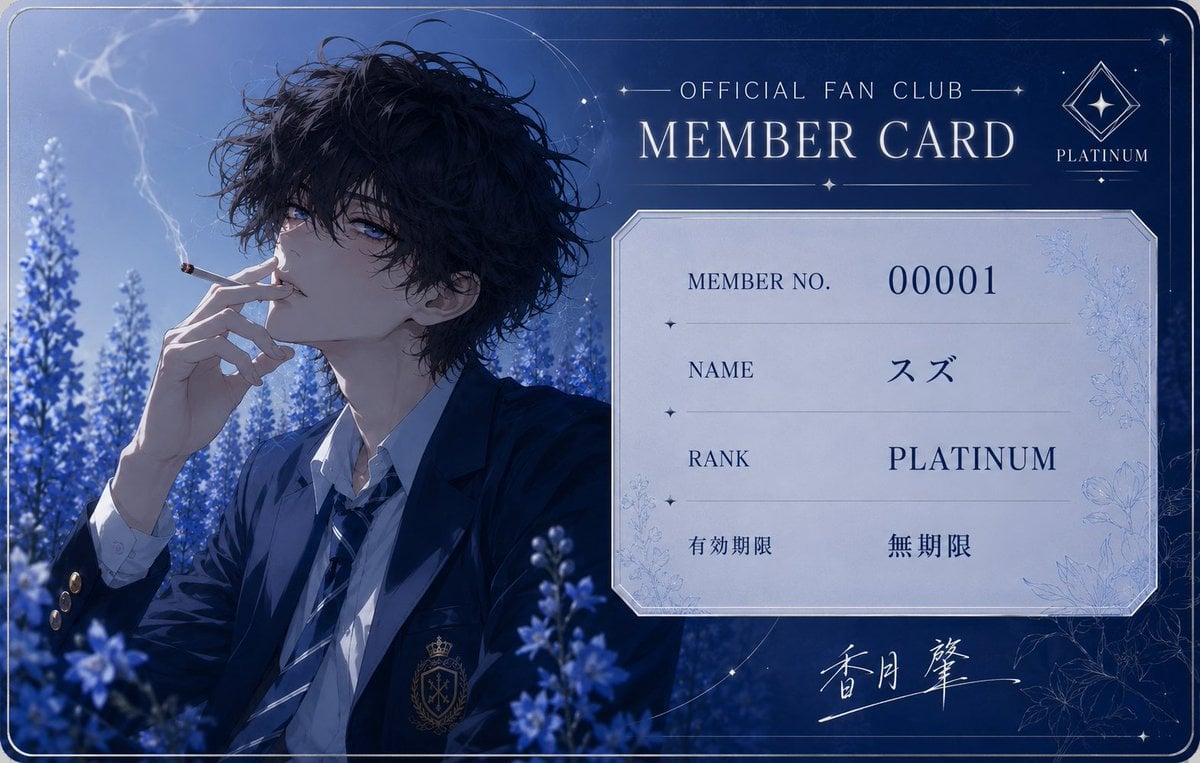
- Prompt included
- Model and format preset
- Free template
The prompt behind this image
Copy the exact prompt behind Anime Fan Club Member Card, or open it in the studio and make it yours.
Goal: Create an elegant anime-style official fan club membership card for a fictional idol or character, with a luxurious platinum theme and a moody blue floral atmosphere. Canvas: Horizontal rounded-corner card design, approximately 16:10 aspect ratio, full-bleed dark navy and icy blue palette. Add a thin double-line silver border around the entire card, subtle corner rounding, faint star accents, fine decorative arcs, and a premium printed-card look. Layout: Split the card into two main areas. The left half shows a detailed anime portrait; the right half contains the membership information panel. At the top right, place the title text “OFFICIAL FAN CLUB” above a large serif “MEMBER CARD”, with thin horizontal divider lines and small star ornaments. In the upper-right corner, include a diamond-shaped platinum emblem with a star inside and the word “PLATINUM” beneath it. In the middle-right, place a pale silver rectangular information plate with clipped beveled corners and a thin metallic border. At the bottom right, add a white handwritten signature-like calligraphy flourish. Subject details: The portrait is a beautiful young male anime character named {argument name="character name" default="Suzu"}, shown from the chest up, seated among blue-purple flower spikes. He has messy wavy {argument name="hair color" default="black"} hair, pale skin, cool blue eyes, and a languid, melancholic expression. He wears a dark navy school-uniform-style blazer with gold buttons and a small crest on the chest, a white shirt, and a loose striped tie. He holds a lit cigarette near his lips with slender fingers; soft smoke curls upward into the blue night air. The background is a dreamy field of lavender-like blue flowers under cool moonlight, with shallow depth of field and cinematic lighting. Text content: Use exactly 4 information rows inside the right information plate: 1) label “MEMBER NO.” with value {argument name="member number" default="00001"}; 2) label “NAME” with value {argument name="display name" default="スズ"}; 3) label “RANK” with value {argument name="membership rank" default="PLATINUM"}; 4) Japanese label “有効期限” with value “無期限”. Keep typography elegant, mostly navy serif text on the pale panel. Preserve the Japanese text exactly where specified. Visual style: High-detail Japanese anime illustration blended with premium graphic design, elegant serif typography, cool monochrome blue grading, silver foil-like linework, delicate floral engravings on the information plate, dreamy glow, crisp card UI composition, refined idol fan club merchandise aesthetic. Constraints: Keep the card readable and balanced, with no extra rows beyond the 4 listed information rows. Do not add watermarks, QR codes, barcodes, logos, or unrelated text. Maintain the platinum luxury mood and the blue flower field setting.
How to use Anime Fan Club Member Card in 3 steps
- 1Upload ImagePNG, JPG or paste
Add your photo
Upload the photo the template builds on. The prompt, model and format are already set.
- 2…a portrait of your subject in softgolden-hour light, 85mm…
Personalize
Edit the subject and creative details for your destination.
- 3Generate
Generate
Press Generate — your image is created in PicX Studio, so you can compare it with the original and refine one variable at a time.
More like this
Templates with the same subject, style or setup. Open one to see its prompt.










Make it yours
Anime Fan Club Member Card works as-is. These are the safest ways to change it without losing the look.
Change one field
Copy a single group, rewrite it, and generate again so you can see what that field is doing.
Keep the frame, change the subject
Hold the composition and light of Anime Fan Club Member Card, then swap wardrobe, props or the person for a new take.
| If the result… | Why | Fix |
|---|---|---|
| The result drifts from the preview | Too many fields changed at once. | Reuse Anime Fan Club Member Card as-is first, then change one group — subject, light, or setting. |
| The model over-stylizes the scene | The prose prompt leaves finish and camera underspecified. | Add one camera or lighting sentence and stay on GPT Image 2. |
More GPT Image 2 templates
Other prompts made for GPT Image 2.

Six VTuber Japanese Logo Sheet

Realistic Portrait of Woman and Deer

The Vista Modular Condo Poster

AI Model Routing Comparison Infographic

2.5D Anime Art Board

Isometric Productivity Desk Scene

New York Double Exposure Poster

Four-Panel AI Landscape Comparison

Japanese Tatami Lifestyle Magazine Cover

NESCAFÉ Coffee Map Poster
More image prompts
Fresh picks from across the catalog.

Ultra-Realistic Corporate Headshot of Businessman
Gemini Nano Banana 2
Candid Urban Portrait with Identity Preservation

Anime Phoenix Girl Ruins Scene

Grainy Paris Café Film Scene

Cinematic Portrait on a Rooftop Ledge at Golden Hour
Anime Girl and Man Date Photo Collage
Monet Style Boat Ride Image Generation
Jomon Pottery Museum Exhibit Mashup
Mirror Selfie in Minimalist Bedroom with Vibrant Clothing
Browse template categories
Anime Fan Club Member Card questions
How do I use the Anime Fan Club Member Card template?
Add your photo if the template asks for one, edit the prompt if you like — the template's model and format are already selected — and press Generate. Your version opens in PicX Studio.
Can I customize the Anime Fan Club Member Card template?
Yes. You can change the subject, setting, lighting, mood, format, and available model controls before creating your image.
Is the Anime Fan Club Member Card template free?
Opening and editing this template is free. Generating uses credits, shown on the Generate button when you are signed in.
Which AI model should I use?
Start with GPT Image 2, which is the model associated with this template. You can compare another compatible model for a different finish.
Looking for something else? Browse all templates.

Your photo, any look
Thousands of ready templates for every top image and video model, from one credit balance.