
Japanese Lunch Menu Poster
Creates a vertical Japanese restaurant lunch menu flyer with five photographed set meals, bold calligraphy, hours, and decorative retro accents.
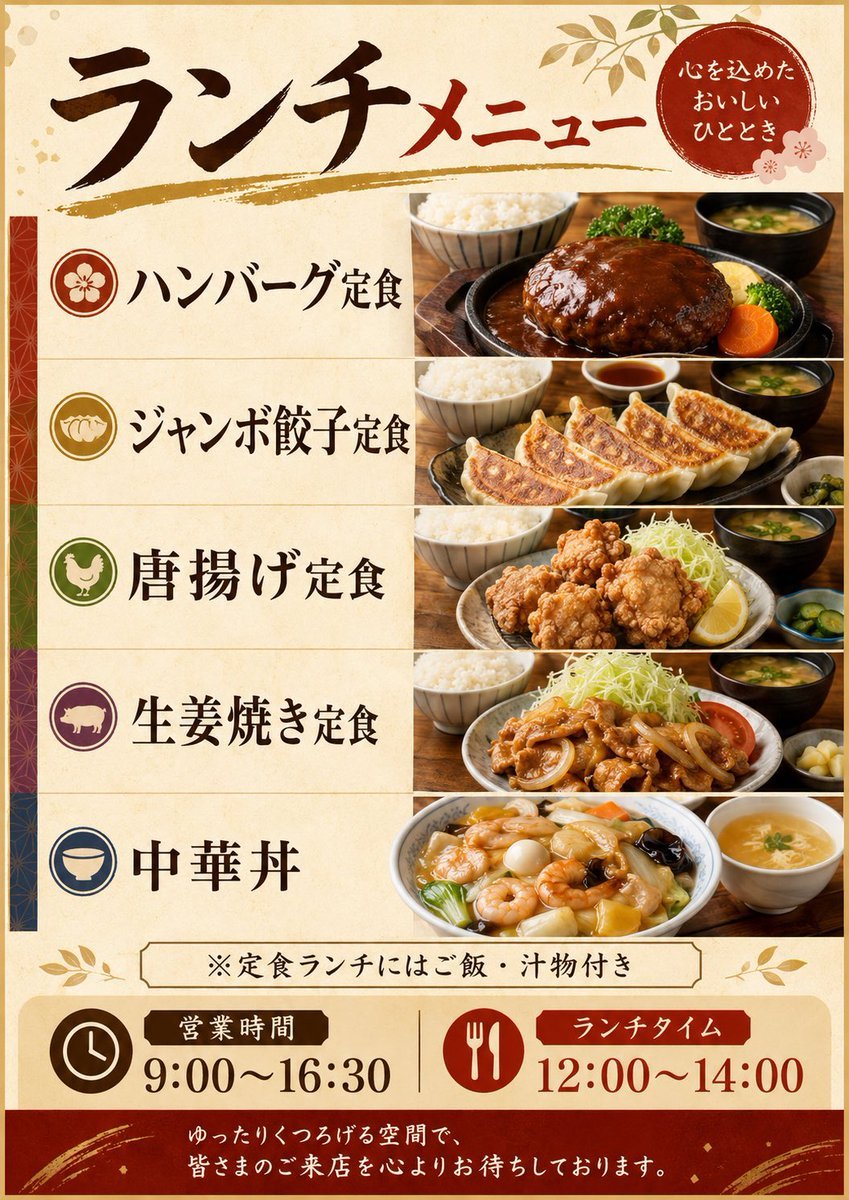
- Prompt included
- Model and format preset
- Free template
The prompt behind this image
Copy the exact prompt behind Japanese Lunch Menu Poster, or open it in the studio and make it yours.
Goal: Create a vertical Japanese restaurant lunch menu poster for a casual diner, warm and slightly retro, with appetizing food photography and large brush-style Japanese typography. Canvas: Portrait poster, approximately 4:5 ratio, parchment beige background with subtle paper texture, thin gold border, red and gold decorative accents, leaf motifs in the corners, and a festive Japanese pattern strip along the far left edge. Header: At the top, place a large calligraphic headline reading {argument name="headline text" default="ランチメニュー"}; make the first word black and the second word deep red. Underline it with a rough gold brush stroke. In the upper-right corner, add a red circular seal containing white Japanese text: 「心を込めた おいしい ひととき」, with small pale pink flower decorations nearby. Main layout: Create exactly five horizontal menu rows separated by thin beige lines. Each row has a circular icon on the left, a bold Japanese dish name in black calligraphy in the middle-left, and a realistic food photo panel filling the right half. Use warm restaurant tabletop lighting and wooden table surfaces in the photos. Menu rows, exactly 5 items: 1. Red circle icon with a plum blossom, label 「ハンバーグ定食」, photo of a glossy demi-glace hamburger steak set with rice bowl, miso soup, broccoli, carrot, and garnish. 2. Gold circle icon with gyoza dumplings, label 「ジャンボ餃子定食」, photo of large pan-fried gyoza arranged in a row with rice, dipping sauce, soup, and pickles. 3. Green circle icon with a chicken silhouette, label {argument name="karaage item text" default="唐揚げ定食"}, photo of fried chicken karaage set with shredded cabbage, lemon wedge, rice, soup, and cucumber pickles; make the fried chicken look slightly uncanny and overly bulbous as if AI-generated. 4. Purple circle icon with a pig silhouette, label 「生姜焼き定食」, photo of pork ginger stir-fry with onions, shredded cabbage, tomato, rice, miso soup, and pickles. 5. Blue circle icon with a rice bowl, label 「中華丼」, photo of Chinese-style rice bowl topped with shrimp, quail eggs, vegetables, black fungus, thick glossy sauce, plus a small soup bowl. Notice strip: Beneath the five rows, add a centered bordered beige notice box reading 「※定食ランチにはご飯・汁物付き」, with small gold leaf ornaments on both sides. Bottom information area: Create a cream-colored panel with two large information blocks. On the left, a brown clock icon and label 「営業時間」 above the time {argument name="business hours" default="9:00〜16:30"}. On the right, a red fork-and-spoon icon and label 「ランチタイム」 above the time {argument name="lunch time" default="12:00〜14:00"}. Separate the two blocks with a thin vertical divider. Footer: Add a deep red footer band with subtle gold brush decorations and small sparkle accents. Center white Japanese closing text: {argument name="footer message" default="ゆったりくつろげる空間で、皆さまのご来店を心よりお待ちしております。"} Visual style: Polished Japanese print flyer, izakaya/family restaurant aesthetic, warm reds, browns, cream, and gold, high-resolution food photography mixed with decorative vector elements, clean grid alignment. Keep all Japanese text legible and avoid adding extra menu items or extra text.
How to use Japanese Lunch Menu Poster in 3 steps
- 1Upload ImagePNG, JPG or paste
Add your photo
Upload the photo the template builds on. The prompt, model and format are already set.
- 2…a portrait of your subject in softgolden-hour light, 85mm…
Personalize
Edit the subject and creative details for your destination.
- 3Generate
Generate
Press Generate — your image is created in PicX Studio, so you can compare it with the original and refine one variable at a time.
More like this
Templates with the same subject, style or setup. Open one to see its prompt.
Japanese Restaurant Promotional Menu Poster

Minecraft Japanese Research Lab Exploration

Japan Travel Brochure Poster

Cartoon TV Show Poster Pack

Trendy Cafe Drink Promo Poster

Urban Fashion Editorial Collage Streetwear Poster

Japanese Architectural Concrete Studio Fashion Campaign

Premium Fashion Editorial Cover Layout System

Polo Ralph Lauren Luxury American Heritage Fashion Campaign

Monochrome Halftone Editorial Fashion Poster

Retro Mirror Luxury Fashion Campaign Poster

Luxury Fashion Campaign Typography Poster System
Make it yours
Japanese Lunch Menu Poster works as-is. These are the safest ways to change it without losing the look.
Change one field
Copy a single group, rewrite it, and generate again so you can see what that field is doing.
Keep the frame, change the subject
Hold the composition and light of Japanese Lunch Menu Poster, then swap wardrobe, props or the person for a new take.
| If the result… | Why | Fix |
|---|---|---|
| The result drifts from the preview | Too many fields changed at once. | Reuse Japanese Lunch Menu Poster as-is first, then change one group — subject, light, or setting. |
| The model over-stylizes the scene | The prose prompt leaves finish and camera underspecified. | Add one camera or lighting sentence and stay on GPT Image 2. |
More GPT Image 2 templates
Other prompts made for GPT Image 2.

Six VTuber Japanese Logo Sheet

Realistic Portrait of Woman and Deer

The Vista Modular Condo Poster

AI Model Routing Comparison Infographic

2.5D Anime Art Board

Isometric Productivity Desk Scene

New York Double Exposure Poster

Four-Panel AI Landscape Comparison

Japanese Tatami Lifestyle Magazine Cover

NESCAFÉ Coffee Map Poster
More image prompts
Fresh picks from across the catalog.

Young Woman in Sequin Dress on Stairs

Angelic Android Over Land Aircraft Carrier

Chaotic Fourth Crusade Parody Poster

Young Woman in a Red Ensemble in an Alpi
High-Quality Image Generation Optimization
Fantasy Villainess Novel Cover
Cobalt Blue Skincare Product Photography
Fantasy Oni Girl Anime Illustration

Fine-Art Cinematic Monochrome Portrait (Thinker Pose)

Playful Crayon Drawing Notebook Style Prompt
Browse template categories
Japanese Lunch Menu Poster questions
How do I use the Japanese Lunch Menu Poster template?
Add your photo if the template asks for one, edit the prompt if you like — the template's model and format are already selected — and press Generate. Your version opens in PicX Studio.
Can I customize the Japanese Lunch Menu Poster template?
Yes. You can change the subject, setting, lighting, mood, format, and available model controls before creating your image.
Is the Japanese Lunch Menu Poster template free?
Opening and editing this template is free. Generating uses credits, shown on the Generate button when you are signed in.
Which AI model should I use?
Start with GPT Image 2, which is the model associated with this template. You can compare another compatible model for a different finish.
Looking for something else? Browse all templates.

Your photo, any look
Thousands of ready templates for every top image and video model, from one credit balance.