
Two Japanese Claymation Adventure Posters
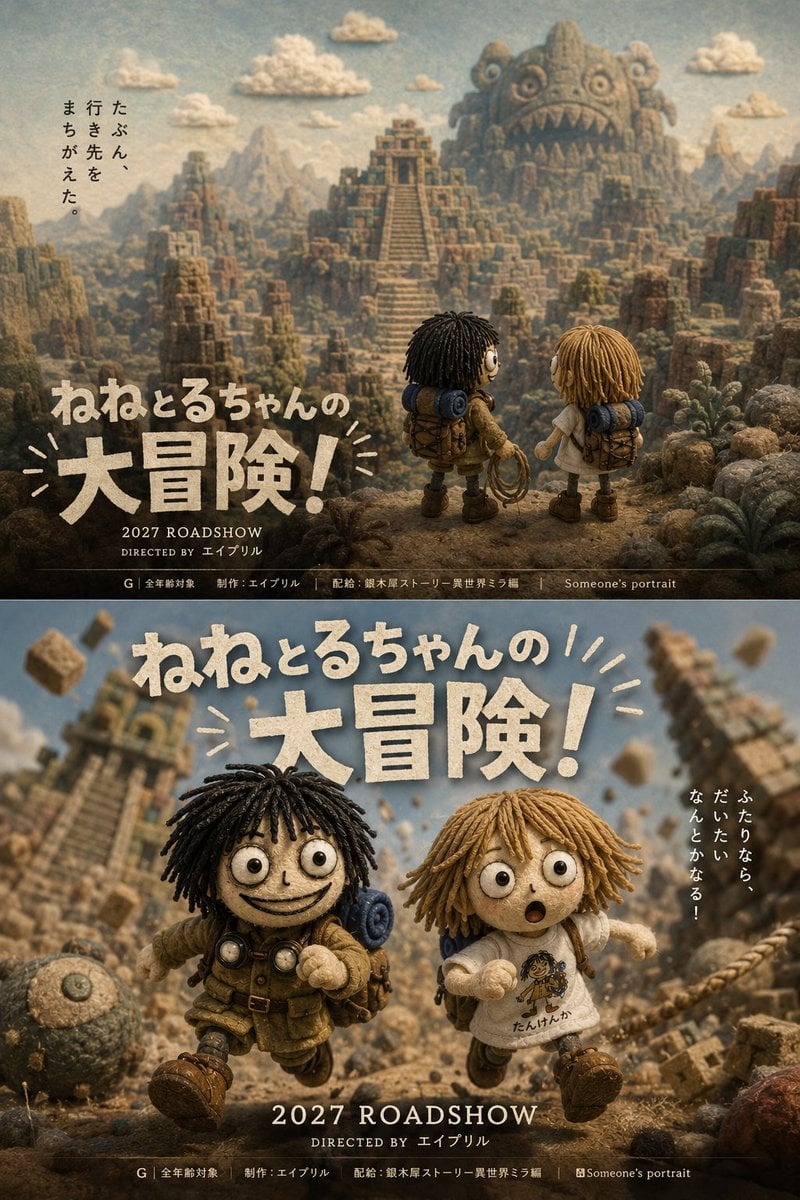
Generates a two-panel Japanese movie poster concept comparing scenic and action-focused designs for a whimsical stop-motion adventure film.
- Prompt included
- Model and format preset
- Free template
The prompt behind this image
Copy the exact prompt behind Two Japanese Claymation Adventure Posters, or open it in the studio and make it yours.
Goal: Create a vertical composite showing two distinct Japanese fantasy adventure movie poster designs for the same fictional claymation film, emphasizing the difference between a scenic information-heavy poster and an action-focused visual poster. Canvas: Tall 2:3 portrait image, split horizontally into exactly 2 stacked poster panels of equal height, separated by a thin dark divider. Use a handcrafted stop-motion clay, felt, fabric, and miniature diorama aesthetic with cinematic lighting, shallow depth of field, warm earthy browns, dusty blues, and vintage film grain. Panel 1, upper poster: A wide scenic adventure poster. Show exactly 2 small handmade doll children seen from behind in the foreground on a rocky cliff: one with black yarn dreadlock-like hair, round eyes, brown explorer clothes, backpack, rolled blue sleeping mat, goggles around the neck, and a coiled rope; the other with blond yarn hair, white shirt, shorts, backpack, and rolled blue sleeping mat. They look toward a vast ancient ruined stone city with a central stepped pyramid temple, jagged mesas, blocky cliffs, cactus-like plants, and distant mountains. In the far background, include a gigantic stone monster mountain face with round eyes and a toothy open mouth carved into the rock. Add exactly 6 small puffy clay clouds in the sky. Place vertical Japanese tagline text on the left reading {argument name="upper tagline" default="たぶん、行き先をまちがえた。"}. Large rough handmade cream title text in the lower left reads {argument name="movie title" default="ねねとるちゃんの大冒険!"}. Under it place “2027 ROADSHOW” and “DIRECTED BY エイプリル”. Along the very bottom add a thin black credit strip with small Japanese rating and production credits. Panel 2, lower poster: A dynamic action poster for the same film. Show the same exactly 2 child doll adventurers running toward the viewer through collapsing ruins. The black-haired child is on the left, smiling widely, wearing explorer gear, backpack, blue sleeping mat, and goggles; the blond child is on the right, surprised with open mouth, wearing a white T-shirt with a small character drawing and Japanese scribble, shorts, backpack, and boots. Behind them, ancient stone towers tilt and crumble, with flying rock blocks and dust clouds creating a sense of motion. Include exactly 1 round stone boulder or relic in the lower left foreground. Large cream textured Japanese title text spans the upper center reading {argument name="movie title" default="ねねとるちゃんの大冒険!"}, with small hand-drawn burst lines around it. Add vertical Japanese tagline text on the right reading {argument name="right tagline" default="ふたりなら、だいたいなんとかなる!"}. At the bottom center place large text “2027 ROADSHOW”, beneath it “DIRECTED BY エイプリル”, and a thin black credit strip with small rating and production credits. Typography and style: Use chunky irregular paper-cut or carved clay lettering, off-white with shadows, matching a whimsical Japanese family adventure film poster. Make all figures look like tactile handmade puppets with yarn hair, button-like eyes, stitched fabric clothes, dusty boots, and miniature props. Keep the composition cinematic, detailed, nostalgic, and high-budget while still clearly handcrafted. Constraints: The image must contain exactly 2 poster panels, exactly 2 main characters repeated in both panels, exactly 6 clouds in the upper panel, exactly 1 giant stone monster face in the upper panel, and exactly 1 round boulder/relic in the lower panel. Do not add logos, watermarks, QR codes, or extra characters.
How to use Two Japanese Claymation Adventure Posters in 3 steps
- 1Upload ImagePNG, JPG or paste
Add your photo
Upload the photo the template builds on. The prompt, model and format are already set.
- 2…a portrait of your subject in softgolden-hour light, 85mm…
Personalize
Edit the subject and creative details for your destination.
- 3Generate
Generate
Press Generate — your image is created in PicX Studio, so you can compare it with the original and refine one variable at a time.
More like this
Templates with the same subject, style or setup. Open one to see its prompt.

Minecraft Japanese Research Lab Exploration

Stop Motion Finale Fireworks

Stop Motion Garden Maze

Stop Motion Rooftop Concert

Stop Motion Bicycle Coast
Stop Motion Castle Gate
Stop Motion Kitchen Chaos

Stop Motion Carnival Ride
Stop Motion Rainy Bus Stop
Stop Motion Space Dock
Stop Motion Cafe Morning
Stop Motion Mountain Summit
Make it yours
Two Japanese Claymation Adventure Posters works as-is. These are the safest ways to change it without losing the look.
Change one field
Copy a single group, rewrite it, and generate again so you can see what that field is doing.
Keep the frame, change the subject
Hold the composition and light of Two Japanese Claymation Adventure Posters, then swap wardrobe, props or the person for a new take.
| If the result… | Why | Fix |
|---|---|---|
| The result drifts from the preview | Too many fields changed at once. | Reuse Two Japanese Claymation Adventure Posters as-is first, then change one group — subject, light, or setting. |
| The model over-stylizes the scene | The prose prompt leaves finish and camera underspecified. | Add one camera or lighting sentence and stay on GPT Image 2. |
More GPT Image 2 templates
Other prompts made for GPT Image 2.

Six VTuber Japanese Logo Sheet

Realistic Portrait of Woman and Deer

The Vista Modular Condo Poster

AI Model Routing Comparison Infographic

2.5D Anime Art Board

Isometric Productivity Desk Scene

New York Double Exposure Poster

Four-Panel AI Landscape Comparison

Japanese Tatami Lifestyle Magazine Cover

NESCAFÉ Coffee Map Poster
More image prompts
Fresh picks from across the catalog.
Tattooed Woman Mirror Selfie Prompt
Realistic Juicy Cheeseburger Splash
Travel Candid of Woman Shielding Eyes near Eiffel Tower
Black-and-White Wartime Ink Scene
Minimalist Boutique Fashion Editorial
Vintage Anime Figurine Portrait
Audi Q5 Interior Upgrade Brochure
Cinematic Portrait on a Bustling City Street at Twilight
Isometric Business People Set
Surreal Fashion Portrait in a Textile Dye Workshop
Browse template categories
Two Japanese Claymation Adventure Posters questions
How do I use the Two Japanese Claymation Adventure Posters template?
Add your photo if the template asks for one, edit the prompt if you like — the template's model and format are already selected — and press Generate. Your version opens in PicX Studio.
Can I customize the Two Japanese Claymation Adventure Posters template?
Yes. You can change the subject, setting, lighting, mood, format, and available model controls before creating your image.
Is the Two Japanese Claymation Adventure Posters template free?
Opening and editing this template is free. Generating uses credits, shown on the Generate button when you are signed in.
Which AI model should I use?
Start with GPT Image 2, which is the model associated with this template. You can compare another compatible model for a different finish.
Looking for something else? Browse all templates.

Your photo, any look
Thousands of ready templates for every top image and video model, from one credit balance.