How do I use the Menacing Leather Muzzle Portrait template?
Choose the primary action to open PicX Studio with the available template settings. Review the model and format, personalize the creative direction, and generate when ready.
A cinematic photorealistic thriller portrait of a hostile man glaring upward while wearing a rugged leather cage muzzle.
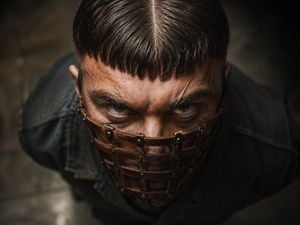
Create a photorealistic cinematic close-up portrait of a menacing adult man, shot from a high overhead angle looking down at him as he glares upward directly into the camera. He has {argument name="hair color" default="dark brown almost black"} hair in a blunt short fringe with a sharp center part, shaved or tightly faded sides, intense pale gray-green eyes, heavy brow, sweaty textured skin, stubble, and a fresh diagonal scar above one eyebrow. His lower face is covered by a rugged brown leather cage muzzle mask made from horizontal and vertical leather straps, secured with small dark metal rivets and buckles; the mask should feel handmade, worn, and slightly grimy. He wears a dark distressed denim or canvas jacket with broad shoulders fading into shadow. The mood is hostile, claustrophobic, and gritty, like a psychological thriller or dystopian character portrait. Use {argument name="lighting style" default="low-key dramatic overhead lighting"}, strong contrast, dark vignette edges, shallow depth of field, warm brown and charcoal color grading, sharp focus on the eyes and mask, blurred dark industrial floor background, realistic skin pores, hair strands, leather grain, metal rivets, sweat, dirt, and cinematic lens distortion. Compose tightly with the top of the head near the upper edge, eyes centered, shoulders cropped, and no text, no watermark, no extra characters.
Choose the primary action to open PicX Studio with the available template settings. Review the model and format, personalize the creative direction, and generate when ready.
Yes. You can change the subject, setting, lighting, mood, format, and available model controls before creating your image.
This template is free to open and customize. Generation usage is shown in PicX Studio before you create.
Start with GPT Image 2, which is the model associated with this template. You can compare another compatible model for a different finish.
Follow a topic to a crawlable collection of related PicX Studio templates.