How do I use the Elegant Abstract Fashion Portrait template?
Choose the primary action to open PicX Studio with the available template settings. Review the model and format, personalize the creative direction, and generate when ready.
Generates a stylish mixed-media couture portrait of a graceful woman against a vivid orange background, ideal for editorial art or character portrait concepts.
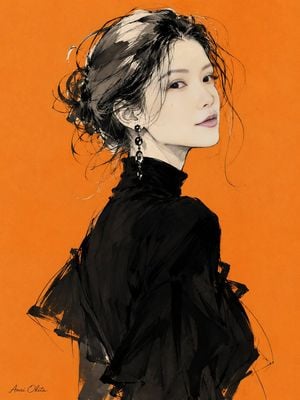
Create an elegant abstract fashion portrait of {argument name="character name" default="Anri Okita"}, shown from the upper body in a three-quarter back pose with her head turned over her shoulder toward the viewer. She has a pale luminous complexion, refined East Asian facial features, soft almond eyes, subtle pink lips, and a calm graceful expression. Her {argument name="hair color" default="black with pale silver-white highlights"} hair is loosely pinned into a messy low bun with many expressive flyaway strands and sketchy looping lines around the head. She wears a high-neck, semi-sheer, flowing {argument name="dress color" default="black"} fashion dress or blouse with dramatic loose sleeves, layered translucent fabric, rough ink-wash shadows, and angular brush textures. Add one visible long dangling black jeweled earring on the ear facing the viewer. Use a vivid flat {argument name="background color" default="orange"} background with subtle paper grain. Style the image as a mixed-media fashion illustration combining realistic soft facial rendering with loose black ink, watercolor wash, charcoal-like sketch lines, expressive unfinished edges, and elegant editorial couture energy. Composition is vertical 4:5, subject centered slightly left, cropped around the torso, with negative space on the right. Include a small handwritten signature reading {argument name="signature text" default="Anri Okita"} in the lower-left corner. No extra objects, no border, no watermark, no typography besides the small signature.
Choose the primary action to open PicX Studio with the available template settings. Review the model and format, personalize the creative direction, and generate when ready.
Yes. You can change the subject, setting, lighting, mood, format, and available model controls before creating your image.
This template is free to open and customize. Generation usage is shown in PicX Studio before you create.
Start with GPT Image 2, which is the model associated with this template. You can compare another compatible model for a different finish.
Follow a topic to a crawlable collection of related PicX Studio templates.