How do I use the Cyberpunk Treadmill Fashion Editorial template?
Choose the primary action to open PicX Studio with the available template settings. Review the model and format, personalize the creative direction, and generate when ready.
Generates a dark luxury studio fashion editorial featuring a masked cyberpunk techwear model walking on a matte-black treadmill.
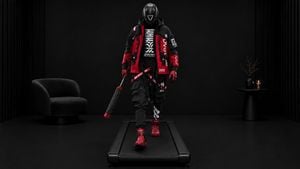
Create a photorealistic premium fashion editorial image of {argument name="character" default="a futuristic masked techwear model"} wearing {argument name="outfit" default="a black and red cyberpunk tactical streetwear outfit with bold white graphic lettering"}, walking naturally toward the camera on a minimal matte-black treadmill. Full-body frontal composition, camera directly centered in front of the treadmill at chest height with a slight telephoto editorial look. The subject is centered and mid-stride, one red boot forward, arms relaxed; one hand carries a closed black umbrella with red accents angled downward. Use a dark luxury studio environment: matte black floor and wall, subtle black vertical ribbed panels at both sides, soft controlled highlights, deep shadows, high contrast, no visible treadmill console or handles. Include exactly 3 main background props: a low black rounded lounge chair on the left, a small black pedestal side table on the right, and a black vase with bare branches plus two small warm candles on the table. The outfit should read as exactly 9 visible fashion elements: glossy black full-face helmet/mask, oversized hooded jacket with red panels and white typography, black graphic shirt, black tactical cargo pants with straps and patches, red gloves, red boots, black harness/belts, red-and-black leg bands, and the carried umbrella. Color palette is almost entirely black with saturated red accents and crisp white logos/text, like a premium avant-garde fashion campaign. Lighting should be cinematic and low-key, with a soft frontal key light revealing fabric texture, rubber, nylon, and glossy helmet reflections. No extra people, no readable brand logos copied from real brands, no watermark, no motion blur, no text overlay. Use a 16:9 horizontal frame, ultra-detailed photorealism, sharp focus, editorial magazine quality.
Choose the primary action to open PicX Studio with the available template settings. Review the model and format, personalize the creative direction, and generate when ready.
Yes. You can change the subject, setting, lighting, mood, format, and available model controls before creating your image.
This template is free to open and customize. Generation usage is shown in PicX Studio before you create.
Start with GPT Image 2, which is the model associated with this template. You can compare another compatible model for a different finish.
Follow a topic to a crawlable collection of related PicX Studio templates.