How do I use the Underwater Red Dress Fantasy Portrait template?
Choose the primary action to open PicX Studio with the available template settings. Review the model and format, personalize the creative direction, and generate when ready.
A cinematic prompt for creating a photorealistic underwater fantasy portrait with a floating woman, jellyfish, coral reef, and tropical fish.
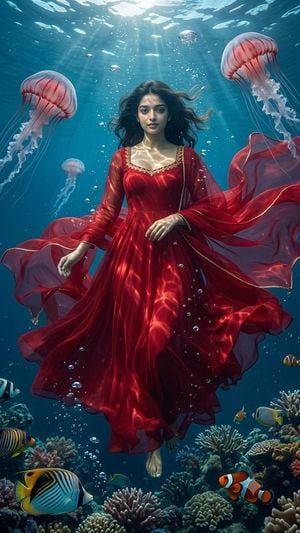
Create a vertical cinematic underwater fantasy portrait of a young woman floating upright in a tropical ocean, centered in frame, wearing a flowing translucent {argument name="dress color" default="deep crimson red"} gown with long sheer sleeves, a wide swirling skirt, and a matching scarf or veil billowing dramatically to both sides. She has {argument name="hair color" default="dark brown"} loose wavy hair drifting in the water, a calm direct gaze, natural makeup, and bare feet visible beneath the dress. Add ornate gold embroidery along the neckline and sleeve edges, with realistic underwater caustic light patterns shimmering across the fabric and skin. The scene is lit from the bright sunlit water surface at the top, with strong shafts of light, bubbles rising around her, and deep teal-blue water fading into the background. Include exactly 3 large pink translucent jellyfish: one large jellyfish at upper left, one large jellyfish at upper right, and one smaller jellyfish behind her on the left; add a few tiny distant bubble-like jellyfish near the top. The bottom of the image shows a vibrant coral reef with many corals and exactly 7 clearly visible tropical fish: one large striped butterflyfish at lower left foreground, one orange-blue striped fish at far lower left, one black-white-yellow fish peeking from the far left edge, one clownfish at lower right foreground, one small yellow fish near the clownfish, one yellow-blue butterflyfish at mid-right, and one tiny orange fish at the right edge. Use photorealistic digital art, highly detailed fabric physics, realistic refraction, suspended particles, soft depth of field, dramatic fantasy editorial composition, 9:16 aspect ratio, no text, no watermark.
Choose the primary action to open PicX Studio with the available template settings. Review the model and format, personalize the creative direction, and generate when ready.
Yes. You can change the subject, setting, lighting, mood, format, and available model controls before creating your image.
This template is free to open and customize. Generation usage is shown in PicX Studio before you create.
Start with GPT Image 2, which is the model associated with this template. You can compare another compatible model for a different finish.
Follow a topic to a crawlable collection of related PicX Studio templates.