
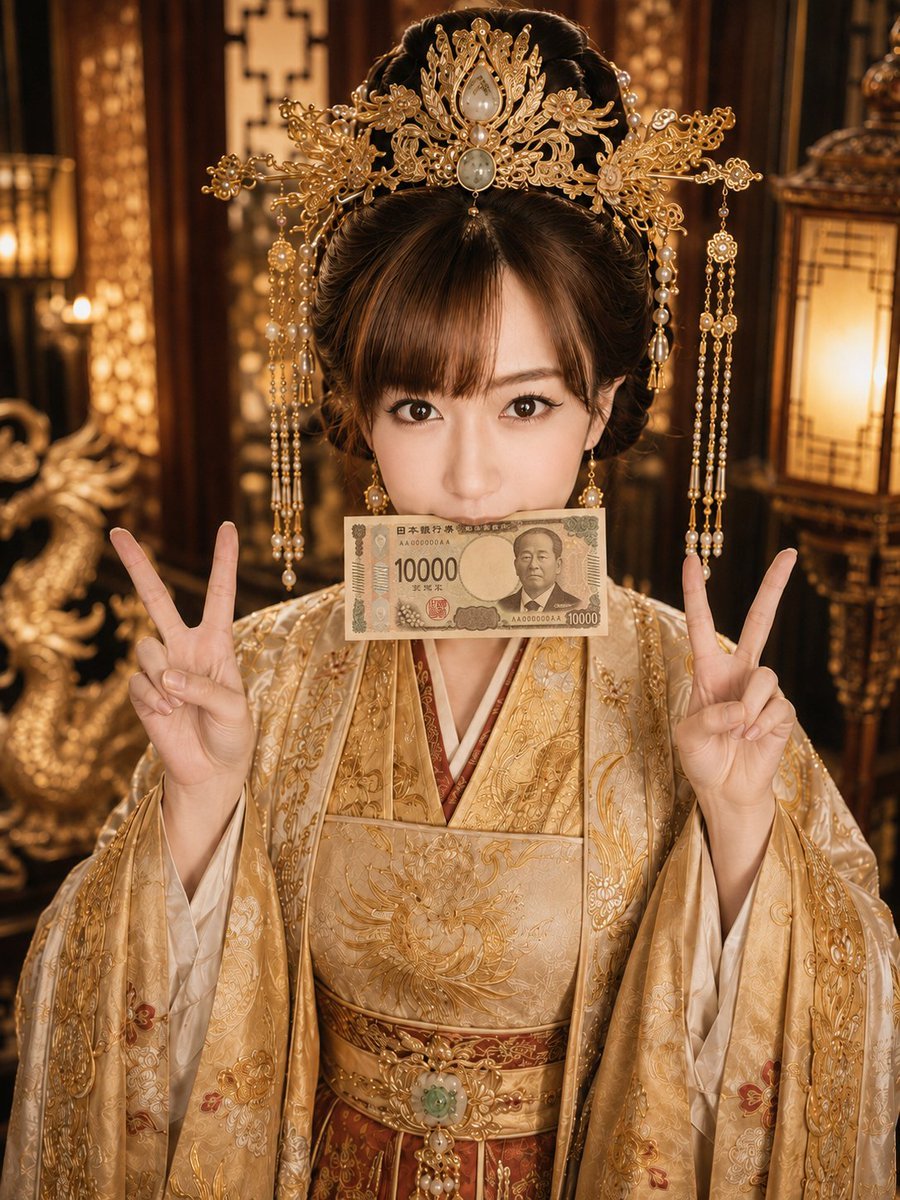
Imperial Princess with 10000 Yen
A cinematic portrait prompt for generating an ornate golden imperial princess holding a Japanese 10,000 yen note with playful peace-sign poses.
- Prompt included
- Model and format preset
- Free template
The prompt behind this image
Copy the exact prompt behind Imperial Princess with 10000 Yen, or open it in the studio and make it yours.
Create a high-resolution vertical portrait photograph of a young East Asian woman dressed as an opulent ancient imperial princess, centered in frame and looking directly into the camera with wide expressive eyes. She wears a lavish cream-and-gold embroidered hanfu-style robe with red inner layers, ornate floral gold brocade, a structured golden belt with a green jade centerpiece, and flowing sleeves. Her hair is styled in a high formal updo with straight bangs, topped by an extremely elaborate gold phoenix-and-floral crown featuring filigree, pearls, teardrop gemstones, dangling pearl chains, and tassels. She holds both hands up near shoulder height making two V-sign peace gestures, one on each side of her face. A realistic Japanese 10,000 yen banknote is held horizontally across her mouth, covering her lips like a playful gag; the note should clearly show the large “10000” denomination and Japanese banknote styling. The background is a luxurious golden palace interior with warm amber lighting, carved dark wood panels, glowing lanterns, bokeh highlights, and a gold dragon sculpture blurred on the left, creating a rich imperial atmosphere. Use cinematic warm color grading, shallow depth of field, sharp facial detail, realistic skin texture, symmetrical composition, ornate textures, and ultra-detailed jewelry. The mood is glamorous, playful, and extravagant, like a premium fashion cosplay editorial. Customize the subject as {argument name="character name" default="young East Asian imperial princess"}, the outfit palette as {argument name="outfit color palette" default="cream, gold, and red"}, the mouth prop as {argument name="mouth prop" default="Japanese 10,000 yen banknote"}, the background setting as {argument name="background setting" default="luxurious golden palace interior"}, and the hand pose as {argument name="hand pose" default="two V-sign peace gestures"}.
How to use Imperial Princess with 10000 Yen in 3 steps
- 1Upload ImagePNG, JPG or paste
Add your photo
Upload the photo the template builds on. The prompt, model and format are already set.
- 2…a portrait of your subject in softgolden-hour light, 85mm…
Personalize
Edit the subject and creative details for your destination.
- 3Generate
Generate
Press Generate — your image is created in PicX Studio, so you can compare it with the original and refine one variable at a time.
More like this
Templates with the same subject, style or setup. Open one to see its prompt.

Anime Happily Ever After Sky

Anime Stained Glass Prayer

Anime White Horse Escape

Anime Golden Spinning Straw

Anime Gingerbread Cottage

Anime Bean Stalk Climb

Anime Seafoam Transformation

Anime Shoe Fitting Trial

Anime Beast Library Night

Anime Poison Apple Offer
Anime Frozen Fountain Kiss

Anime Sewing Room Magic
Make it yours
Imperial Princess with 10000 Yen works as-is. These are the safest ways to change it without losing the look.
Change one field
Copy a single group, rewrite it, and generate again so you can see what that field is doing.
Keep the frame, change the subject
Hold the composition and light of Imperial Princess with 10000 Yen, then swap wardrobe, props or the person for a new take.
| If the result… | Why | Fix |
|---|---|---|
| The result drifts from the preview | Too many fields changed at once. | Reuse Imperial Princess with 10000 Yen as-is first, then change one group — subject, light, or setting. |
| The model over-stylizes the scene | The prose prompt leaves finish and camera underspecified. | Add one camera or lighting sentence and stay on GPT Image 2. |
More GPT Image 2 templates
Other prompts made for GPT Image 2.

Six VTuber Japanese Logo Sheet

Realistic Portrait of Woman and Deer

The Vista Modular Condo Poster

AI Model Routing Comparison Infographic

2.5D Anime Art Board

Isometric Productivity Desk Scene

New York Double Exposure Poster

Four-Panel AI Landscape Comparison

Japanese Tatami Lifestyle Magazine Cover

NESCAFÉ Coffee Map Poster
More image prompts
Fresh picks from across the catalog.

Gen-Z Fashion Studio Shoot with Labubu and Cat
Minimalist Festive Greeting Illustration
Culinary Pop-Up Book Diorama of Swedish Meatballs

Cinematic Close-Up in Formal Suit

Dreamlike Fantasy Forest Boy

Fiery Japanese Growth Thumbnail
Summer Ice Cream Moment

Golden Hour Riverside Portrait

Studio Ghibli Photo Transformation
Surreal Interaction Diptych
Browse template categories
Imperial Princess with 10000 Yen questions
How do I use the Imperial Princess with 10000 Yen template?
Add your photo if the template asks for one, edit the prompt if you like — the template's model and format are already selected — and press Generate. Your version opens in PicX Studio.
Can I customize the Imperial Princess with 10000 Yen template?
Yes. You can change the subject, setting, lighting, mood, format, and available model controls before creating your image.
Is the Imperial Princess with 10000 Yen template free?
Opening and editing this template is free. Generating uses credits, shown on the Generate button when you are signed in.
Which AI model should I use?
Start with GPT Image 2, which is the model associated with this template. You can compare another compatible model for a different finish.
Looking for something else? Browse all templates.

Your photo, any look
Thousands of ready templates for every top image and video model, from one credit balance.