
McLaren GT3X Technical Blueprint Poster
A highly detailed automotive concept blueprint poster showing a McLaren 720S GT3X with orthographic drawings, engineering callouts, component diagrams, and photoreal hero renders for use in premium vehicle design…
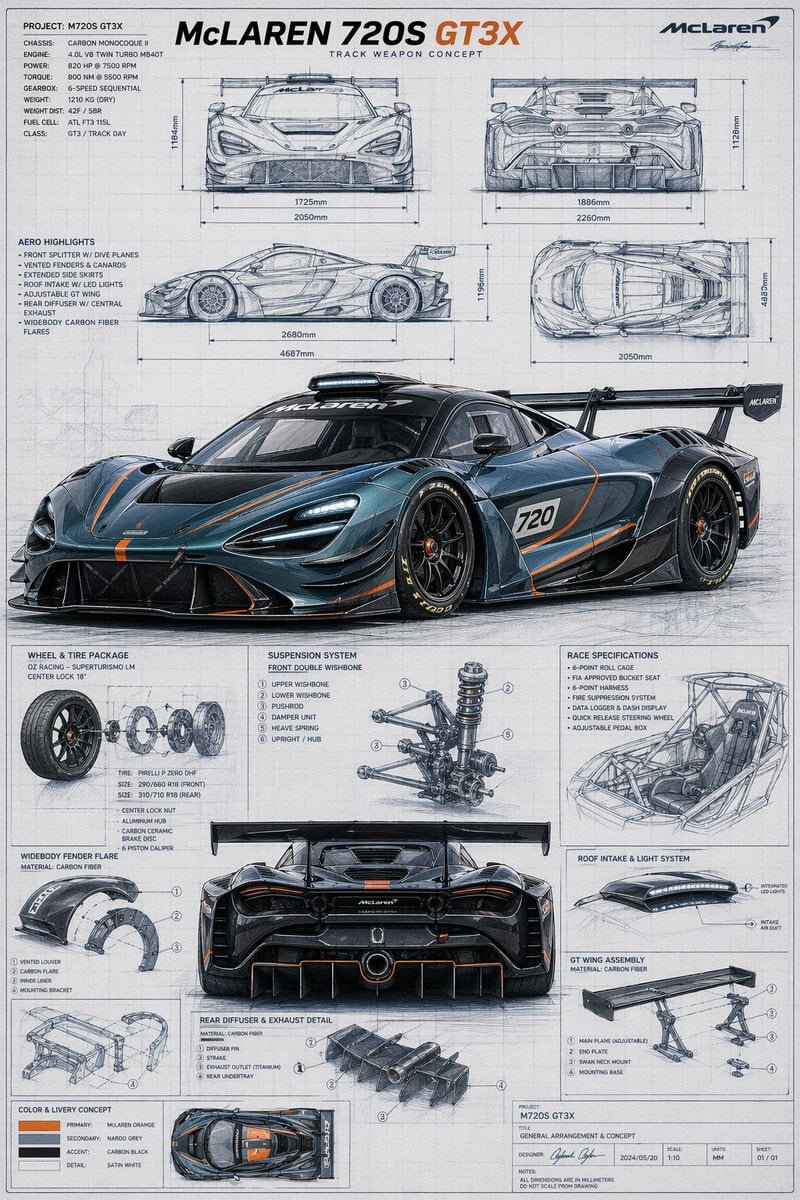
- Prompt included
- Model and format preset
- Free template
The prompt behind this image
Copy the exact prompt behind McLaren GT3X Technical Blueprint Poster, or open it in the studio and make it yours.
- Type
- automotive technical blueprint poster
- Subject › Vehicle
- {argument name="car model" default="McLaren 720S GT3X"}
- Subject › Category
- track weapon concept supercar
- Subject › Brand
- McLaren
- Subject › Primary Render › View
- front three-quarter low angle hero shot
- Subject › Primary Render › Finish
- glossy dark metallic blue-gray body with exposed carbon fiber aero parts
- Subject › Primary Render › Accent Color
- {argument name="accent color" default="McLaren orange"}
- Subject › Primary Render › Livery Details
- thin orange striping across hood, splitter, side skirts, doors, diffuser, and rear surfaces, white race number panel with 720 on the door, black multi-spoke center-lock racing wheels, low-profile slick tires with yellow sidewall lettering, very large rear wing, aggressive front splitter, roof scoop, vented hood, deep side intakes, extreme rear diffuser
- Subject › Poster Text › Headline
- {argument name="headline text" default="McLAREN 720S GT3X"}
- Subject › Poster Text › Subheadline
- TRACK WEAPON CONCEPT
- Subject › Poster Text › Project
- PROJECT: M720S GT3X
- Subject › Poster Text › Title Block
- GENERAL ARRANGEMENT & CONCEPT
- Subject › Palette › Background
- light gray drafting paper
- Subject › Palette › Linework
- blue-gray pencil and ink sketch lines
- Subject › Palette › Text
- charcoal gray and black
- Subject › Palette › Highlight
- orange accent text and pinstripes
- Layout › Style
- clean engineering presentation board with grid background, technical callouts, dimension arrows, section boxes, and mixed photoreal render plus hand-drawn blueprint sketches
- Layout › Sections › 0 › Title
- orthographic views
- Layout › Sections › 0 › Position
- top half
- Layout › Sections › 0 › Count
- 4
- Layout › Sections › 0 › Labels
- front view, rear view, side view, top view
- Layout › Sections › 1 › Title
- specification blocks
- Layout › Sections › 1 › Position
- upper left
- Layout › Sections › 1 › Count
- 2
Raw JSON
{"type":"automotive technical blueprint poster","subject":{"vehicle":"{argument name=\"car model\" default=\"McLaren 720S GT3X\"}","category":"track weapon concept supercar","brand":"McLaren","primary render":{"view":"front three-quarter low angle hero shot","finish":"glossy dark metallic blue-gray body with exposed carbon fiber aero parts","accent color":"{argument name=\"accent color\" default=\"McLaren orange\"}","livery details":"thin orange striping across hood, splitter, side skirts, doors, diffuser, and rear surfaces, white race number panel with 720 on the door, black multi-spoke center-lock racing wheels, low-profile slick tires with yellow sidewall lettering, very large rear wing, aggressive front splitter, roof scoop, vented hood, deep side intakes, extreme rear diffuser"},"poster text":{"headline":"{argument name=\"headline text\" default=\"McLAREN 720S GT3X\"}","subheadline":"TRACK WEAPON CONCEPT","project":"PROJECT: M720S GT3X","title block":"GENERAL ARRANGEMENT & CONCEPT"},"palette":{"background":"light gray drafting paper","linework":"blue-gray pencil and ink sketch lines","text":"charcoal gray and black","highlight":"orange accent text and pinstripes"}},"layout":{"style":"clean engineering presentation board with grid background, technical callouts, dimension arrows, section boxes, and mixed photoreal render plus hand-drawn blueprint sketches","sections":[{"title":"orthographic views","position":"top half","count":4,"labels":["front view","rear view","side view","top view"]},{"title":"specification blocks","position":"upper left","count":2,"labels":["PROJECT / CHASSIS / ENGINE / POWER / TORQUE / GEARBOX / WEIGHT / FUEL / CLASS","AERO HIGHLIGHTS"]},{"title":"component detail boxes","position":"lower half around center rear view","count":8,"labels":["WHEEL & TIRE PACKAGE","WIDEBODY FENDER FLARE","SUSPENSION SYSTEM","RACE SPECIFICATIONS","REAR DIFFUSER & EXHAUST DETAIL","ROOF INTAKE & LIGHT SYSTEM","GT WING ASSEMBLY","COLOR & LIVERY CONCEPT"]},{"title":"main rendered vehicle views","position":"center and lower middle","count":2,"labels":["front three-quarter hero render","rear view render"]}],"counts":{"orthographic drawings":4,"main photoreal renders":2,"component diagrams":8,"color swatches":4},"color swatches":["primary: {argument name=\"primary color\" default=\"McLaren orange\"}","secondary: naroo grey","accent: carbon black","detail: satin white"],"dimension annotations":"include multiple metric measurements in millimeters around the orthographic views with horizontal and vertical arrows","branding":"top-right McLaren logo and signature-like mark, bottom-right project title block with date, scale, units, and sheet numbering"},"composition":"portrait poster, highly detailed, symmetrical technical infographic layout, precise industrial design aesthetic, realistic reflections on the hero car render, blueprint-style sketch shading everywhere else, white-gray paper with subtle wear and drafting texture","quality":"ultra-detailed, accuracy-first, crisp typography, concept-art meets engineering blueprint, premium automotive presentation board"}How to use McLaren GT3X Technical Blueprint Poster in 3 steps
- 1Upload ImagePNG, JPG or paste
Add your photo
Upload the photo the template builds on. The prompt, model and format are already set.
- 2…a portrait of your subject in softgolden-hour light, 85mm…
Personalize
Edit the subject and creative details for your destination.
- 3Generate
Generate
Press Generate — your image is created in PicX Studio, so you can compare it with the original and refine one variable at a time.
More like this
Templates with the same subject, style or setup. Open one to see its prompt.

Japan Travel Brochure Poster

Cartoon TV Show Poster Pack

Trendy Cafe Drink Promo Poster

Urban Fashion Editorial Collage Streetwear Poster

Premium Fashion Editorial Cover Layout System

Polo Ralph Lauren Luxury American Heritage Fashion Campaign

Monochrome Halftone Editorial Fashion Poster

Retro Mirror Luxury Fashion Campaign Poster

Luxury Fashion Campaign Typography Poster System

Premium Fashion Editorial Campaign Poster System

Ultra-Stylized High-Fashion Streetwear Poster

Urban Fashion Editorial Collage Poster
Make it yours
McLaren GT3X Technical Blueprint Poster works as-is. These are the safest ways to change it without losing the look.
Swap the setting
Keep the rest of the prompt and replace the location block. The current setting is “light gray drafting paper”.
Swap the light
One lighting change is enough to compare takes. Current light: “orange accent text and pinstripes”.
Change one field
Copy a single group, rewrite it, and generate again so you can see what that field is doing.
| If the result… | Why | Fix |
|---|---|---|
| The result drifts from the preview | Too many fields changed at once. | Reuse McLaren GT3X Technical Blueprint Poster as-is first, then change one group — subject, light, or setting. |
| GPT Image 2 ignores part of the JSON | Some models flatten or skip nested keys. | Keep the same values and paste them as a short paragraph instead. |
More GPT Image 2 templates
Other prompts made for GPT Image 2.

Six VTuber Japanese Logo Sheet

Realistic Portrait of Woman and Deer

The Vista Modular Condo Poster

AI Model Routing Comparison Infographic

2.5D Anime Art Board

Isometric Productivity Desk Scene

New York Double Exposure Poster

Four-Panel AI Landscape Comparison

Japanese Tatami Lifestyle Magazine Cover

NESCAFÉ Coffee Map Poster
More image prompts
Fresh picks from across the catalog.

Cinematic Neon Ring Portrait

Image-to-Image: Place a Person on a Soap Land
Red Rose Glamour Fashion Editorial

Stylized Screen Print Illustration of Woman in Sea
Cinematic Western Scene with Horseback Riders in Snow

Cozy Night Bedroom With Kitten

High-Contrast Tactical Magazine Cover
Cozy Evening Japanese Sweets Shop

1980s Analog New Year's Eve Portrait Prompt

Anime Shrine Street Portrait
Browse template categories
McLaren GT3X Technical Blueprint Poster questions
How do I use the McLaren GT3X Technical Blueprint Poster template?
Add your photo if the template asks for one, edit the prompt if you like — the template's model and format are already selected — and press Generate. Your version opens in PicX Studio.
Can I customize the McLaren GT3X Technical Blueprint Poster template?
Yes. You can change the subject, setting, lighting, mood, format, and available model controls before creating your image.
Is the McLaren GT3X Technical Blueprint Poster template free?
Opening and editing this template is free. Generating uses credits, shown on the Generate button when you are signed in.
Which AI model should I use?
Start with GPT Image 2, which is the model associated with this template. You can compare another compatible model for a different finish.
Looking for something else? Browse all templates.

Your photo, any look
Thousands of ready templates for every top image and video model, from one credit balance.