
Panel AI Feature Explainer Manga
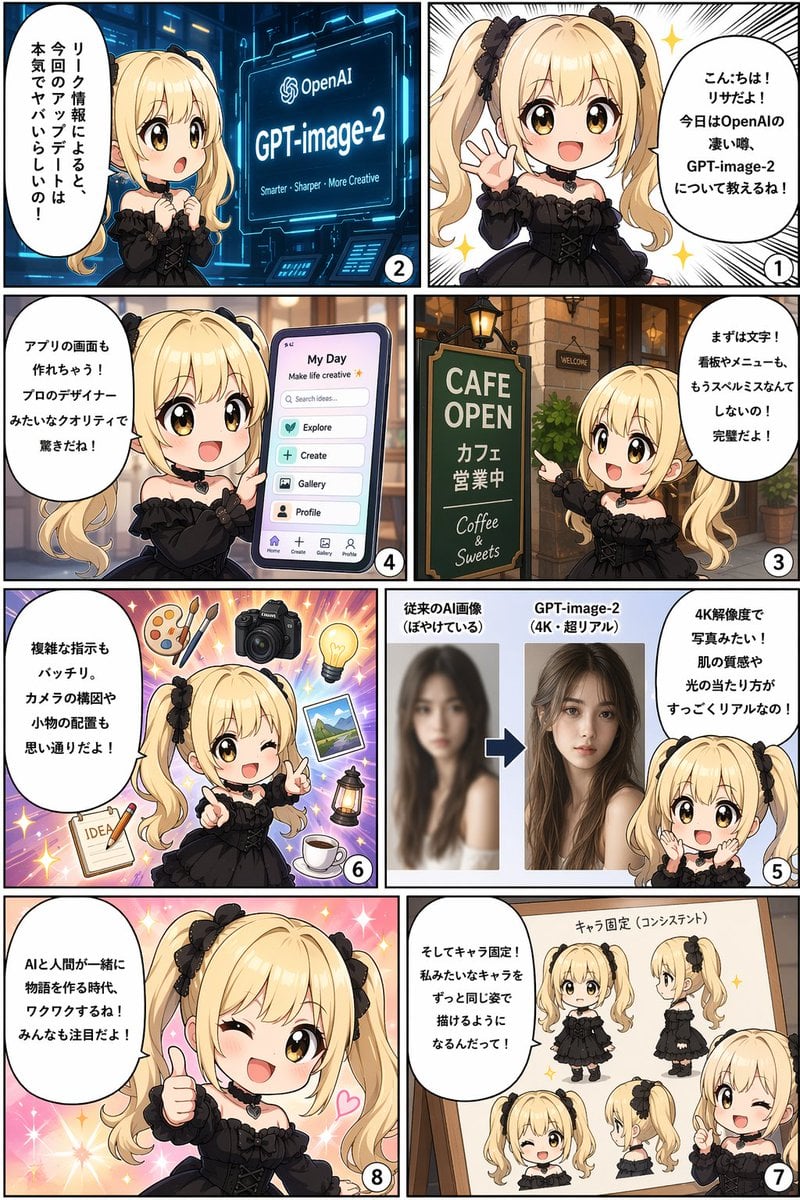
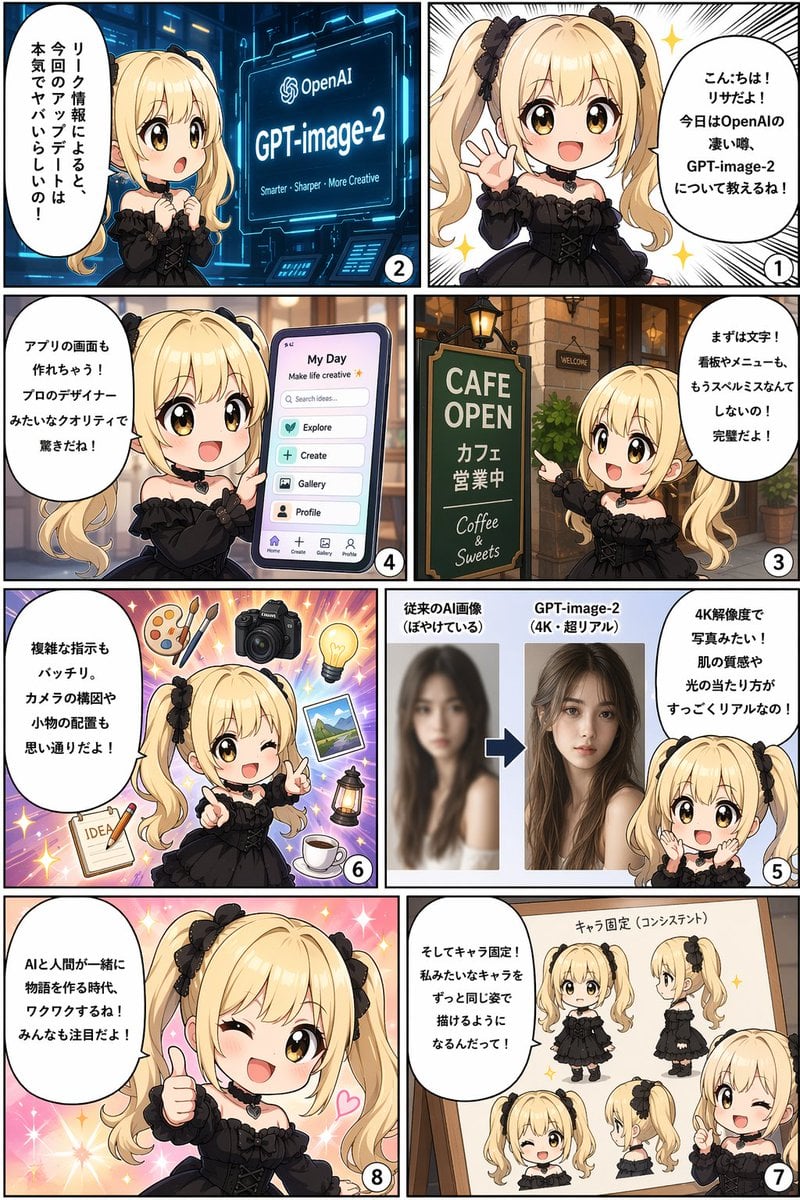
Generates an 8-panel manga comic strip featuring a chibi character explaining software features with UI mockups and diagrams.
- Prompt included
- Model and format preset
- Premium template
The prompt behind this image
Copy the exact prompt behind Panel AI Feature Explainer Manga, or open it in the studio and make it yours.
- Type
- 8-panel manga comic strip
- Layout
- 4 rows, 2 columns grid, reading right-to-left, top-to-bottom
- Character › Appearance
- {argument name="character appearance" default="chibi anime girl, blonde twin tails, black bows, brown eyes, black gothic dress, heart choker"}
- Panels › 0 › Number
- 1
- Panels › 0 › Position
- top right
- Panels › 0 › Visual
- Character waving and smiling happily against a sparkling white background.
- Panels › 0 › Speech Bubble
- {argument name="panel 1 text" default="こんにちは!リサだよ!今日はOpenAIの凄い噂、GPT-image-2について教えるね!"}
- Panels › 1 › Number
- 2
- Panels › 1 › Position
- top left
- Panels › 1 › Visual
- Character looking surprised at a futuristic blue holographic screen displaying the OpenAI logo and '{argument name="topic" default="GPT-image-2"}'.
- Panels › 1 › Screen Subtext
- {argument name="panel 2 screen text" default="Smarter - Sharper - More Creative"}
- Panels › 1 › Speech Bubble
- According to leak info, this update is seriously crazy!
- Panels › 2 › Number
- 3
- Panels › 2 › Position
- row 2 right
- Panels › 2 › Visual
- Character pointing at a green cafe sign outside a brick building.
- Panels › 2 › Sign Text
- CAFE OPEN, Cafe is open, Coffee & Sweets
- Panels › 2 › Speech Bubble
- First, text! Signboards and menus won't have spelling mistakes anymore! It's perfect!
- Panels › 3 › Number
- 4
- Panels › 3 › Position
- row 2 left
- Panels › 3 › Visual
- Character holding a large smartphone displaying a mobile app interface.
- Panels › 3 › Ui Elements › Header
- My Day, Make life creative
- Panels › 3 › Ui Elements › Search Bar
- Search ideas...
- Panels › 3 › Ui Elements › Buttons Count
- 4
- Panels › 3 › Ui Elements › Buttons Labels
- Explore, Create, Gallery, Profile
Raw JSON
{
  "type": "8-panel manga comic strip",
  "layout": "4 rows, 2 columns grid, reading right-to-left, top-to-bottom",
  "character": {
    "appearance": "{argument name=\"character appearance\" default=\"chibi anime girl, blonde twin tails, black bows, brown eyes, black gothic dress, heart choker\"}"
  },
  "panels": [
    {
      "number": 1,
      "position": "top right",
      "visual": "Character waving and smiling happily against a sparkling white background.",
      "speech_bubble": "{argument name=\"panel 1 text\" default=\"こんにちは!リサだよ!今日はOpenAIの凄い噂、GPT-image-2について教えるね!\"}"
    },
    {
      "number": 2,
      "position": "top left",
      "visual": "Character looking surprised at a futuristic blue holographic screen displaying the OpenAI logo and '{argument name=\"topic\" default=\"GPT-image-2\"}'.",
      "screen_subtext": "{argument name=\"panel 2 screen text\" default=\"Smarter - Sharper - More Creative\"}",
      "speech_bubble": "According to leak info, this update is seriously crazy!"
    },
    {
      "number": 3,
      "position": "row 2 right",
      "visual": "Character pointing at a green cafe sign outside a brick building.",
      "sign_text": ["CAFE OPEN", "Cafe is open", "Coffee & Sweets"],
      "speech_bubble": "First, text! Signboards and menus won't have spelling mistakes anymore! It's perfect!"
    },
    {
      "number": 4,
      "position": "row 2 left",
      "visual": "Character holding a large smartphone displaying a mobile app interface.",
      "ui_elements": {
        "header": ["My Day", "Make life creative"],
        "search_bar": "Search ideas...",
        "buttons_count": 4,
        "buttons_labels": ["Explore", "Create", "Gallery", "Profile"],
        "bottom_nav_icons_count": 4
      },
      "speech_bubble": "It can even make app screens! The pro-designer quality is surprising!"
    },
    {
      "number": 5,
      "position": "row 3 right",
      "visual": "Character looking amazed at a before-and-after image comparison graphic.",
      "graphic_elements": {
        "left_image": "Blurry photo of a woman",
        "left_label": "Conventional AI image (blurry)",
        "right_image": "Sharp, realistic 4K photo of the same woman",
        "right_label": "{argument name=\"topic\" default=\"GPT-image-2\"} (4K super real)",
        "separator": "Blue arrow pointing right"
      },
      "speech_bubble": "It's like a photo in 4K resolution! Skin texture and lighting are super realistic!"
    },
    {
      "number": 6,
      "position": "row 3 left",
      "visual": "Character winking and pointing, surrounded by floating objects on a purple starburst background.",
      "floating_objects_count": 7,
      "floating_objects_labels": ["wooden palette with 2 brushes", "DSLR camera", "glowing lightbulb", "landscape photograph", "vintage lantern", "cup of coffee on saucer", "notepad with pencil and the word IDEA"],
      "speech_bubble": "Complex instructions are perfect too. Camera composition and prop placement are exactly as you want!"
    },
    {
      "number": 7,
      "position": "row 4 right",
      "visual": "Character pointing at a wooden whiteboard displaying a character reference sheet of herself.",
      "whiteboard_title": "Character consistency",
      "character_views_count": 5,
      "character_views_labels": ["front full-body", "side full-body", "front face winking", "side face", "half-body pointing"],
      "speech_bubble": "And character consistency! You'll be able to draw characters like me in the exact same appearance!"
    },
    {
      "number": 8,
      "position": "row 4 left",
      "visual": "Character giving a thumbs up, winking, and smiling broadly against a sparkling pink background.",
      "speech_bubble": "{argument name=\"panel 8 text\" default=\"AIと人間が一緒に物語を作る時代、ワクワクするね!みんなも注目だよ!\"}"
    }
  ]
}Reference images included
Panel AI Feature Explainer Manga needs input media to work. They load alongside the prompt when you open it in the studio.
How to use Panel AI Feature Explainer Manga in 3 steps
- 1Upload ImagePNG, JPG or paste
Add your photo
Upload the photo the template builds on. The prompt, model and format are already set.
- 2…a portrait of your subject in softgolden-hour light, 85mm…
Personalize
Edit the subject and creative details for your destination.
- 3Generate
Generate
Press Generate — your image is created in PicX Studio, so you can compare it with the original and refine one variable at a time.
More like this
Templates with the same subject, style or setup. Open one to see its prompt.










Make it yours
Panel AI Feature Explainer Manga works as-is. These are the safest ways to change it without losing the look.
Change one field
Copy a single group, rewrite it, and generate again so you can see what that field is doing.
Keep the frame, change the subject
Hold the composition and light of 8-Panel AI Feature Explainer Manga, then swap wardrobe, props or the person for a new take.
| If the result… | Why | Fix |
|---|---|---|
| The result drifts from the preview | Too many fields changed at once. | Reuse 8-Panel AI Feature Explainer Manga as-is first, then change one group — subject, light, or setting. |
| GPT Image 2 ignores part of the JSON | Some models flatten or skip nested keys. | Keep the same values and paste them as a short paragraph instead. |
More GPT Image 2 templates
Other prompts made for GPT Image 2.

Six VTuber Japanese Logo Sheet

Realistic Portrait of Woman and Deer

The Vista Modular Condo Poster

AI Model Routing Comparison Infographic

2.5D Anime Art Board

Isometric Productivity Desk Scene

New York Double Exposure Poster

Four-Panel AI Landscape Comparison

Japanese Tatami Lifestyle Magazine Cover

NESCAFÉ Coffee Map Poster
More image prompts
Fresh picks from across the catalog.
Calligraphic Design with Vibrant Illustration Style
Intimate Photorealistic FaceTime Portrait Prompt
Crashed Orbital Ring Segment Concept Art
Train Photography Game Simulation
Neon Light High-Contrast Portrait Template
Top-Down Flat Lay of Dog Formed from Keyboard Keycaps
Ultra-Realistic Nighttime Photograph Prompt for Nano Banana 2 Pro
Glitch Lord Style Transformation
Hand-Drawn Storyboard Previs Sketch
Pastel Pink and Silver Ornate Style Transfer
Browse template categories
Panel AI Feature Explainer Manga questions
How do I use the 8-Panel AI Feature Explainer Manga template?
Add your photo if the template asks for one, edit the prompt if you like — the template's model and format are already selected — and press Generate. Your version opens in PicX Studio.
Can I customize the 8-Panel AI Feature Explainer Manga template?
Yes. You can change the subject, setting, lighting, mood, format, and available model controls before creating your image.
Is the 8-Panel AI Feature Explainer Manga template free?
Opening and editing this template is free. Generating uses credits, shown on the Generate button when you are signed in.
Which AI model should I use?
Start with GPT Image 2, which is the model associated with this template. You can compare another compatible model for a different finish.
Looking for something else? Browse all templates.

Your photo, any look
Thousands of ready templates for every top image and video model, from one credit balance.