
Panel Yoga Instructional Storyboard
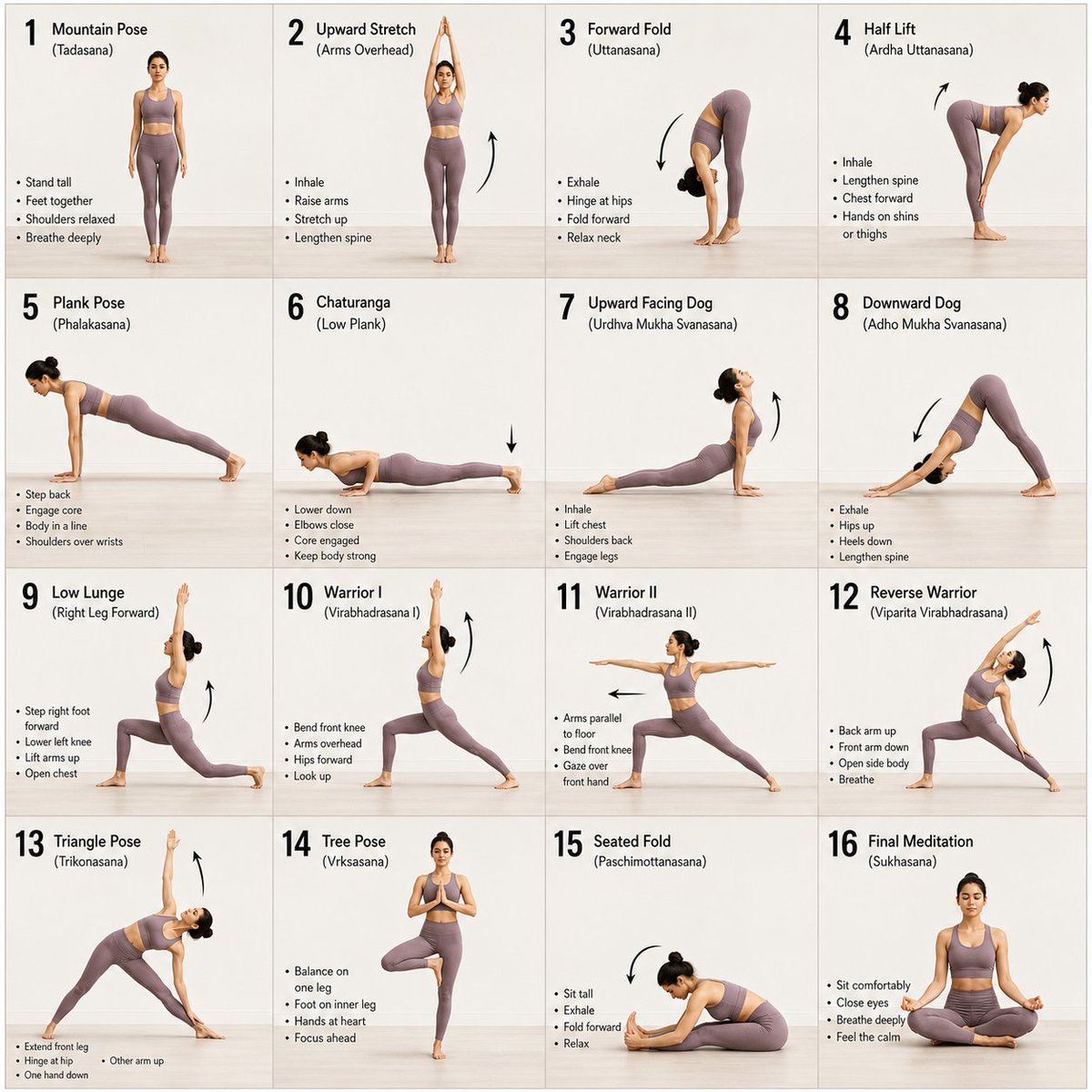
A clean, minimalist 16-panel grid layout for a yoga instructional guide, showing a progression of poses with a consistent subject and background.
- Prompt included
- Model and format preset
- Free template
The prompt behind this image
Copy the exact prompt behind Panel Yoga Instructional Storyboard, or open it in the studio and make it yours.
A 16-panel instructional storyboard grid featuring a {argument name="subject" default="calm, athletic young woman"} performing a sequence of {argument name="activity" default="yoga poses"} in the same spot. Clean minimal studio background with soft natural lighting, consistent full-body framing across all panels. The woman wears a {argument name="outfit" default="fitted neutral-toned yoga outfit (leggings + sports top)"}, barefoot, hair tied back. Each panel shows a different pose in a smooth progression: Mountain Pose (Tadasana), Upward Stretch (Arms Overhead), Forward Fold (Uttanasana), Half Lift, Plank Pose, Chaturanga (Low Plank), Upward Facing Dog, Downward Dog, Low Lunge (Right Leg Forward), Warrior I, Warrior II, Reverse Warrior, Triangle Pose, Tree Pose (Balance), Seated Fold, Final Meditation Pose (Eyes Closed, Calm Expression). Style: modern instructional design, evenly spaced grid layout, each frame labeled with step number and pose name, subtle arrows indicating movement flow, soft shadows, neutral background, high detail, realistic proportions, elegant and calming aesthetic.
How to use Panel Yoga Instructional Storyboard in 3 steps
- 1
Open
The prompt is already in the box next to the preview, with the template's model and format selected.
- 2…a portrait of your subject in softgolden-hour light, 85mm…
Personalize
Edit the subject and creative details for your destination.
- 3Generate
Generate
Press Generate — your image is created in PicX Studio, so you can compare it with the original and refine one variable at a time.
More like this
Templates with the same subject, style or setup. Open one to see its prompt.

Headphones Lifestyle Nine Panel Grid
Panel Football Boy Storyboard

Pixar 6-Panel Streethero Expression Grid
Panel Spear Sakuga Storyboard
Yoga Pose Instructional Grid
Seedance - Storyboard to Movie
Outdoor Park Yoga Stretch
Premium emerald green velvet high-waist yoga leggings matching velvet

Panel Mirror Selfie Collage

Cozy Six-Panel Bedtime Stages Collage

Four-Panel AI Landscape Comparison

Four-Panel Anime Face Comparison
Make it yours
Panel Yoga Instructional Storyboard works as-is. These are the safest ways to change it without losing the look.
Change one field
Copy a single group, rewrite it, and generate again so you can see what that field is doing.
Keep the frame, change the subject
Hold the composition and light of 16-Panel Yoga Instructional Storyboard, then swap wardrobe, props or the person for a new take.
| If the result… | Why | Fix |
|---|---|---|
| The result drifts from the preview | Too many fields changed at once. | Reuse 16-Panel Yoga Instructional Storyboard as-is first, then change one group — subject, light, or setting. |
| The model over-stylizes the scene | The prose prompt leaves finish and camera underspecified. | Add one camera or lighting sentence and stay on GPT Image 2. |
More GPT Image 2 templates
Other prompts made for GPT Image 2.

Six VTuber Japanese Logo Sheet

Realistic Portrait of Woman and Deer

The Vista Modular Condo Poster

AI Model Routing Comparison Infographic

2.5D Anime Art Board

Isometric Productivity Desk Scene

New York Double Exposure Poster

Japanese Tatami Lifestyle Magazine Cover

NESCAFÉ Coffee Map Poster

Brutalist Cogito Chinese Typography Poster
More image prompts
Fresh picks from across the catalog.

Cinematic Action Collage Split-Screen

Retro AI Survival Guide Poster
Giant Pikachu Studio Portrait Identity Lock Prompt
Conceptual Frame: Absurd Specimen Jar Study

Fantasy Garden in a Glass Bottle
Sunlit Fashion Editorial Collage

Autonomous Financial Artist Prompt for 3D Stock Visualization
Fisheye selfie with anime characters
Seedance - Arrow Microscopic Battle

Ultra-luxurious Perfume Campaign
Browse template categories
Panel Yoga Instructional Storyboard questions
How do I use the 16-Panel Yoga Instructional Storyboard template?
Add your photo if the template asks for one, edit the prompt if you like — the template's model and format are already selected — and press Generate. Your version opens in PicX Studio.
Can I customize the 16-Panel Yoga Instructional Storyboard template?
Yes. You can change the subject, setting, lighting, mood, format, and available model controls before creating your image.
Is the 16-Panel Yoga Instructional Storyboard template free?
Opening and editing this template is free. Generating uses credits, shown on the Generate button when you are signed in.
Which AI model should I use?
Start with GPT Image 2, which is the model associated with this template. You can compare another compatible model for a different finish.
Looking for something else? Browse all templates.

Your photo, any look
Thousands of ready templates for every top image and video model, from one credit balance.