
Yoga Pose Instructional Grid
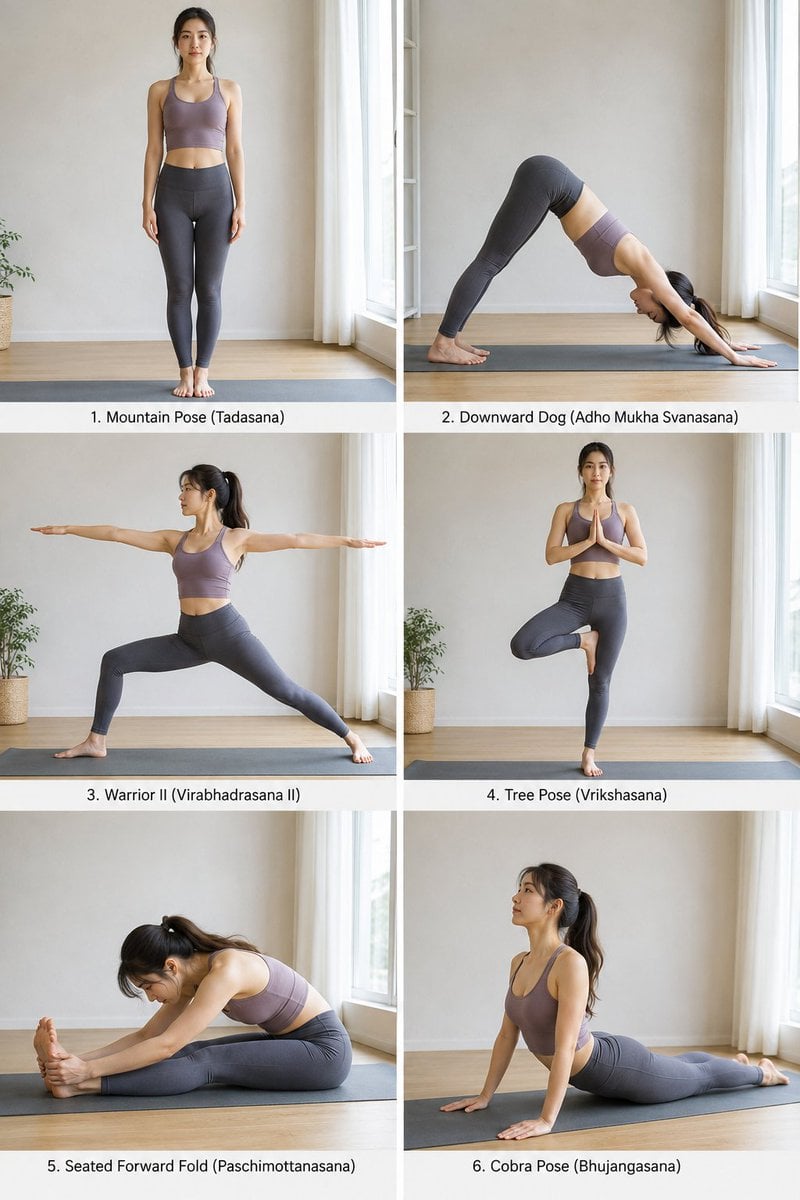
A structured JSON-based prompt for generating a clean 2x3 grid of a single model performing various yoga poses with labels and natural lighting.
- Prompt included
- Model and format preset
- Free template
The prompt behind this image
Copy the exact prompt behind Yoga Pose Instructional Grid, or open it in the studio and make it yours.
- Objective
- Generate a realistic 3:4 image showing six different yoga poses performed by a single model, arranged in a clean 2x3 grid with labeled pose names and a smooth visual flow.
- Aspect Ratio
- 3:4
- Composition › Layout
- 2 columns x 3 rows grid
- Composition › Spacing
- minimal clean spacing between frames
- Composition › Flow
- poses arranged in a natural progression (warm-up to stretch to balance)
- Composition › Labels
- each pose has a small clean label beneath or beside it
- Subject › Description
- extremely attractive Japanese woman
- Subject › Physique
- slim, toned, flexible
- Subject › Appearance
- natural beauty, minimal makeup, smooth skin (not over-retouched), dark straight or slightly tied hair
- Subject › Outfit
- fitted yoga top, high-waisted yoga leggings
- Subject › Expression
- calm, focused, serene
- Poses
- Mountain Pose (Tadasana), Downward Dog (Adho Mukha Svanasana), Warrior II (Virabhadrasana II), Tree Pose (Vrikshasana), Seated Forward Fold (Paschimottanasana), Cobra Pose (Bhujangasana)
- Environment › Location
- minimal indoor studio or home setting
- Environment › Details
- wooden floor or yoga mat, soft natural light from window, clean uncluttered background
- Camera Style › Type
- smartphone photography
- Camera Style › Quality
- slightly imperfect, natural
- Camera Style › Imperfections
- subtle grain, minor motion blur, natural lighting inconsistencies
- Camera Style › Angles
- consistent eye-level framing for all poses
- Lighting › Type
- soft natural daylight
- Lighting › Style
- diffused window light
- Lighting › Mood
- calm, wellness-focused
- Text Style › Font
- clean modern sans-serif
- Text Style › Color
- subtle neutral (white or black depending on background)
- Text Style › Placement
- discreet, not overpowering visuals
Raw JSON
{
  "objective": "Generate a realistic 3:4 image showing six different yoga poses performed by a single model, arranged in a clean 2x3 grid with labeled pose names and a smooth visual flow.",

  "aspect_ratio": "3:4",

  "composition": {
    "layout": "2 columns x 3 rows grid",
    "spacing": "minimal clean spacing between frames",
    "flow": "poses arranged in a natural progression (warm-up to stretch to balance)",
    "labels": "each pose has a small clean label beneath or beside it"
  },

  "subject": {
    "description": "extremely attractive Japanese woman",
    "physique": "slim, toned, flexible",
    "appearance": [
      "natural beauty",
      "minimal makeup",
      "smooth skin (not over-retouched)",
      "dark straight or slightly tied hair"
    ],
    "outfit": [
      "fitted yoga top",
      "high-waisted yoga leggings"
    ],
    "expression": "calm, focused, serene"
  },

  "poses": [
    "Mountain Pose (Tadasana)",
    "Downward Dog (Adho Mukha Svanasana)",
    "Warrior II (Virabhadrasana II)",
    "Tree Pose (Vrikshasana)",
    "Seated Forward Fold (Paschimottanasana)",
    "Cobra Pose (Bhujangasana)"
  ],

  "environment": {
    "location": "minimal indoor studio or home setting",
    "details": [
      "wooden floor or yoga mat",
      "soft natural light from window",
      "clean uncluttered background"
    ]
  },

  "camera_style": {
    "type": "smartphone photography",
    "quality": "slightly imperfect, natural",
    "imperfections": [
      "subtle grain",
      "minor motion blur",
      "natural lighting inconsistencies"
    ],
    "angles": "consistent eye-level framing for all poses"
  },

  "lighting": {
    "type": "soft natural daylight",
    "style": "diffused window light",
    "mood": "calm, wellness-focused"
  },

  "text_style": {
    "font": "clean modern sans-serif",
    "color": "subtle neutral (white or black depending on background)",
    "placement": "discreet, not overpowering visuals"
  },

  "style": {
    "overall": "realistic wellness photography",
    "mood": "peaceful, elegant, lifestyle",
    "editing": "light color grading, not over-processed"
  },

  "negative_prompt": [
    "overly polished skin",
    "studio glamour lighting",
    "cluttered background",
    "incorrect yoga poses",
    "distorted anatomy",
    "low realism",
    "cartoon style"
  ]
}How to use Yoga Pose Instructional Grid in 3 steps
- 1
Open
The prompt is already in the box next to the preview, with the template's model and format selected.
- 2…a portrait of your subject in softgolden-hour light, 85mm…
Personalize
Edit the subject and creative details for your destination.
- 3Generate
Generate
Press Generate — your image is created in PicX Studio, so you can compare it with the original and refine one variable at a time.
More like this
Templates with the same subject, style or setup. Open one to see its prompt.

Yoga Pose Editorial Collage

Korean Luxury Fashion Editorial 2x2 Grid Series

Minimalist Fashion Editorial Split Layout

Ultra-Realistic Vogue-Style Editorial Fashion Grid

Headphones Lifestyle Nine Panel Grid
Panel Yoga Instructional Storyboard

4x4 Grid - Candid Nostalgic Vacation Selfies

Movement Sheet - Dance Reference (Seedance 2.0)
Ultra-Photorealistic Yoga Cow Pose Smartphone Selfie Prompt

Paris Travel Collage Grid - Face Reference

Instagram Feed Grid
Outdoor Park Yoga Stretch
Make it yours
Yoga Pose Instructional Grid works as-is. These are the safest ways to change it without losing the look.
Swap the setting
Keep the rest of the prompt and replace the location block. The current setting is “minimal indoor studio or home setting”.
Swap the light
One lighting change is enough to compare takes. Current light: “soft natural daylight”.
Change one field
Copy a single group, rewrite it, and generate again so you can see what that field is doing.
| If the result… | Why | Fix |
|---|---|---|
| The result drifts from the preview | Too many fields changed at once. | Reuse Yoga Pose Instructional Grid as-is first, then change one group — subject, light, or setting. |
| GPT Image 2 ignores part of the JSON | Some models flatten or skip nested keys. | Keep the same values and paste them as a short paragraph instead. |
More GPT Image 2 templates
Other prompts made for GPT Image 2.

Six VTuber Japanese Logo Sheet

Realistic Portrait of Woman and Deer

The Vista Modular Condo Poster

AI Model Routing Comparison Infographic

2.5D Anime Art Board

Isometric Productivity Desk Scene

New York Double Exposure Poster

Four-Panel AI Landscape Comparison

Japanese Tatami Lifestyle Magazine Cover

NESCAFÉ Coffee Map Poster
More image prompts
Fresh picks from across the catalog.

French Omelette Tutorial Poster
Bold Red Fashion Portrait
Cinematic Urban Night Portrait
Realistic Pet and Owner Wide-Angle Selfie
Y2K Urban Twilight Portrait
Overhead View of Saturday Morning Activity Prompt
Cinematic Low-Angle Street Portrait Prompt

Explosive Japanese X Monetization Thumbnail

FIFA World Cup Trophy Winner

Minimal Clay Animal Trio
Browse template categories
Yoga Pose Instructional Grid questions
How do I use the Yoga Pose Instructional Grid template?
Add your photo if the template asks for one, edit the prompt if you like — the template's model and format are already selected — and press Generate. Your version opens in PicX Studio.
Can I customize the Yoga Pose Instructional Grid template?
Yes. You can change the subject, setting, lighting, mood, format, and available model controls before creating your image.
Is the Yoga Pose Instructional Grid template free?
Opening and editing this template is free. Generating uses credits, shown on the Generate button when you are signed in.
Which AI model should I use?
Start with GPT Image 2, which is the model associated with this template. You can compare another compatible model for a different finish.
Looking for something else? Browse all templates.

Your photo, any look
Thousands of ready templates for every top image and video model, from one credit balance.