
Vintage Creepy Children's Book Transformation
Transforms a real outdoor architectural photo into an aged, whimsical, slightly eerie children's book illustration with hand-lettered poem text and anthropomorphic details.
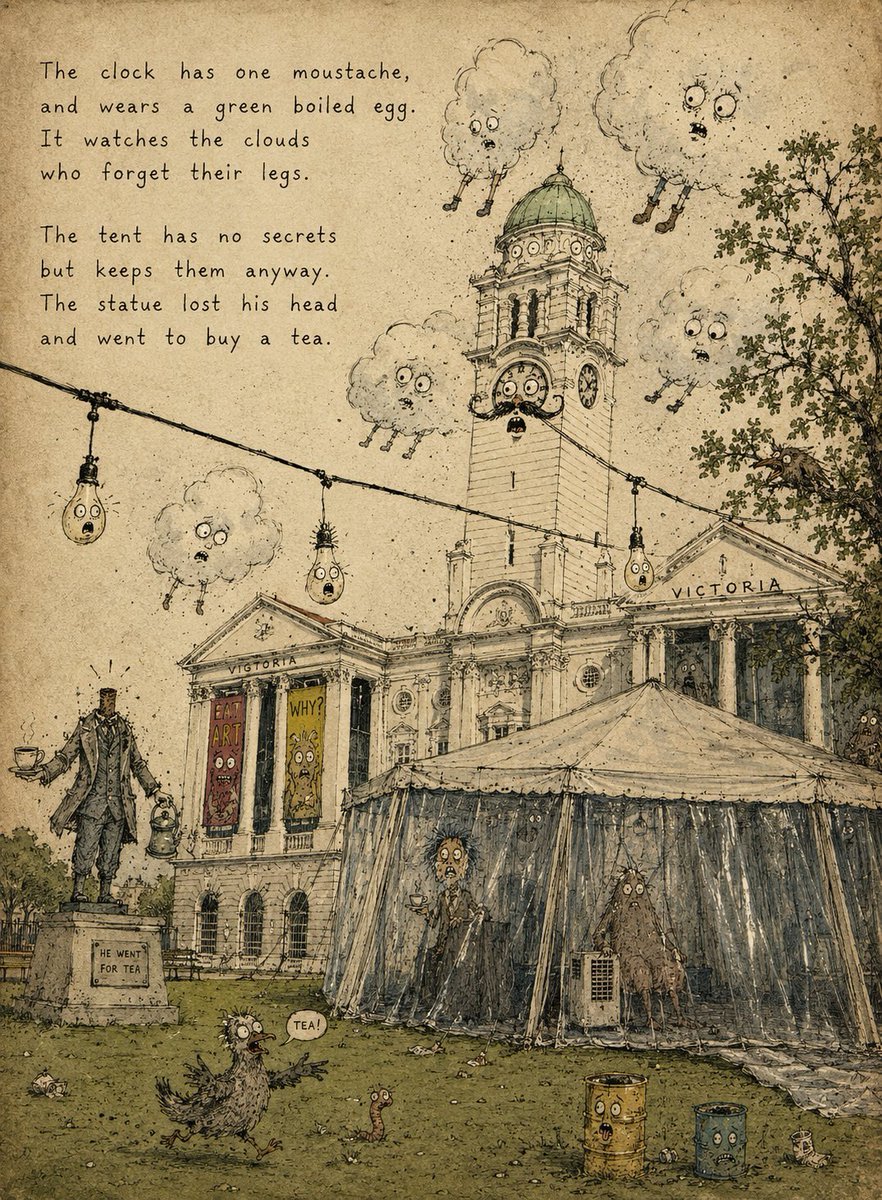
- Prompt included
- Model and format preset
- Free template
The prompt behind this image
Copy the exact prompt behind Vintage Creepy Children's Book Transformation, or open it in the studio and make it yours.
Using the provided reference photo as the scene base, transform it into a strange vintage children's picture-book illustration on aged yellow paper. Keep the same overall composition, building, clock tower, tent, lawn, statue position, string lights, tree, and dramatic cloud placement, but redraw everything as delicate ink line art with muted watercolor washes, paper grain, stains, scratches, and a slightly creepy whimsical storybook mood. Style: old absurdist children's book illustration, hand-drawn pen hatching, muted olive/sepia/gray palette, worn book-page texture, imperfect perspective, whimsical grotesque faces added to ordinary objects. Additions and changes: - Add a hand-lettered poem in the upper-left, exactly 8 lines in two 4-line stanzas: “The clock has one moustache, and wears a green boiled egg. It watches the clouds who forget their legs. The tent has no secrets but keeps them anyway. The statue lost his head and went to buy a tea.” - Turn the clock face on the tower into a surprised character with eyes, mouth, and one moustache; make the dome look like a green boiled egg. - Add exactly 5 anthropomorphic clouds with worried faces and tiny dangling legs, placed around the tower and sky. - Turn exactly 3 hanging bulbs on the string light into little worried faces. - Make the statue headless and give it a teacup and small kettle/lantern, with a small plaque reading “HE WENT FOR TEA.” - Add exactly 2 vertical poster banners on the building facade with silly monster faces and short readable words, one saying “EAT ART” and one saying “WHY?” - Add exactly 2 strange figures inside or behind the tent plastic, one tall person-like figure holding tea and one shaggy creature near the right side. - Add exactly 1 bird-like creature on the grass in the foreground with a speech bubble saying “TEA!”, plus exactly 1 small worm nearby. - Add exactly 2 rusty cylindrical bins in the lower-right foreground, each with a face. Constraints: preserve the architecture and layout from the reference, but make it look fully illustrated rather than photographic. No modern photorealism, no clean digital vector look, no extra poem text beyond the specified lines.
Reference images included
Vintage Creepy Children's Book Transformation needs input media to work. They load alongside the prompt when you open it in the studio.
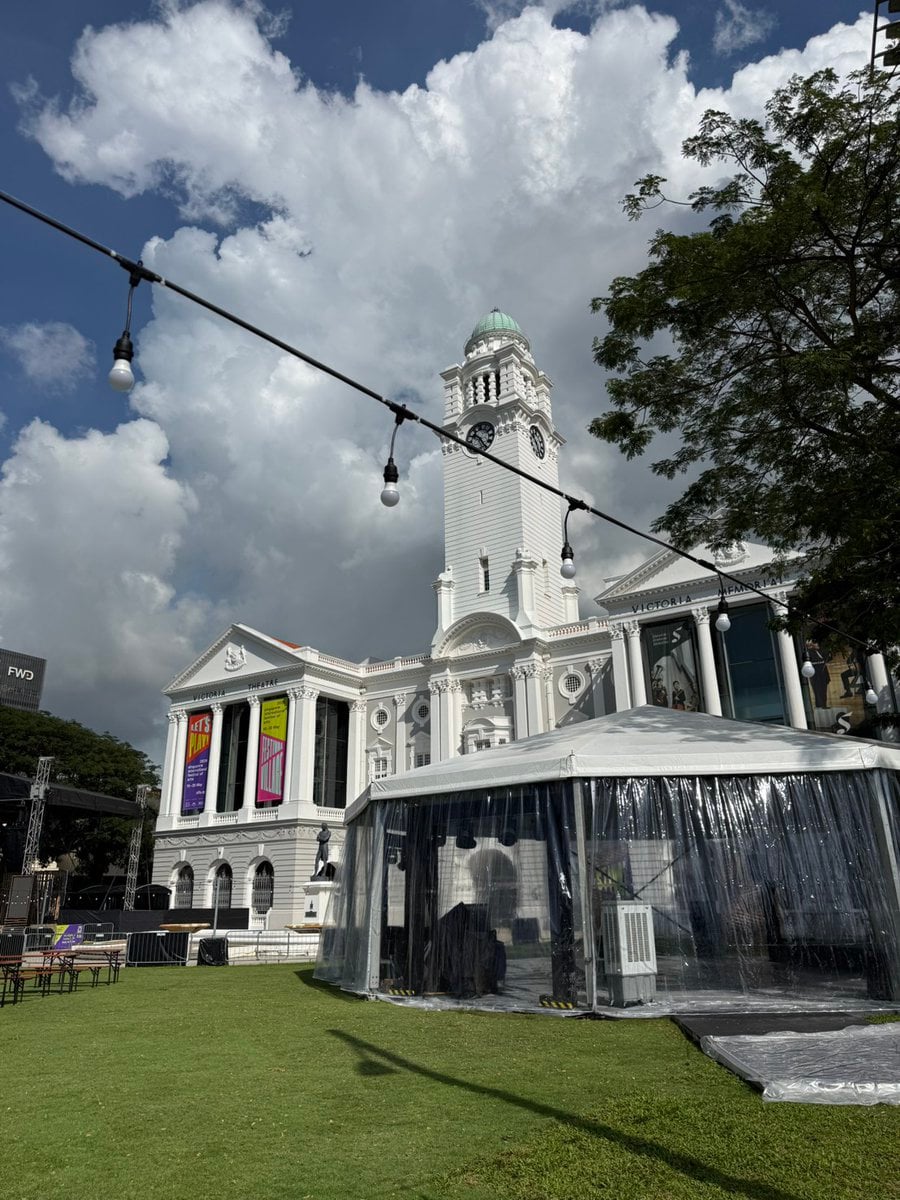
How to use Vintage Creepy Children's Book Transformation in 3 steps
- 1Upload ImagePNG, JPG or paste
Add your photo
Upload the photo the template builds on. The prompt, model and format are already set.
- 2…a portrait of your subject in softgolden-hour light, 85mm…
Personalize
Edit the subject and creative details for your destination.
- 3Generate
Generate
Press Generate — your image is created in PicX Studio, so you can compare it with the original and refine one variable at a time.
More like this
Templates with the same subject, style or setup. Open one to see its prompt.











Make it yours
Vintage Creepy Children's Book Transformation works as-is. These are the safest ways to change it without losing the look.
Change one field
Copy a single group, rewrite it, and generate again so you can see what that field is doing.
Keep the frame, change the subject
Hold the composition and light of Vintage Creepy Children's Book Transformation, then swap wardrobe, props or the person for a new take.
| If the result… | Why | Fix |
|---|---|---|
| The result drifts from the preview | Too many fields changed at once. | Reuse Vintage Creepy Children's Book Transformation as-is first, then change one group — subject, light, or setting. |
| The model over-stylizes the scene | The prose prompt leaves finish and camera underspecified. | Add one camera or lighting sentence and stay on GPT Image 2. |
More GPT Image 2 templates
Other prompts made for GPT Image 2.

Six VTuber Japanese Logo Sheet

Realistic Portrait of Woman and Deer

The Vista Modular Condo Poster

AI Model Routing Comparison Infographic

2.5D Anime Art Board

Isometric Productivity Desk Scene

New York Double Exposure Poster

Four-Panel AI Landscape Comparison

Japanese Tatami Lifestyle Magazine Cover

NESCAFÉ Coffee Map Poster
More image prompts
Fresh picks from across the catalog.

Cinematic Fashion Portrait in Neon Light

Fashion Editorial Photography Prompt
High-Quality Flat Design Slide Generation Prompt
Luxury Fashion Portrait in Burnt Orange Suit
Top View of Chess Board in Starting Position
Luxury High-Speed Shake Commercial Photography Prompt
Pastel Kawaii Study Room Illustration
3D paper cut light box illustration framework
Cinematic Short Video Prompt for Baking Scene
Misty Lotus Pond Heron Sunrise
Browse template categories
Vintage Creepy Children's Book Transformation questions
How do I use the Vintage Creepy Children's Book Transformation template?
Add your photo if the template asks for one, edit the prompt if you like — the template's model and format are already selected — and press Generate. Your version opens in PicX Studio.
Can I customize the Vintage Creepy Children's Book Transformation template?
Yes. You can change the subject, setting, lighting, mood, format, and available model controls before creating your image.
Is the Vintage Creepy Children's Book Transformation template free?
Opening and editing this template is free. Generating uses credits, shown on the Generate button when you are signed in.
Which AI model should I use?
Start with GPT Image 2, which is the model associated with this template. You can compare another compatible model for a different finish.
Looking for something else? Browse all templates.

Your photo, any look
Thousands of ready templates for every top image and video model, from one credit balance.