How do I use the 3D Grayscale Dance Reference Sheet template?
Choose the primary action to open PicX Studio with the available template settings. Review the model and format, personalize the creative direction, and generate when ready.
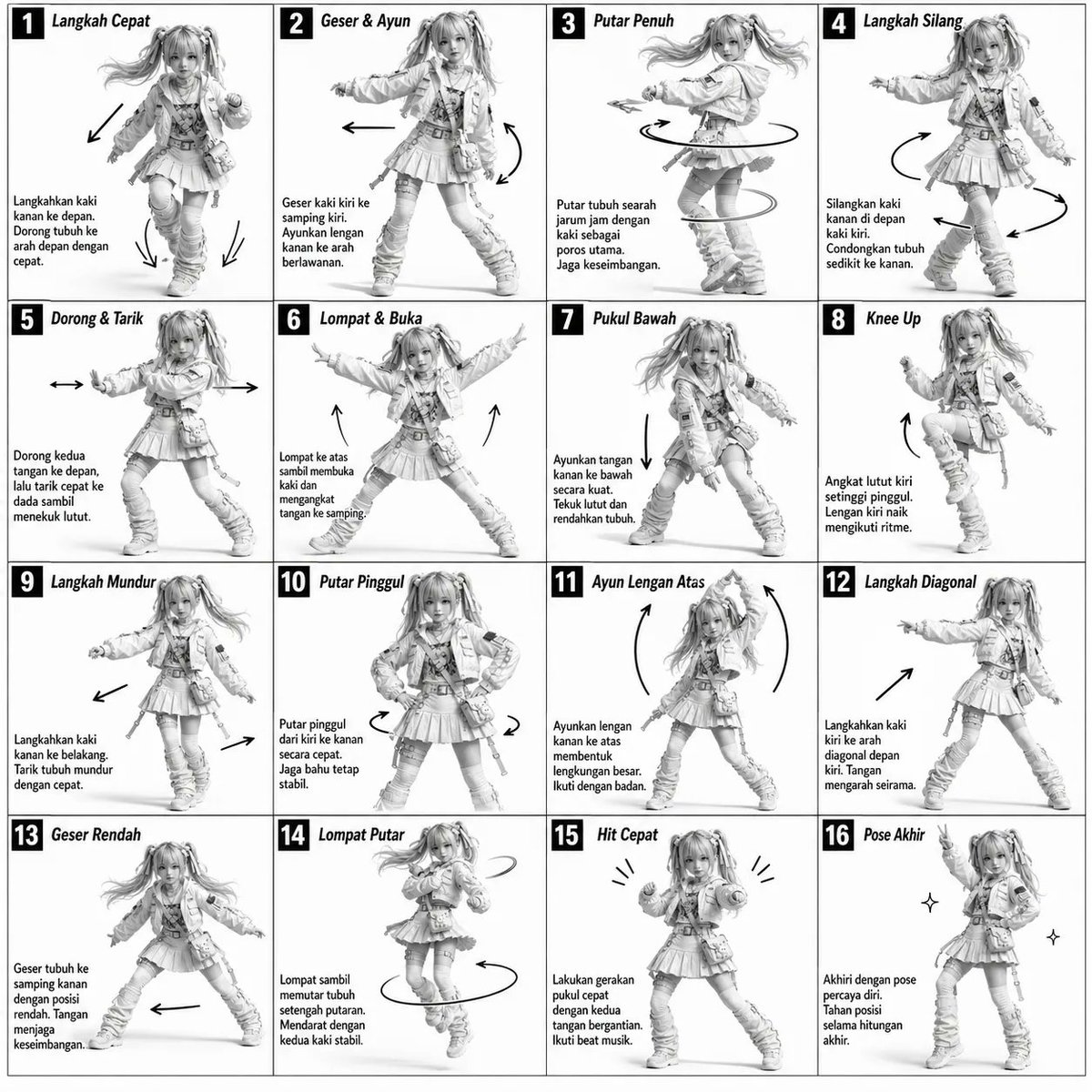
A technical diagram-style prompt for a monochromatic 4x4 movement sheet with instructional text and motion arrows. (free to use) — Free AI image template on PicX Studio.
Monochromatic grayscale illustration, 3D-rendered character, clean instructional reference sheet. White background, comic-style cell grid layout, technical diagram aesthetic. [LAYOUT] 4×4 grid layout (16 panels total). Each panel separated by thin black border lines. Panels are evenly sized and consistently aligned. Each cell is clearly numbered from 1 to 16. [CHARACTER] {argument name="subject" default="Young female dancer with an athletic build, ponytail hairstyle, wearing a crop top, baggy pants, and sneakers"}. The same character must appear consistently in all panels. [PANEL STRUCTURE – per cell] Top-left: bold number badge + {argument name="language" default="Korean"} title text Center: full-body character pose illustration Bottom-left: {argument name="language" default="Korean"} description text (3–4 lines) Overlay: directional arrows indicating movement flow [ARROWS / MOTION INDICATORS] Curved arrows, straight arrows, and circular rotation indicators. Arrows should be placed around the character to clearly show movement direction and flow. [RENDERING STYLE] Highly detailed 3D sculpted style. Soft studio lighting with subtle shadows. No color — grayscale only. Clean linework, polished finish, game concept art quality. [NEGATIVE PROMPT] No background scenery. No color tones. No additional characters. No cluttered or complex backgrounds.
Use 3D Grayscale Dance Reference Sheet to plan an AI image around gpt-image-2 generation, themes such as en and gpt-image-2. Match the preview's composition first, then personalize the subject, setting, and mood for your own project.
Use the primary action to load the template settings in PicX Studio.
Adjust the subject and creative details for your destination.
Create the image, compare the result with the preview, and refine one variable at a time.
A continuous mix — similar concepts first, woven with same-model prompts and fresh picks from the catalog.
Choose the primary action to open PicX Studio with the available template settings. Review the model and format, personalize the creative direction, and generate when ready.
Yes. You can change the subject, setting, lighting, mood, format, and available model controls before creating your image.
This template is free to open and customize. Generation usage is shown in PicX Studio before you create.
Start with gpt-image-2, which is the model associated with this template. You can compare another compatible model for a different finish.
Follow a topic to a crawlable collection of related PicX Studio templates.
39,157 public templates available. Verified via the PicX Studio public templates API; refreshed hourly.
A continuous mix — similar concepts first, woven with same-model prompts and fresh picks from the catalog.