
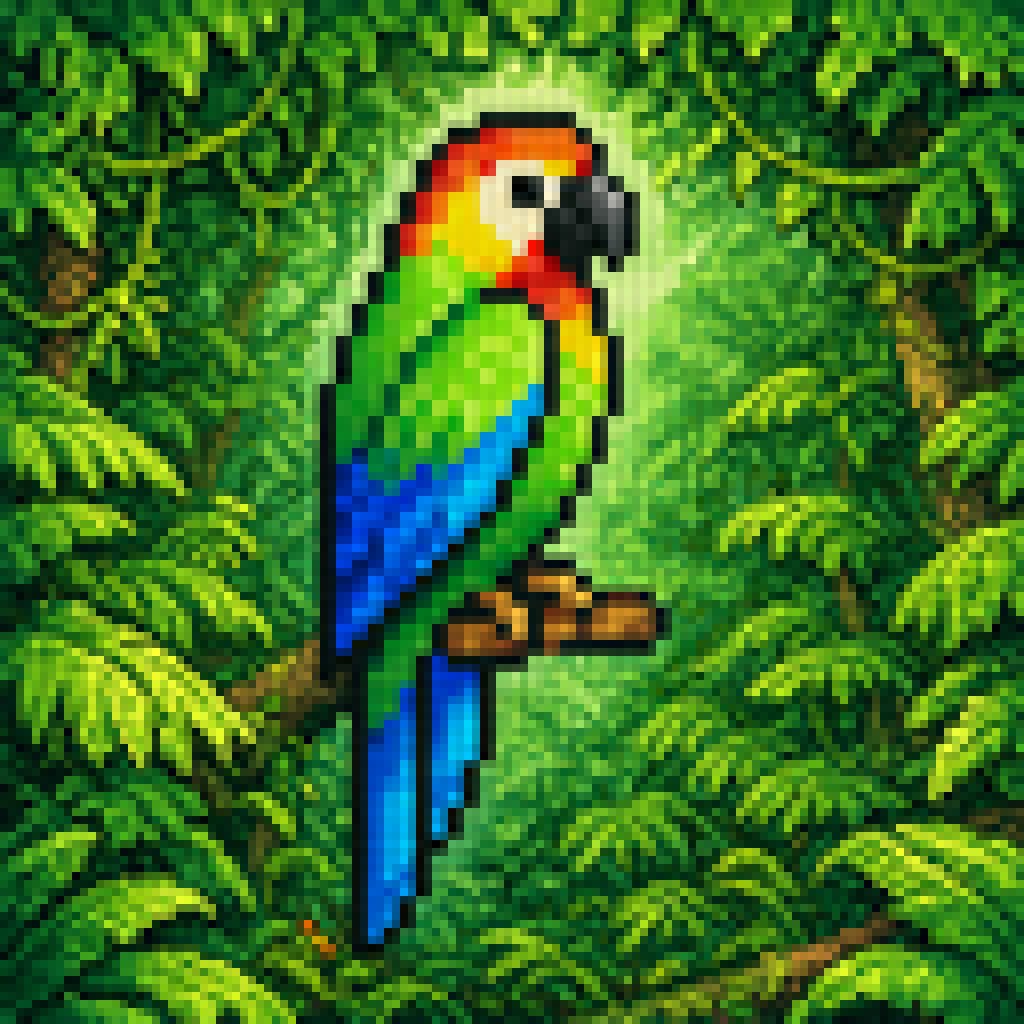
Blurry Retro Pixel Parrot Jungle
Generates a square retro-game-style tropical parrot scene with chunky blurred pixels, useful for vintage video art or nostalgic jungle-themed illustrations.
- Prompt included
- Model and format preset
- Free template
The prompt behind this image
Copy the exact prompt behind Blurry Retro Pixel Parrot Jungle, or open it in the studio and make it yours.
A retro pixel-art style illustration of a tropical parrot perched on a short brown branch in the center of a dense jungle. The bird is shown in side profile facing right, with a bright green body, a vivid blue wing and long blue tail feathers, a yellow chest, an orange-red head and neck, a white facial patch around the eye, and a large curved black beak. The parrot is the single main subject, centered and enlarged, outlined with dark pixel edges. Surround it with thick rainforest foliage filling the entire frame: layered green leaves, twisting vines, and partial tree trunks on both sides, with 2 visible trunks and many overlapping leaf clusters. Add a soft glowing light halo behind the parrot to separate it from the darker forest background. Use a square composition, saturated colors, classic 16-bit game sprite aesthetics, chunky visible pixels, low-resolution grid-based rendering, and intentionally soft, blurry pixel edges rather than crisp modern pixel art. The mood is lush, vibrant, and nostalgic, like a tropical scene from an old video game.
How to use Blurry Retro Pixel Parrot Jungle in 3 steps
- 1Upload ImagePNG, JPG or paste
Add your photo
Upload the photo the template builds on. The prompt, model and format are already set.
- 2…a portrait of your subject in softgolden-hour light, 85mm…
Personalize
Edit the subject and creative details for your destination.
- 3Generate
Generate
Press Generate — your image is created in PicX Studio, so you can compare it with the original and refine one variable at a time.
More like this
Templates with the same subject, style or setup. Open one to see its prompt.











Make it yours
Blurry Retro Pixel Parrot Jungle works as-is. These are the safest ways to change it without losing the look.
Change one field
Copy a single group, rewrite it, and generate again so you can see what that field is doing.
Keep the frame, change the subject
Hold the composition and light of Blurry Retro Pixel Parrot Jungle, then swap wardrobe, props or the person for a new take.
| If the result… | Why | Fix |
|---|---|---|
| The result drifts from the preview | Too many fields changed at once. | Reuse Blurry Retro Pixel Parrot Jungle as-is first, then change one group — subject, light, or setting. |
| The model over-stylizes the scene | The prose prompt leaves finish and camera underspecified. | Add one camera or lighting sentence and stay on GPT Image 2. |
More GPT Image 2 templates
Other prompts made for GPT Image 2.

Six VTuber Japanese Logo Sheet

Realistic Portrait of Woman and Deer

The Vista Modular Condo Poster

AI Model Routing Comparison Infographic

2.5D Anime Art Board

Isometric Productivity Desk Scene

New York Double Exposure Poster

Four-Panel AI Landscape Comparison

Japanese Tatami Lifestyle Magazine Cover

NESCAFÉ Coffee Map Poster
More image prompts
Fresh picks from across the catalog.
iPhone Flash Glamour Portrait
Elegant Woman Blowing a Kiss Portrait
Mauve Loungewear Bedroom Portrait
Blue Cat-Ear Shopkeeper Portrait
Cozy Bedtime Woman With Ginger Kitten
Soft Girl Editorial Fashion Portrait (JSON)
Minimalist Studio Object Photography
Hyper-Realistic Smoothie Bowl Advertising
Couture Velvet Dress on Volcanic Rocks Prompt
Exaggerated Gamer Girl Mirror Selfie Prompt
Browse template categories
Blurry Retro Pixel Parrot Jungle questions
How do I use the Blurry Retro Pixel Parrot Jungle template?
Add your photo if the template asks for one, edit the prompt if you like — the template's model and format are already selected — and press Generate. Your version opens in PicX Studio.
Can I customize the Blurry Retro Pixel Parrot Jungle template?
Yes. You can change the subject, setting, lighting, mood, format, and available model controls before creating your image.
Is the Blurry Retro Pixel Parrot Jungle template free?
Opening and editing this template is free. Generating uses credits, shown on the Generate button when you are signed in.
Which AI model should I use?
Start with GPT Image 2, which is the model associated with this template. You can compare another compatible model for a different finish.
Looking for something else? Browse all templates.

Your photo, any look
Thousands of ready templates for every top image and video model, from one credit balance.