
Surreal Action RPG Boss Fight UI
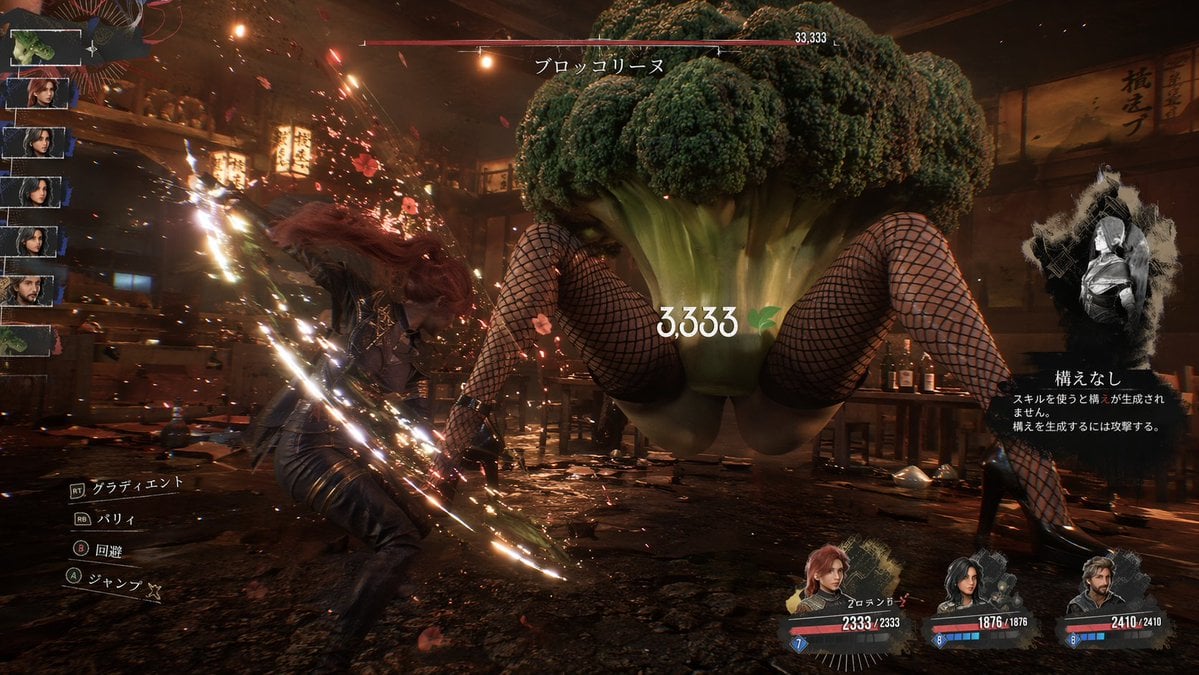
Generates a highly detailed video game UI mockup featuring a battle against a bizarre, surreal boss monster with customizable text and elements.
- Prompt included
- Model and format preset
- Free template
The prompt behind this image
Copy the exact prompt behind Surreal Action RPG Boss Fight UI, or open it in the studio and make it yours.
- Type
- action RPG video game screenshot
- Environment
- {argument name="environment" default="dark, gritty tavern interior with wooden structures, lanterns, and scattered debris"}
- Characters › Player › Description
- female warrior with red hair in dark leather armor
- Characters › Player › Action
- {argument name="player action" default="swinging a glowing sword that emits bright sparks and light trails"}
- Characters › Boss › Description
- giant {argument name="boss type" default="broccoli"} head attached to human female legs wearing fishnet stockings and black high heels
- Characters › Boss › Pose
- floating or jumping in the center of the room
- Layout › Ui Components › 0 › Position
- top center
- Layout › Ui Components › 0 › Type
- boss health bar
- Layout › Ui Components › 0 › Text
- {argument name="boss name" default="ブロッコリーヌ"}
- Layout › Ui Components › 0 › Value
- 33,333
- Layout › Ui Components › 1 › Position
- center
- Layout › Ui Components › 1 › Type
- floating damage number
- Layout › Ui Components › 1 › Text
- {argument name="damage number" default="3,333"}
- Layout › Ui Components › 1 › Icon
- green leaf
- Layout › Ui Components › 2 › Position
- left edge
- Layout › Ui Components › 2 › Type
- party roster
- Layout › Ui Components › 2 › Count
- 7
- Layout › Ui Components › 2 › Description
- vertical column of small character portrait thumbnails
- Layout › Ui Components › 3 › Position
- bottom left
- Layout › Ui Components › 3 › Type
- control prompts
- Layout › Ui Components › 3 › Count
- 4
- Layout › Ui Components › 3 › Labels
- [RT] グラディエント, [RB] パリィ, (B) 回避, (A) ジャンプ
- Layout › Ui Components › 4 › Position
- bottom right
- Layout › Ui Components › 4 › Type
- party status bars
Raw JSON
{
  "type": "action RPG video game screenshot",
  "environment": "{argument name=\"environment\" default=\"dark, gritty tavern interior with wooden structures, lanterns, and scattered debris\"}",
  "characters": {
    "player": {
      "description": "female warrior with red hair in dark leather armor",
      "action": "{argument name=\"player action\" default=\"swinging a glowing sword that emits bright sparks and light trails\"}"
    },
    "boss": {
      "description": "giant {argument name=\"boss type\" default=\"broccoli\"} head attached to human female legs wearing fishnet stockings and black high heels",
      "pose": "floating or jumping in the center of the room"
    }
  },
  "layout": {
    "ui_components": [
      {
        "position": "top center",
        "type": "boss health bar",
        "text": "{argument name=\"boss name\" default=\"ブロッコリーヌ\"}",
        "value": "33,333"
      },
      {
        "position": "center",
        "type": "floating damage number",
        "text": "{argument name=\"damage number\" default=\"3,333\"}",
        "icon": "green leaf"
      },
      {
        "position": "left edge",
        "type": "party roster",
        "count": 7,
        "description": "vertical column of small character portrait thumbnails"
      },
      {
        "position": "bottom left",
        "type": "control prompts",
        "count": 4,
        "labels": ["[RT] グラディエント", "[RB] パリィ", "(B) 回避", "(A) ジャンプ"]
      },
      {
        "position": "bottom right",
        "type": "party status bars",
        "count": 3,
        "description": "character portraits with HP/MP bars and numeric values like 2333/2333"
      },
      {
        "position": "mid-right",
        "type": "stance info panel",
        "style": "ink-splatter frame",
        "labels": ["構えなし", "スキルを使うと構えが生成されません。構えを生成するには攻撃する。"]
      }
    ]
  }
}Reference images included
Surreal Action RPG Boss Fight UI needs input media to work. They load alongside the prompt when you open it in the studio.
How to use Surreal Action RPG Boss Fight UI in 3 steps
- 1Upload ImagePNG, JPG or paste
Add your photo
Upload the photo the template builds on. The prompt, model and format are already set.
- 2…a portrait of your subject in softgolden-hour light, 85mm…
Personalize
Edit the subject and creative details for your destination.
- 3Generate
Generate
Press Generate — your image is created in PicX Studio, so you can compare it with the original and refine one variable at a time.
More like this
Templates with the same subject, style or setup. Open one to see its prompt.

Seedance 2.0 - Anime Girl Fight
Seedance - Epic Fight Scene
Dark Fantasy RPG Boss Fight Screenshot
Seedance - Anime Fighting Game Finisher

Surreal Cat Astronaut — Humanoid Face Freefall

Bold Red Contrast Fashion Editorial Newspaper Room

Stylized Fashion Portrait Bold Color Contrast Editorial

Venom SpongeBob Hyperreal Cinematic Mix

Hero Portrait Comic Multi-Panel Poster

Panning Motion Soccer Kick Poster
Dual Composition Hero Action Football Poster
Voxel Survival Game Boss Fight UI
Make it yours
Surreal Action RPG Boss Fight UI works as-is. These are the safest ways to change it without losing the look.
Swap the setting
Keep the rest of the prompt and replace the location block. The current setting is “{argument name="environment" default="dark, gritty tavern interior with wooden s”.
Change one field
Copy a single group, rewrite it, and generate again so you can see what that field is doing.
Keep the frame, change the subject
Hold the composition and light of Surreal Action RPG Boss Fight UI, then swap wardrobe, props or the person for a new take.
| If the result… | Why | Fix |
|---|---|---|
| The result drifts from the preview | Too many fields changed at once. | Reuse Surreal Action RPG Boss Fight UI as-is first, then change one group — subject, light, or setting. |
| GPT Image 2 ignores part of the JSON | Some models flatten or skip nested keys. | Keep the same values and paste them as a short paragraph instead. |
More GPT Image 2 templates
Other prompts made for GPT Image 2.

Six VTuber Japanese Logo Sheet

Realistic Portrait of Woman and Deer

The Vista Modular Condo Poster

AI Model Routing Comparison Infographic

2.5D Anime Art Board

Isometric Productivity Desk Scene

New York Double Exposure Poster

Four-Panel AI Landscape Comparison

Japanese Tatami Lifestyle Magazine Cover

NESCAFÉ Coffee Map Poster
More image prompts
Fresh picks from across the catalog.
Accidental Kitchen Candid Realism
3x3 Keyframe Grid Generation for Video Workflow
Luxury Fashion Editorial Portrait with Diamond Cherry Jewelry
Comic Book Page Generation

Panel Japanese Advertising Concept Grid
Japanese Film Aesthetic Portrait Grid
Cyberpunk Fashion Campaign Poster

Nano Banana Pro Photoreal Playful Couple
High-Fashion Christmas Editorial Prompt
Low-Quality Disposable Camera Aesthetic for Daily Life Photos
Browse template categories
Surreal Action RPG Boss Fight UI questions
How do I use the Surreal Action RPG Boss Fight UI template?
Add your photo if the template asks for one, edit the prompt if you like — the template's model and format are already selected — and press Generate. Your version opens in PicX Studio.
Can I customize the Surreal Action RPG Boss Fight UI template?
Yes. You can change the subject, setting, lighting, mood, format, and available model controls before creating your image.
Is the Surreal Action RPG Boss Fight UI template free?
Opening and editing this template is free. Generating uses credits, shown on the Generate button when you are signed in.
Which AI model should I use?
Start with GPT Image 2, which is the model associated with this template. You can compare another compatible model for a different finish.
Looking for something else? Browse all templates.

Your photo, any look
Thousands of ready templates for every top image and video model, from one credit balance.