
Panel Japanese Advertising Concept Grid
Generates a 2x2 grid of diverse Japanese advertising posters, perfect for marketing mood boards or graphic design inspiration.
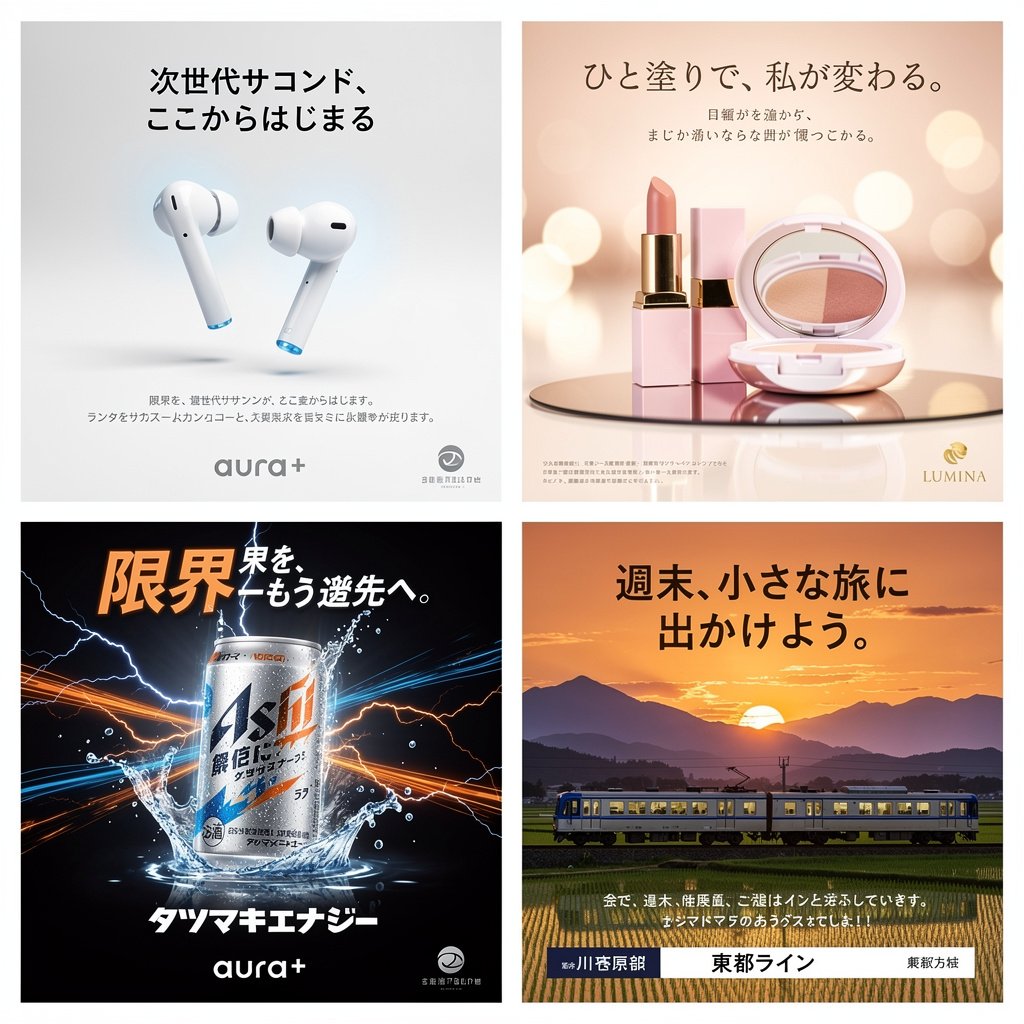
- Prompt included
- Model and format preset
- Free template
The prompt behind this image
Copy the exact prompt behind Panel Japanese Advertising Concept Grid, or open it in the studio and make it yours.
- Type
- advertising concept board
- Layout › Style
- {argument name="grid layout style" default="2x2 grid of Japanese advertising posters"}
- Layout › Sections › 0 › Position
- top-left
- Layout › Sections › 0 › Industry
- technology
- Layout › Sections › 0 › Subject
- white wireless earbuds hovering over a clean surface
- Layout › Sections › 0 › Style
- minimalist, bright, white background, sleek
- Layout › Sections › 0 › Headline
- {argument name="tech ad headline" default="次世代サコンド、ここからはじまる"}
- Layout › Sections › 0 › Brand Logo
- aura+
- Layout › Sections › 1 › Position
- top-right
- Layout › Sections › 1 › Industry
- beauty
- Layout › Sections › 1 › Subject
- pink lipstick and an open makeup compact on a reflective surface
- Layout › Sections › 1 › Style
- elegant, warm lighting, soft bokeh background, luxurious
- Layout › Sections › 1 › Headline
- {argument name="cosmetics ad headline" default="ひと塗りで、私が変わる。"}
- Layout › Sections › 1 › Brand Logo
- LUMINA
- Layout › Sections › 2 › Position
- bottom-left
- Layout › Sections › 2 › Industry
- beverage
- Layout › Sections › 2 › Subject
- silver and blue energy drink can surrounded by splashing water and electric lightning bolts
- Layout › Sections › 2 › Style
- dynamic, high contrast, dark background, energetic
- Layout › Sections › 2 › Headline
- {argument name="energy drink headline" default="限界を、もう一歩先へ。"}
- Layout › Sections › 2 › Brand Logo
- aura+
- Layout › Sections › 3 › Position
- bottom-right
- Layout › Sections › 3 › Industry
- travel
- Layout › Sections › 3 › Subject
- local train traveling through green rice fields with mountains in the background
- Layout › Sections › 3 › Style
- scenic, sunset lighting, warm, nostalgic
Raw JSON
{
  "type": "advertising concept board",
  "layout": {
    "style": "{argument name=\"grid layout style\" default=\"2x2 grid of Japanese advertising posters\"}",
    "sections": [
      {
        "position": "top-left",
        "industry": "technology",
        "subject": "white wireless earbuds hovering over a clean surface",
        "style": "minimalist, bright, white background, sleek",
        "headline": "{argument name=\"tech ad headline\" default=\"次世代サコンド、ここからはじまる\"}",
        "brand_logo": "aura+"
      },
      {
        "position": "top-right",
        "industry": "beauty",
        "subject": "pink lipstick and an open makeup compact on a reflective surface",
        "style": "elegant, warm lighting, soft bokeh background, luxurious",
        "headline": "{argument name=\"cosmetics ad headline\" default=\"ひと塗りで、私が変わる。\"}",
        "brand_logo": "LUMINA"
      },
      {
        "position": "bottom-left",
        "industry": "beverage",
        "subject": "silver and blue energy drink can surrounded by splashing water and electric lightning bolts",
        "style": "dynamic, high contrast, dark background, energetic",
        "headline": "{argument name=\"energy drink headline\" default=\"限界を、もう一歩先へ。\"}",
        "brand_logo": "aura+"
      },
      {
        "position": "bottom-right",
        "industry": "travel",
        "subject": "local train traveling through green rice fields with mountains in the background",
        "style": "scenic, sunset lighting, warm, nostalgic",
        "headline": "{argument name=\"travel ad headline\" default=\"週末、小さな旅に出かけよう。\"}",
        "brand_logo": "東都ライン"
      }
    ]
  }
}How to use Panel Japanese Advertising Concept Grid in 3 steps
- 1Upload ImagePNG, JPG or paste
Add your photo
Upload the photo the template builds on. The prompt, model and format are already set.
- 2…a portrait of your subject in softgolden-hour light, 85mm…
Personalize
Edit the subject and creative details for your destination.
- 3Generate
Generate
Press Generate — your image is created in PicX Studio, so you can compare it with the original and refine one variable at a time.
More like this
Templates with the same subject, style or setup. Open one to see its prompt.

Pixar 6-Panel Streethero Expression Grid

Headphones Lifestyle Nine Panel Grid
Surreal Advertising Concept Grid
Louis Vuitton Sneaker Editorial Grid (9-Panel Concept)

Gpt2 Social Media Post 4 Panel Japanese Digital Ad Banner Grid

Minecraft Japanese Research Lab Exploration

Six-Panel Retro Japanese Poster Collage
Japanese Absurd Lifestyle Ad Grid

Japanese Architectural Concrete Studio Fashion Campaign

Japanese Minimalist Concrete Studio Fashion Editorial

Korean Luxury Fashion Editorial 2x2 Grid Series

Blue Backdrop Luxury Fashion Portrait Campaign
Make it yours
Panel Japanese Advertising Concept Grid works as-is. These are the safest ways to change it without losing the look.
Change one field
Copy a single group, rewrite it, and generate again so you can see what that field is doing.
Keep the frame, change the subject
Hold the composition and light of 4-Panel Japanese Advertising Concept Grid, then swap wardrobe, props or the person for a new take.
| If the result… | Why | Fix |
|---|---|---|
| The result drifts from the preview | Too many fields changed at once. | Reuse 4-Panel Japanese Advertising Concept Grid as-is first, then change one group — subject, light, or setting. |
| GPT Image 2 ignores part of the JSON | Some models flatten or skip nested keys. | Keep the same values and paste them as a short paragraph instead. |
More GPT Image 2 templates
Other prompts made for GPT Image 2.

Six VTuber Japanese Logo Sheet

Realistic Portrait of Woman and Deer

The Vista Modular Condo Poster

AI Model Routing Comparison Infographic

2.5D Anime Art Board

Isometric Productivity Desk Scene

New York Double Exposure Poster

Four-Panel AI Landscape Comparison

Japanese Tatami Lifestyle Magazine Cover

NESCAFÉ Coffee Map Poster
More image prompts
Fresh picks from across the catalog.
Luxury Snapchat Neon Fashion Portrait
Royal Perfume Advertisement Prompt
Character on a High Mountain Peak with Text in Clouds

Desert Landscape Heroic Collage
Ultra-Realistic Graphite Pencil Portrait

Anime Spring Travel Film Poster
Anime RPG Dialogue Screenshot

Luxury Football Victory Campaign Poster

Golden Hour Macro Portrait Prompts
Pure Morning Beauty Lifestyle Portrait Prompt
Browse template categories
Panel Japanese Advertising Concept Grid questions
How do I use the 4-Panel Japanese Advertising Concept Grid template?
Add your photo if the template asks for one, edit the prompt if you like — the template's model and format are already selected — and press Generate. Your version opens in PicX Studio.
Can I customize the 4-Panel Japanese Advertising Concept Grid template?
Yes. You can change the subject, setting, lighting, mood, format, and available model controls before creating your image.
Is the 4-Panel Japanese Advertising Concept Grid template free?
Opening and editing this template is free. Generating uses credits, shown on the Generate button when you are signed in.
Which AI model should I use?
Start with GPT Image 2, which is the model associated with this template. You can compare another compatible model for a different finish.
Looking for something else? Browse all templates.

Your photo, any look
Thousands of ready templates for every top image and video model, from one credit balance.