How do I use the Dual-Personality Cinematic Poster template?
Choose the primary action to open PicX Studio with the available template settings. Review the model and format, personalize the creative direction, and generate when ready.
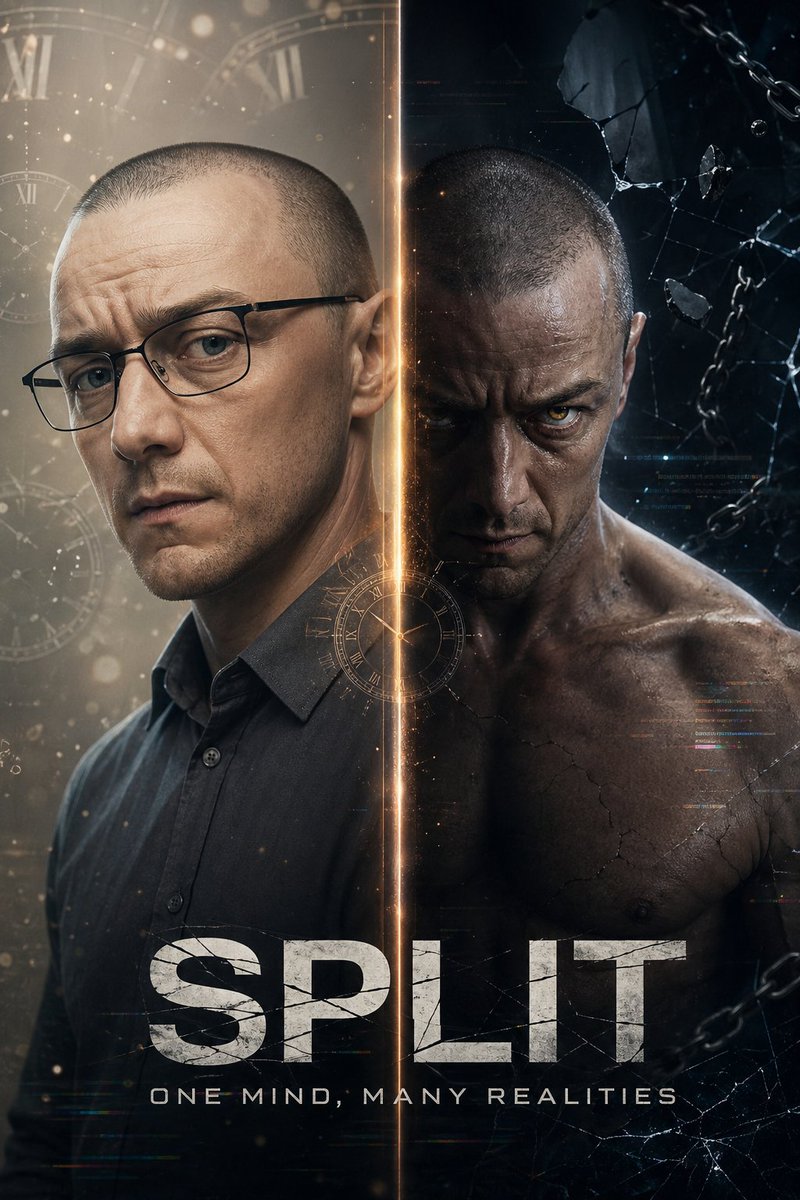
A vertical split-screen poster prompt exploring two contrasting personalities of a single character with cinematic lighting and typography. (free to use) — Free AI image template on PicX Studio.
Create a high-quality vertical split-screen cinematic poster with a glowing vertical divide down the middle. Left side (lighter, more vulnerable personality): {argument name="actor" default="James McAvoy"} as a soft, anxious, intellectual version of Kevin from the movie {argument name="movie" default="Split"}. Neat button-up shirt, gentle expression, warm lighting, slightly nervous but intelligent eyes, subtle time particles floating around him, clean minimalist background with faint clock faces. Right side (dark, intense personality): {argument name="actor" default="James McAvoy"} as the powerful, menacing "The Beast" alter from Split. Shirtless or torn clothing, muscular and primal pose, intense glowing eyes, dramatic dark lighting with strong shadows, cracked concrete and broken chains, raw powerful energy. Bold text at the bottom in fractured futuristic font: “{argument name="title" default="Split — One Mind, Many Realities"}”. Ultra-detailed, photorealistic, cinematic color grading, moody thriller atmosphere, 8k quality.
Use Dual-Personality Cinematic Poster to plan an AI image around gpt-image-2 generation, themes such as en and gpt-image-2. Match the preview's composition first, then personalize the subject, setting, and mood for your own project.
Use the primary action to load the template settings in PicX Studio.
Adjust the subject and creative details for your destination.
Create the image, compare the result with the preview, and refine one variable at a time.
A continuous mix — similar concepts first, woven with same-model prompts and fresh picks from the catalog.
Choose the primary action to open PicX Studio with the available template settings. Review the model and format, personalize the creative direction, and generate when ready.
Yes. You can change the subject, setting, lighting, mood, format, and available model controls before creating your image.
This template is free to open and customize. Generation usage is shown in PicX Studio before you create.
Start with gpt-image-2, which is the model associated with this template. You can compare another compatible model for a different finish.
Follow a topic to a crawlable collection of related PicX Studio templates.
39,157 public templates available. Verified via the PicX Studio public templates API; refreshed hourly.
A continuous mix — similar concepts first, woven with same-model prompts and fresh picks from the catalog.