How do I use the Japanese Mountain Safety Infographic template?
Choose the primary action to open PicX Studio with the available template settings. Review the model and format, personalize the creative direction, and generate when ready.
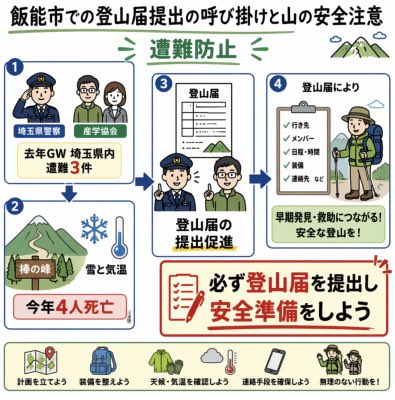
Generates a square Japanese public-safety infographic encouraging hikers to submit climbing plans and prepare for safe mountain travel. (free to use) — Free AI image template on PicX Studio.
{"type":"Japanese public-safety infographic poster","topic":"mountain climbing registration and safety precautions","headline":"{argument name=\"headline text\" default=\"飯能市での登山届提出の呼び掛けと山の安全注意\"}","style":"friendly illustrated government notice, clean vector art, thick rounded borders, blue step numbers, green mountains, warm off-white background, hand-drawn graphic recording feel, readable Japanese text, square social-media image","layout":{"overall":"square poster with a bold headline at the top, a four-panel flowchart in the center, a large red call-to-action box at lower right, and a pale green checklist strip along the bottom","main panels":{"count":4,"items":[{"number":"1","position":"upper left","content":"police officer, hiker, and hiking club representative icons discussing safety; label blocks read \"埼玉県警察\" and \"越生会\"; central text reads \"去年GW 埼玉県内 遭難3件\""},{"number":"2","position":"lower left","content":"mountain path illustration with snowflake and thermometer icons; labels read \"棒の峰\", \"雪と気温\", and red warning box \"今年4人死亡\""},{"number":"3","position":"center","content":"a document titled \"登山届\" above a police officer speaking with a hiker; main caption reads \"登山届の提出促進\""},{"number":"4","position":"upper right","content":"clipboard checklist beside backpacker wearing hat and green gear; checklist text reads \"行き先\", \"メンバー\", \"日程・時間\", \"装備\", \"連絡先 など\"; yellow message box reads \"早期発見・救助につながる!安全な登山を!\""}]},"flow arrows":{"count":4,"description":"blue arrows connect panel 1 down to panel 2, panel 1 to panel 3, panel 2 to panel 3, and panel 3 to panel 4, showing a safety-awareness progression"},"call to action":{"position":"lower right","border":"thick red rounded rectangle","icon":"red checklist paper and pencil","text":"{argument name=\"call to action text\" default=\"必ず登山届を提出し、安全準備をしよう\"}"},"bottom checklist strip":{"count":5,"items":[{"icon":"map with location pins","label":"計画を立てよう"},{"icon":"backpack and equipment","label":"装備を整えよう"},{"icon":"sun, cloud, rain and thermometer","label":"天候・気温を確認しよう"},{"icon":"smartphone contact icon","label":"連絡手段を確保しよう"},{"icon":"guide or police officer pointing","label":"無理のない行動を!"}]}},"visual details":{"color palette":"green, navy blue, red warning accents, pale yellow, cream background","typography":"bold Japanese sans-serif headline, red emphasis for death toll and action text, small labels inside rounded boxes","mood":"urgent but approachable, educational, municipal disaster-prevention notice","subject location":"{argument name=\"city name\" default=\"飯能市\"}","safety statistic":"{argument name=\"death toll text\" default=\"今年4人死亡\"}","holiday statistic":"{argument name=\"incident statistic text\" default=\"去年GW 埼玉県内 遭難3件\"}"},"rendering instructions":"Generate a polished, legible Japanese infographic with all text spelled clearly, balanced spacing, consistent icon style, no photorealism, no extra panels, and preserve the exact panel count and checklist item count."}
Use Japanese Mountain Safety Infographic to plan an AI image around gpt-image-2 generation, themes such as en and gpt-image-2. Match the preview's composition first, then personalize the subject, setting, and mood for your own project.
Use the primary action to load the template settings in PicX Studio.
Adjust the subject and creative details for your destination.
Create the image, compare the result with the preview, and refine one variable at a time.
A continuous mix — similar concepts first, woven with same-model prompts and fresh picks from the catalog.
Choose the primary action to open PicX Studio with the available template settings. Review the model and format, personalize the creative direction, and generate when ready.
Yes. You can change the subject, setting, lighting, mood, format, and available model controls before creating your image.
This template is free to open and customize. Generation usage is shown in PicX Studio before you create.
Start with gpt-image-2, which is the model associated with this template. You can compare another compatible model for a different finish.
Follow a topic to a crawlable collection of related PicX Studio templates.
39,157 public templates available. Verified via the PicX Studio public templates API; refreshed hourly.
A continuous mix — similar concepts first, woven with same-model prompts and fresh picks from the catalog.