
3D Construction Safety Icon Set
Generates a transparent PNG asset sheet of 35 cute glossy 3D construction and safety equipment icons for UI, stickers, or design materials.
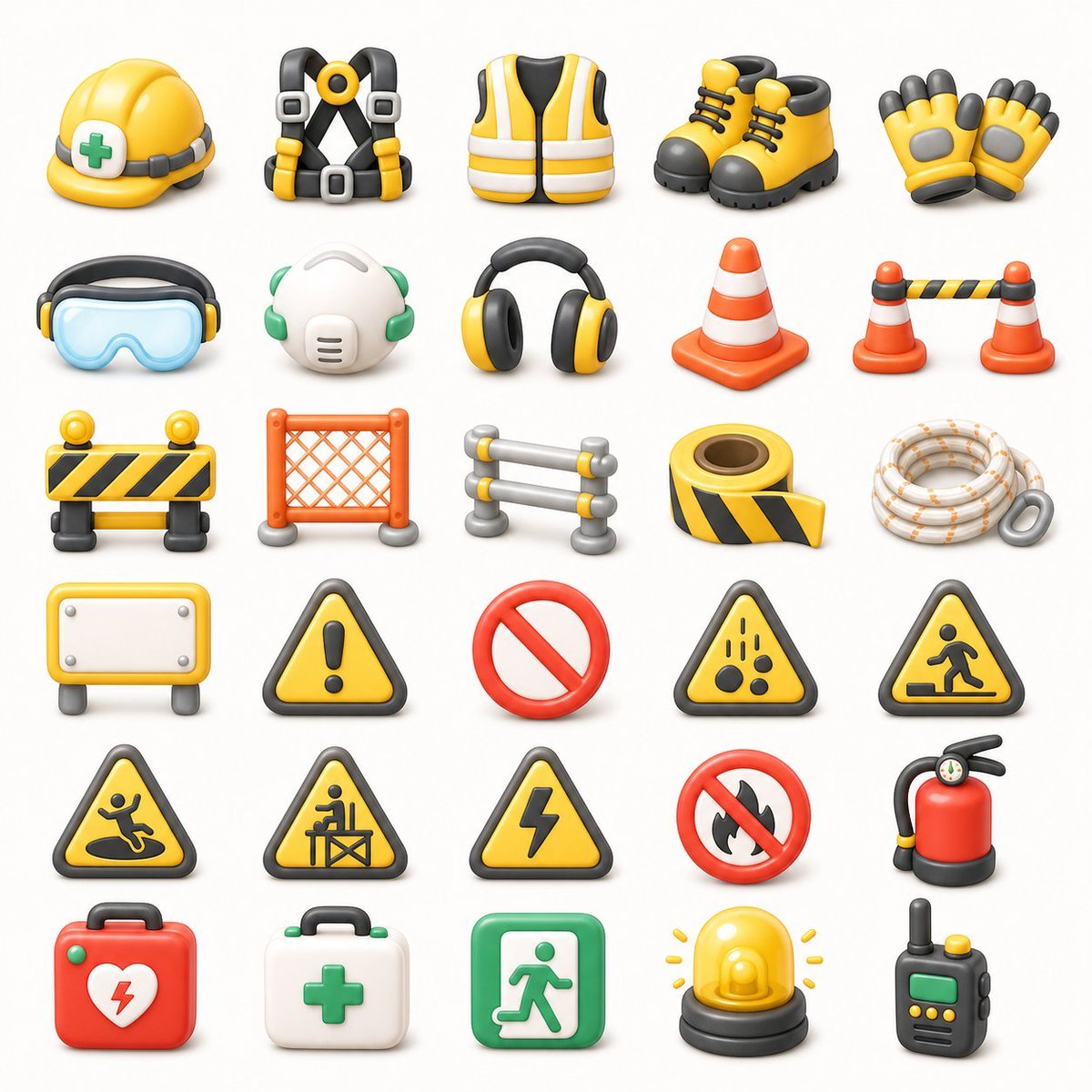
- Prompt included
- Model and format preset
- Free template
The prompt behind this image
Copy the exact prompt behind 3D Construction Safety Icon Set, or open it in the studio and make it yours.
- Type
- 3D construction and safety equipment icon set
- Format
- transparent background PNG asset sheet
- Style
- cute glossy 3D clay-render icons, rounded edges, soft studio lighting, subtle ambient occlusion, clean toy-like proportions, high-detail but simple shapes, consistent scale, front-facing three-quarter view
- Color Palette
- bright safety yellow, orange, black, white, gray, green, and red accents
- Layout › Grid
- 7 rows by 5 columns
- Layout › Total Icon Count
- 35
- Layout › Spacing
- evenly spaced with generous white/transparent negative space, no text labels, no borders
- Layout › Icons › 0 › Position
- row 1 column 1
- Layout › Icons › 0 › Description
- yellow construction hard hat with gray strap and green medical cross badge
- Layout › Icons › 1 › Position
- row 1 column 2
- Layout › Icons › 1 › Description
- black and yellow fall-arrest safety harness with gray buckles and central yellow ring
- Layout › Icons › 2 › Position
- row 1 column 3
- Layout › Icons › 2 › Description
- yellow high-visibility safety vest with white reflective stripes and black arm openings
- Layout › Icons › 3 › Position
- row 1 column 4
- Layout › Icons › 3 › Description
- pair of yellow work boots with black toes, soles, collars, and laces
- Layout › Icons › 4 › Position
- row 1 column 5
- Layout › Icons › 4 › Description
- pair of yellow protective work gloves with black fingertips and gray padded palms
- Layout › Icons › 5 › Position
- row 2 column 1
- Layout › Icons › 5 › Description
- blue transparent safety goggles with black and yellow earmuff-like side pieces
- Layout › Icons › 6 › Position
- row 2 column 2
- Layout › Icons › 6 › Description
- white respirator mask with green elastic straps and side filters
- Layout › Icons › 7 › Position
- row 2 column 3
- Layout › Icons › 7 › Description
- black and yellow over-ear hearing protection headphones
- Layout › Icons › 8 › Position
- row 2 column 4
Raw JSON
{"type":"3D construction and safety equipment icon set","format":"transparent background PNG asset sheet","style":"cute glossy 3D clay-render icons, rounded edges, soft studio lighting, subtle ambient occlusion, clean toy-like proportions, high-detail but simple shapes, consistent scale, front-facing three-quarter view","color palette":"bright safety yellow, orange, black, white, gray, green, and red accents","layout":{"grid":"7 rows by 5 columns","total icon count":35,"spacing":"evenly spaced with generous white/transparent negative space, no text labels, no borders","icons":[{"position":"row 1 column 1","description":"yellow construction hard hat with gray strap and green medical cross badge"},{"position":"row 1 column 2","description":"black and yellow fall-arrest safety harness with gray buckles and central yellow ring"},{"position":"row 1 column 3","description":"yellow high-visibility safety vest with white reflective stripes and black arm openings"},{"position":"row 1 column 4","description":"pair of yellow work boots with black toes, soles, collars, and laces"},{"position":"row 1 column 5","description":"pair of yellow protective work gloves with black fingertips and gray padded palms"},{"position":"row 2 column 1","description":"blue transparent safety goggles with black and yellow earmuff-like side pieces"},{"position":"row 2 column 2","description":"white respirator mask with green elastic straps and side filters"},{"position":"row 2 column 3","description":"black and yellow over-ear hearing protection headphones"},{"position":"row 2 column 4","description":"single orange traffic cone with two white reflective bands"},{"position":"row 2 column 5","description":"two small orange traffic cones connected by a black-and-yellow striped barrier bar"},{"position":"row 3 column 1","description":"portable black-and-yellow striped road barricade with two round yellow warning lights on top"},{"position":"row 3 column 2","description":"orange plastic mesh safety fence panel with gray feet"},{"position":"row 3 column 3","description":"small gray metal crowd-control barrier with yellow connector caps"},{"position":"row 3 column 4","description":"roll of black-and-yellow caution tape with loose strip extended"},{"position":"row 3 column 5","description":"coiled white safety rope with orange flecks and a gray carabiner"},{"position":"row 4 column 1","description":"blank rectangular yellow warning signboard on gray legs with white center panel and screw heads"},{"position":"row 4 column 2","description":"yellow triangular caution sign with black border and exclamation mark"},{"position":"row 4 column 3","description":"red prohibition symbol, empty no-entry circle with diagonal slash"},{"position":"row 4 column 4","description":"yellow triangular falling objects hazard sign with black border and falling rocks icon"},{"position":"row 4 column 5","description":"yellow triangular pedestrian construction crossing warning sign with black border"},{"position":"row 5 column 1","description":"yellow triangular slippery surface warning sign with black border and person slipping icon"},{"position":"row 5 column 2","description":"yellow triangular construction worker barrier warning sign with black border"},{"position":"row 5 column 3","description":"yellow triangular electrical hazard warning sign with black border and lightning bolt"},{"position":"row 5 column 4","description":"red no-fire prohibition sign with black flame crossed by a red slash"},{"position":"row 5 column 5","description":"red fire extinguisher with black hose, pressure gauge, yellow nozzle detail, and dark base"},{"position":"row 6 column 1","description":"red emergency first aid kit case with handle, green latches, white heart emblem, and red lightning bolt"},{"position":"row 6 column 2","description":"white medical first aid kit case with handle, green latches, and green cross"},{"position":"row 6 column 3","description":"green emergency exit sign icon with white running figure and door arrow"},{"position":"row 6 column 4","description":"yellow rotating warning beacon light on black base with small yellow rays"},{"position":"row 6 column 5","description":"black handheld walkie-talkie with green display, yellow buttons, and antenna"}],"canvas":"square composition, centered asset sheet, transparent background or pure white preview background","rendering":"crisp edges, soft shadows directly under each item, consistent material roughness, no typography, no watermark"},"customization":{"theme":"{argument name=\"icon theme\" default=\"construction and safety equipment\"}","primary color":"{argument name=\"primary safety color\" default=\"yellow\"}","secondary color":"{argument name=\"secondary safety color\" default=\"orange\"}","background":"{argument name=\"background\" default=\"transparent PNG\"}","icon style":"{argument name=\"icon style\" default=\"cute glossy 3D clay-render\"}"}}How to use 3D Construction Safety Icon Set in 3 steps
- 1Upload ImagePNG, JPG or paste
Add your photo
Upload the photo the template builds on. The prompt, model and format are already set.
- 2…a portrait of your subject in softgolden-hour light, 85mm…
Personalize
Edit the subject and creative details for your destination.
- 3Generate
Generate
Press Generate — your image is created in PicX Studio, so you can compare it with the original and refine one variable at a time.
More like this
Templates with the same subject, style or setup. Open one to see its prompt.
Abstract Vector Icon Asset Board
Vintage Skeuomorphic Icon Set

Business Presentation Icon Set

Japanese New Year Kirie-Style Icon Set Generation

Our Song was on a Cassette
Peaceful Multi-Legged Construction Machine
Giant Ice Cream Construction Site

Cinematic Studio Portrait Lighting Setup

Golden Retriever Sunset Campfire Photography

Foxy App Icon Exploration Board

Ultra-Realistic Yacht Sunset Portrait

Cute 3D render of a, matte surface, kneaded clay icon style, simple
Make it yours
3D Construction Safety Icon Set works as-is. These are the safest ways to change it without losing the look.
Swap the setting
Keep the rest of the prompt and replace the location block. The current setting is “{argument name="background" default="transparent PNG"}”.
Change one field
Copy a single group, rewrite it, and generate again so you can see what that field is doing.
Keep the frame, change the subject
Hold the composition and light of 3D Construction Safety Icon Set, then swap wardrobe, props or the person for a new take.
| If the result… | Why | Fix |
|---|---|---|
| The result drifts from the preview | Too many fields changed at once. | Reuse 3D Construction Safety Icon Set as-is first, then change one group — subject, light, or setting. |
| GPT Image 2 ignores part of the JSON | Some models flatten or skip nested keys. | Keep the same values and paste them as a short paragraph instead. |
More GPT Image 2 templates
Other prompts made for GPT Image 2.

Six VTuber Japanese Logo Sheet

Realistic Portrait of Woman and Deer

The Vista Modular Condo Poster

AI Model Routing Comparison Infographic

2.5D Anime Art Board

Isometric Productivity Desk Scene

New York Double Exposure Poster

Four-Panel AI Landscape Comparison

Japanese Tatami Lifestyle Magazine Cover

NESCAFÉ Coffee Map Poster
More image prompts
Fresh picks from across the catalog.

Ornate Diorama of a Spring Shrine Prompt

Group Photo Inside Retro Flip Phone
High-Fashion Studio Photo Collage Prompt

Anime Friends Eating Soba

Anime Movie Poster from Reference
Retro Minimalist Balloon Dog Illustration

Cinematic Night City Mustang Portrait

BMW Performance Social Poster
Colossal Labyrinth Woman Monument

Scandinavian Wooden Toy Figure
Browse template categories
3D Construction Safety Icon Set questions
How do I use the 3D Construction Safety Icon Set template?
Add your photo if the template asks for one, edit the prompt if you like — the template's model and format are already selected — and press Generate. Your version opens in PicX Studio.
Can I customize the 3D Construction Safety Icon Set template?
Yes. You can change the subject, setting, lighting, mood, format, and available model controls before creating your image.
Is the 3D Construction Safety Icon Set template free?
Opening and editing this template is free. Generating uses credits, shown on the Generate button when you are signed in.
Which AI model should I use?
Start with GPT Image 2, which is the model associated with this template. You can compare another compatible model for a different finish.
Looking for something else? Browse all templates.

Your photo, any look
Thousands of ready templates for every top image and video model, from one credit balance.