
Sheep Good-Luck Charm Poster
A dreamy Japanese watercolor bedtime affirmation poster with a sheep-themed girl, celestial decorations, and customizable good-luck message text.
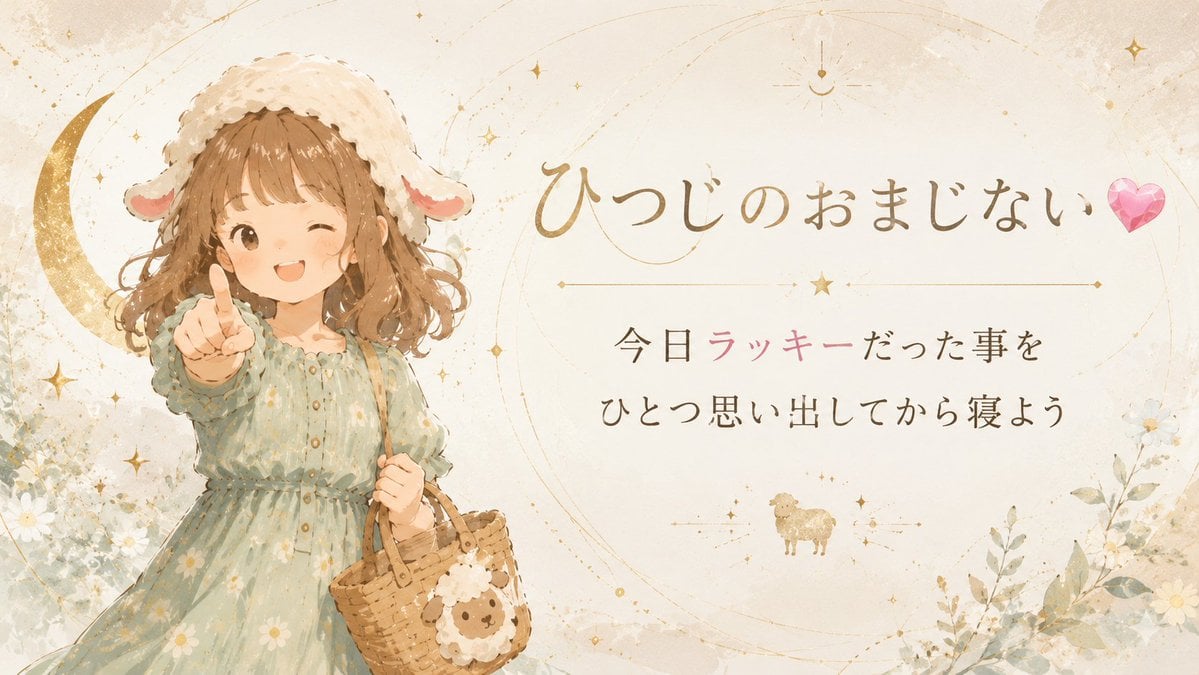
- Prompt included
- Model and format preset
- Premium template
The prompt behind this image
Copy the exact prompt behind Sheep Good-Luck Charm Poster, or open it in the studio and make it yours.
Goal: Create a soft Japanese storybook-style good-luck charm poster themed around sheep magic and bedtime gratitude. Canvas: Wide horizontal 16:9 illustration, warm ivory parchment background with subtle watercolor texture, faint circular astrological orbit lines, gold speckles, and dreamy celestial accents. Layout: Place the character on the left third, facing forward and reaching one hand toward the viewer with an index finger pointing outward. Keep the right two-thirds mostly open for elegant Japanese typography. Center the title in the upper-right area, a thin gold divider line with a small star beneath it, then two centered message lines below. Add a tiny sheep icon near the lower center under the message. Subject details: Illustrate exactly 1 young girl in a gentle watercolor anime picture-book style. She has wavy light brown shoulder-length hair, a fluffy white sheep hood with two floppy ears, and a pale sage-green long-sleeve dress with small white daisy prints and soft ruffles. Her face is intentionally hidden by a plain skin-toned square with no facial features. She carries exactly 1 woven wicker basket in her other hand, decorated with exactly 1 cute sheep face ornament and a bit of white wool trim. Behind her on the far left is exactly 1 large gold crescent moon. Text content: Use Japanese calligraphy-inspired typography. Main title: {argument name="headline text" default="ひつじのおまじない"} followed by exactly 1 pink faceted heart emoji/gem on the right. Message line 1: {argument name="message line one" default="今日ラッキーだった事を"}. Message line 2: {argument name="message line two" default="ひとつ思い出してから寝よう"}. Highlight the word 「ラッキー」 in soft pink while the rest of the message is dark warm brown. Decorative elements: Include exactly 1 main gold crescent moon, exactly 1 pink heart gem, exactly 1 small gold sheep icon under the text, exactly 1 thin horizontal divider line with a central star, and numerous tiny gold stars, dots, and constellation-like arcs distributed lightly across the background. Add soft white daisies and pale green foliage in the lower-left and lower-right corners without overpowering the text. Visual style: Delicate watercolor, soft beige and gold palette, airy magical bedtime mood, Japanese kawaii fairy-tale atmosphere, gentle paper grain, low contrast, elegant and calming. Constraints: Keep all typography crisp and readable, preserve the wide poster composition, avoid modern UI elements, avoid photorealism, no watermark, no extra characters, no extra main text.
How to use Sheep Good-Luck Charm Poster in 3 steps
- 1Upload ImagePNG, JPG or paste
Add your photo
Upload the photo the template builds on. The prompt, model and format are already set.
- 2…a portrait of your subject in softgolden-hour light, 85mm…
Personalize
Edit the subject and creative details for your destination.
- 3Generate
Generate
Press Generate — your image is created in PicX Studio, so you can compare it with the original and refine one variable at a time.
More like this
Templates with the same subject, style or setup. Open one to see its prompt.
Gpt2 Product Marketing Pastel Jellyfish Room Goods Poster
Gpt2 Infographic Edu Visual Good Bath Day Editorial Poster
Sheep Bedtime Charm Poster

Japan Travel Brochure Poster

Cartoon TV Show Poster Pack

Trendy Cafe Drink Promo Poster

Urban Fashion Editorial Collage Streetwear Poster

Premium Fashion Editorial Cover Layout System

Polo Ralph Lauren Luxury American Heritage Fashion Campaign

Monochrome Halftone Editorial Fashion Poster

Retro Mirror Luxury Fashion Campaign Poster

Luxury Fashion Campaign Typography Poster System
Make it yours
Sheep Good-Luck Charm Poster works as-is. These are the safest ways to change it without losing the look.
Change one field
Copy a single group, rewrite it, and generate again so you can see what that field is doing.
Keep the frame, change the subject
Hold the composition and light of Sheep Good-Luck Charm Poster, then swap wardrobe, props or the person for a new take.
| If the result… | Why | Fix |
|---|---|---|
| The result drifts from the preview | Too many fields changed at once. | Reuse Sheep Good-Luck Charm Poster as-is first, then change one group — subject, light, or setting. |
| The model over-stylizes the scene | The prose prompt leaves finish and camera underspecified. | Add one camera or lighting sentence and stay on GPT Image 2. |
More GPT Image 2 templates
Other prompts made for GPT Image 2.

Six VTuber Japanese Logo Sheet

Realistic Portrait of Woman and Deer

The Vista Modular Condo Poster

AI Model Routing Comparison Infographic

2.5D Anime Art Board

Isometric Productivity Desk Scene

New York Double Exposure Poster

Four-Panel AI Landscape Comparison

Japanese Tatami Lifestyle Magazine Cover

NESCAFÉ Coffee Map Poster
More image prompts
Fresh picks from across the catalog.

untitled
Futuristic Footwear Advertisement
Gallery Wall Portrait with Identity Lock
Office Style Fashion Magazine Cover
Detailed Video Generation Prompt for Product Display

Modern Christmas sale poster design (English)
Isometric 3D World Render
Cinematic Night Street Portrait of Indian Man
Custom Manga Panel Page Illustration
Winter Noir Cinematic Portrait of Man in Snowy Street
Browse template categories
Sheep Good-Luck Charm Poster questions
How do I use the Sheep Good-Luck Charm Poster template?
Add your photo if the template asks for one, edit the prompt if you like — the template's model and format are already selected — and press Generate. Your version opens in PicX Studio.
Can I customize the Sheep Good-Luck Charm Poster template?
Yes. You can change the subject, setting, lighting, mood, format, and available model controls before creating your image.
Is the Sheep Good-Luck Charm Poster template free?
Opening and editing this template is free. Generating uses credits, shown on the Generate button when you are signed in.
Which AI model should I use?
Start with GPT Image 2, which is the model associated with this template. You can compare another compatible model for a different finish.
Looking for something else? Browse all templates.

Your photo, any look
Thousands of ready templates for every top image and video model, from one credit balance.