How do I use the Anime Fairy Demon Office Pin-Up template?
Choose the primary action to open PicX Studio with the available template settings. Review the model and format, personalize the creative direction, and generate when ready.
Generates a vertical anime character illustration of a horned fairy-demon office lady with glowing butterfly wings and magical pastel effects. Change the subject, setting, or lighting one variable at a time.
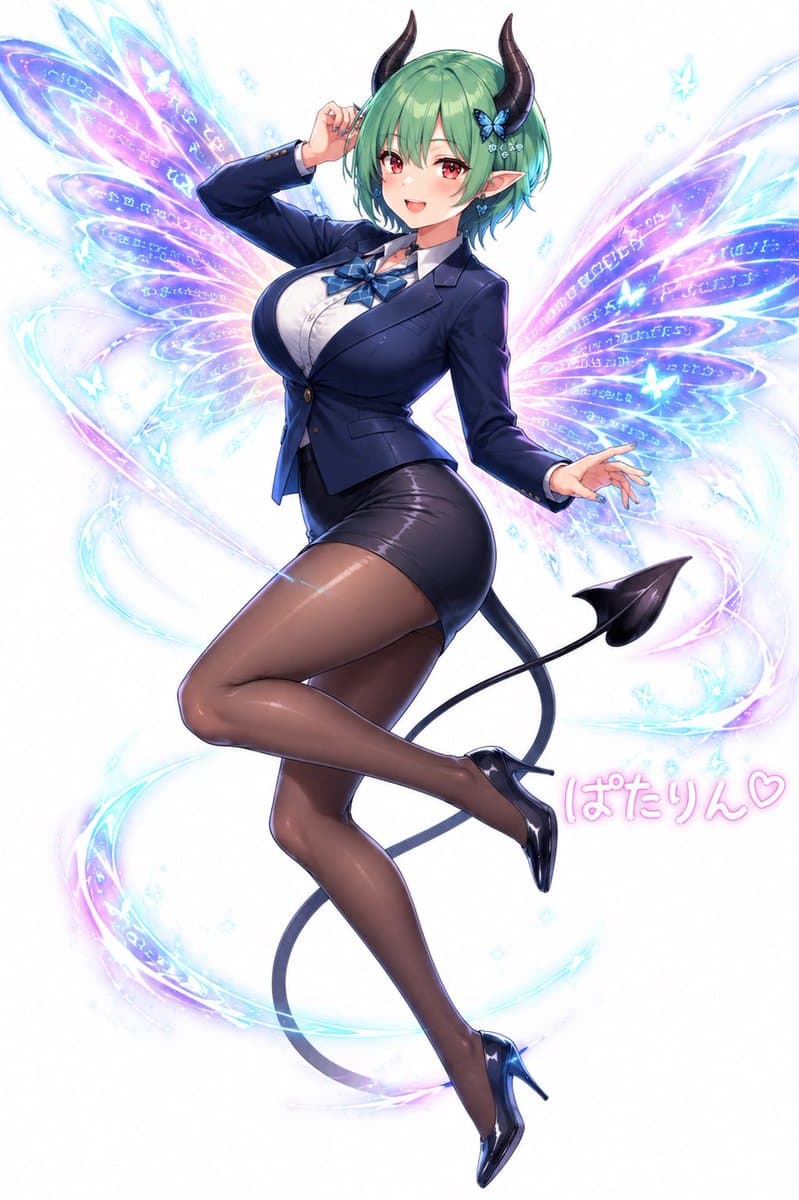
Create a polished anime-style full-body character illustration on a clean white background: a glamorous adult fairy-demon woman named {argument name="character name" default="Patarin"} floating in a playful pin-up pose with one leg bent behind the other, one hand lifted near her head and the other extended outward. She has short bobbed {argument name="hair color" default="mint green"} hair with soft bangs, pointed elf ears, two glossy curved black demon horns, a small blue butterfly hair ornament, and a long thin black devil tail ending in a spade tip. Her face should be softly obscured or left featureless with a translucent square blur over the central face area. Dress her in a fitted navy business blazer over a white button-up blouse, a blue ribbon bow tie at the collar, a tight black pencil mini skirt, sheer dark brown pantyhose, and shiny black high heels. Give her a curvy mature figure and confident magical-girl energy while keeping the rendering elegant and high-detail. Behind her, draw exactly 2 large translucent butterfly wings, one on each side, glowing in cyan, lavender, pink, and electric blue, with multiple petal-like wing segments filled with faint magical runes and sparkling linework. Add swirling luminous ribbon trails around her body and legs, tiny blue-white sparkles, and exactly 4 small glowing butterfly silhouettes scattered near the wings. Include pink handwritten Japanese text near the lower right reading {argument name="signature text" default="ぱたりん♡"}. Use glossy highlights, soft bloom, crisp cel-shaded anime rendering with painterly gradients, delicate magical particles, luminous pastel fantasy effects, and a vertical composition centered on the character. Avoid extra characters, avoid a detailed background, and keep the overall mood cute, stylish, and magical.
Choose the primary action to open PicX Studio with the available template settings. Review the model and format, personalize the creative direction, and generate when ready.
Yes. You can change the subject, setting, lighting, mood, format, and available model controls before creating your image.
This template is free to open and customize. Generation usage is shown in PicX Studio before you create.
Start with GPT Image 2, which is the model associated with this template. You can compare another compatible model for a different finish.
© 2026 PicX Studio. All rights reserved.

Follow a topic to a crawlable collection of related PicX Studio templates.
43,474 public templates available. Verified via the PicX Studio public templates API; refreshed hourly.

















![Minimalist Flat Vector Travel Poster — Premium minimalist flat-vector travel poster for {argument name="city name" default="[CITY_NAME]"}, 3:4 vertical format.](https://cms-assets.youmind.com/media/1787917359711_3ug846_HQX205cbMAA6F6S-300x400.jpg)

























![Ethereal Digital Painting Portrait — A highly detailed 4K digital painting of a young woman [Use the uploaded image as reference] with li…](https://pbs.twimg.com/media/HCSHYEHXgAEVMcl.jpg)