Cozy Pixel Farm Island Village
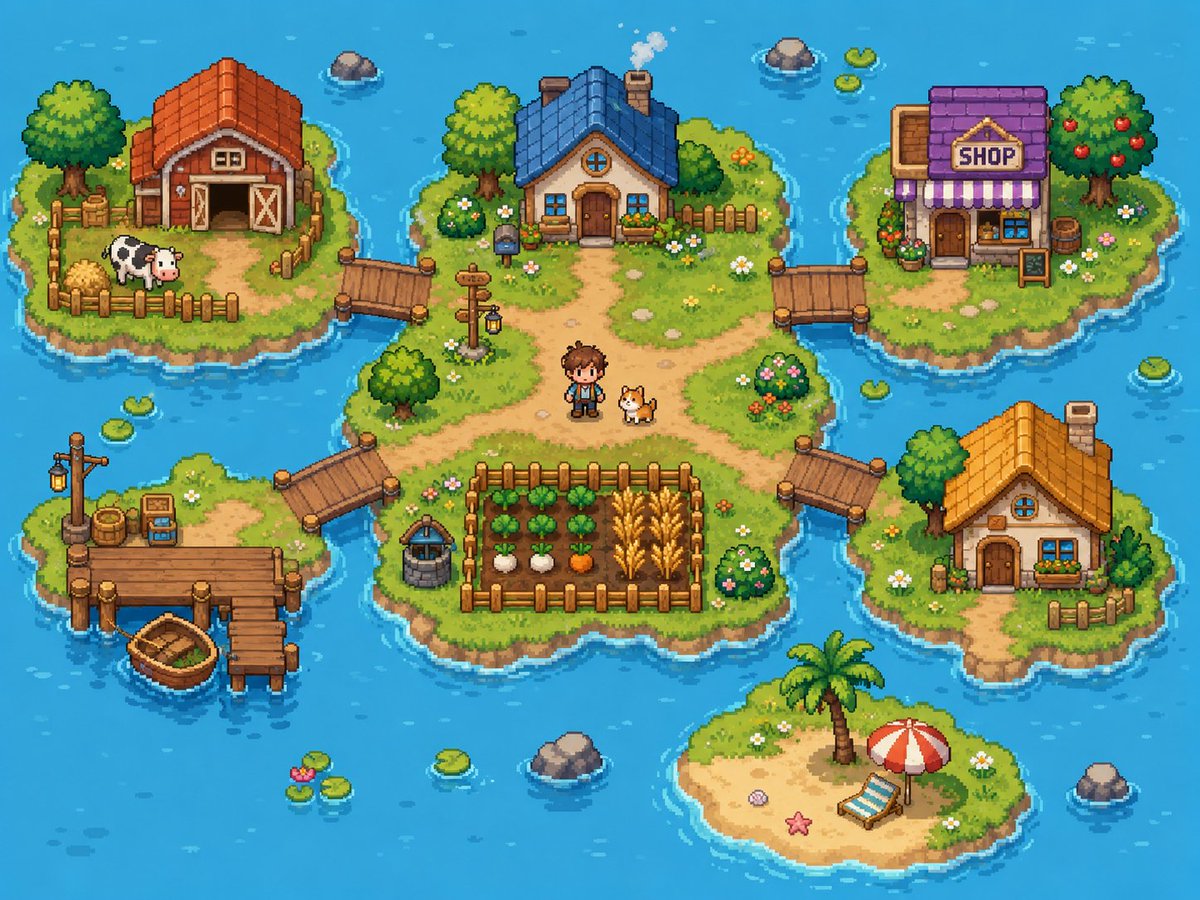
Goal: Create a bright cozy pixel-art farming village map on small islands in a blue ocean, like a top-down/isometric 16-bit life-sim game screenshot.
Canvas: 4:3 landscape image, about 1024×768, crisp pixel art with no UI overlay, no borders, no watermark. Use a vibrant turquoise ocean background with gentle wave highlights, ripples around shores, scattered lily pads, and small rocks.
Layout: Show exactly 6 grassy/sandy islands connected by wooden bridges and docks. The largest central island sits in the middle and contains the main house, paths, a fenced crop field, a well, a signpost, a human character, and a dog. Four smaller grassy islands surround it at upper left, upper right, lower left, and right. One small sandy beach island sits near the bottom center.
Island count and contents:
1. Central island: irregular grassy island with dirt paths forming a crossroad. Place a cozy blue-roof cottage near the top center with a chimney puffing smoke, round attic window, wooden front door, flower boxes, shrubs, and a short fence behind it. Put a small pixel farmer character named {argument name="character name" default="young farmer"} standing slightly below center beside a corgi-like dog. Add a fenced crop plot at the lower center with exactly 4 crop rows: leafy green vegetables, white turnips, orange carrots, and golden wheat. Add a stone well to the left of the crop plot, a wooden signpost with a hanging lantern near the left-center path, bushes with flowers, small stones, and daisies.
2. Upper-left island: red-roof barn with open double doors, hay bales, a fenced pen, and exactly 1 black-and-white cow. Include a large leafy tree, crates, flowers, and a wooden bridge connecting to the central island.
3. Upper-right island: village shop with purple roof, striped purple-and-white awning, front door, window display, flower pots, barrel, and a freestanding signboard. The sign above the awning must read {argument name="shop sign text" default="SHOP"}. Include a fruit tree with red apples and a bridge connecting to the central island.
4. Lower-left island: fishing dock island with a wooden pier, a lamppost, barrels, crates, small tackle box/sign, and exactly 1 small wooden rowboat tied near the dock. Connect this island to the central island with a wooden bridge.
5. Right island: small orange-roof cottage with chimney, round attic window, front door, blue window, flower box, small fence, trees, flowers, and a wooden bridge connecting to the central island.
6. Bottom-center island: tiny sandy beach with a palm tree, red-and-white beach umbrella, blue-striped lounge chair, starfish, shell, and grass around the edges; it is not connected by a bridge.
Discrete element counts to preserve: exactly 6 islands, exactly 4 bridges connecting to the central island, exactly 4 buildings total (barn, blue-roof cottage, purple shop, orange-roof cottage), exactly 1 human character, exactly 2 animals (1 cow and 1 dog), exactly 1 rowboat, exactly 1 crop field with 4 visible crop types, exactly 1 well, exactly 1 signpost lantern, exactly 1 beach umbrella, exactly 1 lounge chair, exactly 1 palm tree.
Visual style: Cute high-detail pixel art, top-down three-quarter perspective, warm sunny daylight, saturated colors, soft shadows, chunky readable shapes, detailed grass texture, tiny flowers, rounded shoreline outlines, and animated-game charm. Use {argument name="water color" default="bright turquoise blue"} for the surrounding ocean, {argument name="main roof color" default="blue"} for the central cottage roof, and {argument name="overall mood" default="cheerful cozy farming adventure"} as the emotional tone.
Constraints: Keep the whole scene visible as a single map-like composition. Do not add interface buttons, text besides the shop sign, extra characters, extra animals, vehicles, modern objects, or photorealism.













![Blueprint Split Reality Archetype Prompt — A [subject] split vertically down the center. Left half as a technical blueprint. Right half as a 3D render. The seam](/_next/image?url=https%3A%2F%2Fcdn.picxstudio.com%2Fuploads%2Fmeigen_24ef9cf28a0c_7844b725-4555-4a31-b247-59dcc1626cdd.jpg&w=828&q=100)




![Minimalist Flat Vector Travel Poster — Premium minimalist flat-vector travel poster for {argument name="city name" default="[CITY_NAME]"}, 3:4 vertical format.](https://cms-assets.youmind.com/media/1787917359711_3ug846_HQX205cbMAA6F6S-300x400.jpg)
























![Slow Motion Pour Food Photography Prompt for Nano Banana 2 — [DISH] at the precise moment of a dramatic [LIQUID] pour in ultra high-speed photography, liquid ca](https://pbs.twimg.com/media/HEbyM0QaUAAm4Pv.jpg)




![Ugly Christmas Sweater Prompt Template — {
"theme": "ugly_christmas_sweater",
"prompt": "{argument name="image reference" default="[IMAGE REFERENCE]"} weari](https://pbs.twimg.com/media/G7kVIOGWgAAuhn2.jpg)


![Surreal Agricultural Civilization Inside a Fruit Prompt — A single {argument name="fruit or vegetable" default="[FRUIT/VEGETABLE]"} suspended in space, sliced o](https://pbs.twimg.com/media/HA5SbUDXYAAzFlZ.jpg)