
Fictional Game Case in Store
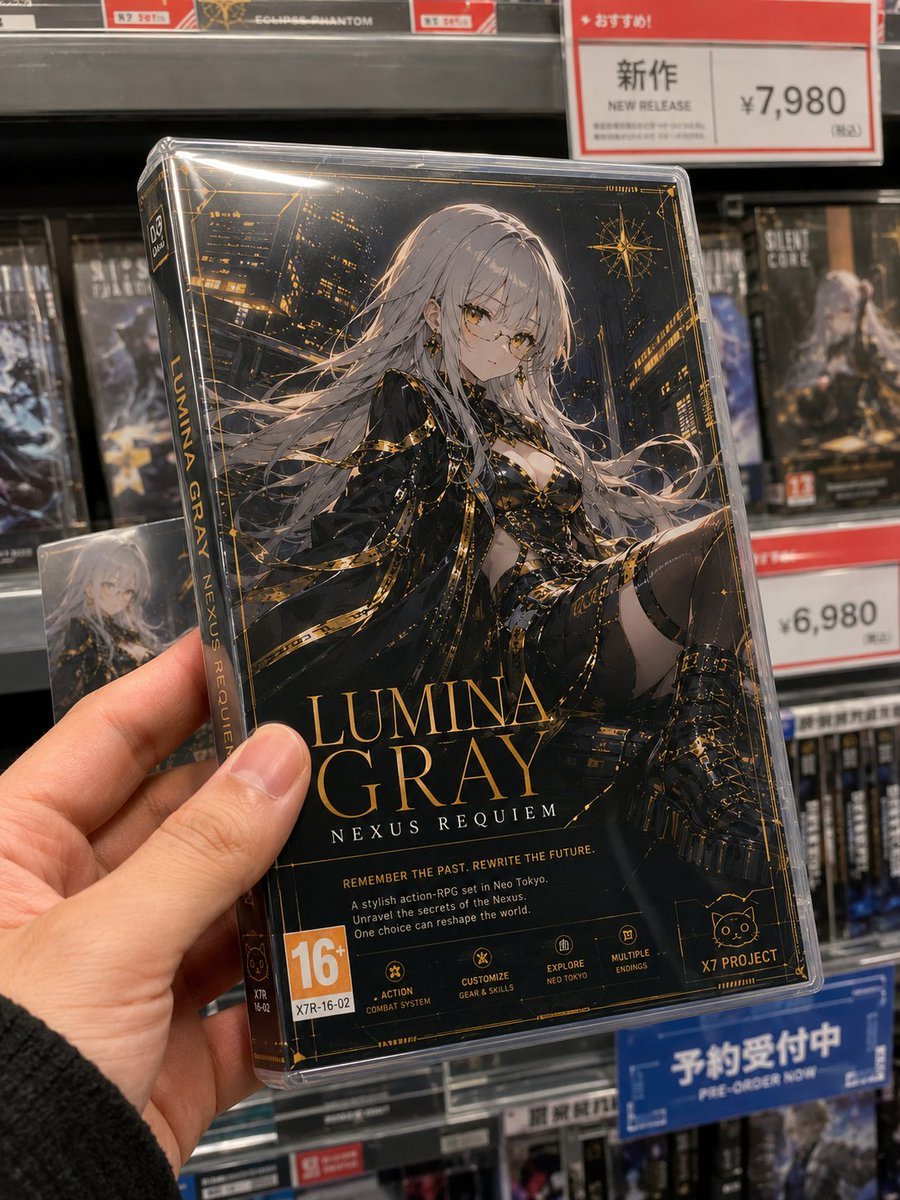
Generates a photorealistic handheld retail shot of an original anime-style fictional game case with detailed cover art, store shelves, and price signage.
- Prompt included
- Model and format preset
- Free template
The prompt behind this image
Copy the exact prompt behind Fictional Game Case in Store, or open it in the studio and make it yours.
- Type
- photorealistic handheld product photo of a fictional console game case
- Scene
- inside a Japanese electronics/game store, close-up smartphone-style photo with shallow depth of field, shelves of boxed video games in the background, fluorescent retail lighting, realistic reflections on clear plastic wrap
- Main Subject › Object
- one Nintendo DS-style plastic game case held upright in a left hand
- Main Subject › Angle
- slightly tilted toward the camera, spine visible on the left, front cover dominant
- Main Subject › Case Details
- transparent glossy protective case with specular highlights, black-and-gold premium sci-fi fantasy cover design
- Main Subject › Hand
- realistic adult left hand gripping the lower-left corner, thumb visible on the front, dark knit sleeve at wrist
- Game Cover › Title
- {argument name="game title" default="LUMINA GRAY"}
- Game Cover › Subtitle
- {argument name="subtitle" default="NEXUS REQUIEM"}
- Game Cover › Cover Character
- elegant original anime woman with very long silver-white hair flowing across the cover, black-and-gold ornate futuristic outfit, exposed shoulders and thigh-high details, seated dynamic pose against a glowing night city skyline
- Game Cover › Face Treatment
- the character face is covered by a plain opaque taupe-gray square censor block, centered over the face
- Game Cover › Art Style On Cover
- high-detail dark cyberpunk fantasy illustration, gold linework, astrological compass motifs, glowing skyscraper windows, luxury collector-edition feel
- Game Cover › Spine Text
- vertical gold text reading LUMINA GRAY and smaller NEXUS REQUIEM, DS logo area at the top
- Game Cover › Bottom Cover Text › Tagline
- {argument name="tagline" default="REMEMBER THE PAST. REWRITE THE FUTURE."}
- Game Cover › Bottom Cover Text › Description
- A stylish action-RPG set in Neo Tokyo. Unravel the secrets of the Nexus. One choice can reshape the world.
- Game Cover › Visible Cover Badges Count
- 7
- Game Cover › Visible Cover Badges
- 16+ age rating block at bottom left, X7R-16-02 product code below the rating, ACTION COMBAT SYSTEM icon, CUSTOMIZE GEAR & SKILLS icon, EXPLORE NEO TOKYO icon, MULTIPLE ENDINGS icon, X7 PROJECT cat-logo publisher badge at bottom right
- Background › Store Fixtures
- gray metal shelves packed with blurred game cases, red and white retail price cards, blue reservation sign
- Background › Visible Retail Signs Count
- 3
- Background › Visible Retail Signs
- top-right red sign with Japanese recommendation header, New Release label, and price ¥7,980, right-middle red and white price tag showing ¥6,980, bottom-right blue sign reading 予約受付中 and PRE-ORDER NOW
- Background › Background Game Cases
- blurred dark sci-fi game boxes, one duplicate-looking Lumina Gray cover partially visible behind the hand on the left
- Photography › Composition
- portrait orientation, close-up product-in-hand framing, game case centered and filling most of the image
- Photography › Lens And Rendering
- realistic phone camera perspective, mild wide-angle distortion, natural hand scale, sharp focus on foreground case, background bokeh
- Photography › Lighting
- bright store lighting with strong glossy highlights along the plastic edges
- Photography › Quality
- high-resolution photorealism, believable retail environment, crisp typography on the main cover
Raw JSON
{
  "type": "photorealistic handheld product photo of a fictional console game case",
  "scene": "inside a Japanese electronics/game store, close-up smartphone-style photo with shallow depth of field, shelves of boxed video games in the background, fluorescent retail lighting, realistic reflections on clear plastic wrap",
  "main subject": {
    "object": "one Nintendo DS-style plastic game case held upright in a left hand",
    "angle": "slightly tilted toward the camera, spine visible on the left, front cover dominant",
    "case details": "transparent glossy protective case with specular highlights, black-and-gold premium sci-fi fantasy cover design",
    "hand": "realistic adult left hand gripping the lower-left corner, thumb visible on the front, dark knit sleeve at wrist"
  },
  "game cover": {
    "title": "{argument name=\"game title\" default=\"LUMINA GRAY\"}",
    "subtitle": "{argument name=\"subtitle\" default=\"NEXUS REQUIEM\"}",
    "cover character": "elegant original anime woman with very long silver-white hair flowing across the cover, black-and-gold ornate futuristic outfit, exposed shoulders and thigh-high details, seated dynamic pose against a glowing night city skyline",
    "face treatment": "the character face is covered by a plain opaque taupe-gray square censor block, centered over the face",
    "art style on cover": "high-detail dark cyberpunk fantasy illustration, gold linework, astrological compass motifs, glowing skyscraper windows, luxury collector-edition feel",
    "spine text": "vertical gold text reading LUMINA GRAY and smaller NEXUS REQUIEM, DS logo area at the top",
    "bottom cover text": {
      "tagline": "{argument name=\"tagline\" default=\"REMEMBER THE PAST. REWRITE THE FUTURE.\"}",
      "description": "A stylish action-RPG set in Neo Tokyo. Unravel the secrets of the Nexus. One choice can reshape the world."
    },
    "visible cover badges count": 7,
    "visible cover badges": [
      "16+ age rating block at bottom left",
      "X7R-16-02 product code below the rating",
      "ACTION COMBAT SYSTEM icon",
      "CUSTOMIZE GEAR & SKILLS icon",
      "EXPLORE NEO TOKYO icon",
      "MULTIPLE ENDINGS icon",
      "X7 PROJECT cat-logo publisher badge at bottom right"
    ]
  },
  "background": {
    "store fixtures": "gray metal shelves packed with blurred game cases, red and white retail price cards, blue reservation sign",
    "visible retail signs count": 3,
    "visible retail signs": [
      "top-right red sign with Japanese recommendation header, New Release label, and price ¥7,980",
      "right-middle red and white price tag showing ¥6,980",
      "bottom-right blue sign reading 予約受付中 and PRE-ORDER NOW"
    ],
    "background game cases": "blurred dark sci-fi game boxes, one duplicate-looking Lumina Gray cover partially visible behind the hand on the left"
  },
  "photography": {
    "composition": "portrait orientation, close-up product-in-hand framing, game case centered and filling most of the image",
    "lens and rendering": "realistic phone camera perspective, mild wide-angle distortion, natural hand scale, sharp focus on foreground case, background bokeh",
    "lighting": "bright store lighting with strong glossy highlights along the plastic edges",
    "quality": "high-resolution photorealism, believable retail environment, crisp typography on the main cover"
  },
  "customization": {
    "character name": "{argument name=\"character name\" default=\"Lumina Gray\"}",
    "price on new release sign": "{argument name=\"price on new release sign\" default=\"¥7,980\"}"
  }
}How to use Fictional Game Case in Store in 3 steps
- 1Upload ImagePNG, JPG or paste
Add your photo
Upload the photo the template builds on. The prompt, model and format are already set.
- 2…a portrait of your subject in softgolden-hour light, 85mm…
Personalize
Edit the subject and creative details for your destination.
- 3Generate
Generate
Press Generate — your image is created in PicX Studio, so you can compare it with the original and refine one variable at a time.
More like this
Templates with the same subject, style or setup. Open one to see its prompt.
Fictional Gothic Sci-Fi Game Case Photo
Fictional Japanese Driving Game Magazine Page
Pastel Japanese Mobile Game Store Screenshot
Anime Clerk in PS5 Game Store
Nintendo Game Boy Product Showcase Infographic with Tetris
X-Treme 90s PlayStation Game Case
Photography Game Cinematic Capture
Anime Schoolgirl in Convenience Store

Candid Store Front-Camera Photo
Handcrafted Clay Store Diorama
Dark Oriental Fragrance Brand Case Study
Detailed product showcase image of a table design with multiple
Make it yours
Fictional Game Case in Store works as-is. These are the safest ways to change it without losing the look.
Swap the setting
Keep the rest of the prompt and replace the location block. The current setting is “gray metal shelves packed with blurred game cases, red and white retail price ca”.
Swap the light
One lighting change is enough to compare takes. Current light: “bright store lighting with strong glossy highlights along the plastic edges”.
Change one field
Copy a single group, rewrite it, and generate again so you can see what that field is doing.
| If the result… | Why | Fix |
|---|---|---|
| The result drifts from the preview | Too many fields changed at once. | Reuse Fictional Game Case in Store as-is first, then change one group — subject, light, or setting. |
| GPT Image 2 ignores part of the JSON | Some models flatten or skip nested keys. | Keep the same values and paste them as a short paragraph instead. |
More GPT Image 2 templates
Other prompts made for GPT Image 2.

Six VTuber Japanese Logo Sheet

Realistic Portrait of Woman and Deer

The Vista Modular Condo Poster

AI Model Routing Comparison Infographic

2.5D Anime Art Board

Isometric Productivity Desk Scene

New York Double Exposure Poster

Four-Panel AI Landscape Comparison

Japanese Tatami Lifestyle Magazine Cover

NESCAFÉ Coffee Map Poster
More image prompts
Fresh picks from across the catalog.
Glossy magazine article layout from text
Blind Box Camera Path Guide

Hyper-Realistic Studio Shoot of Woman in Lace Minidress

Chinese Sour Fish Restaurant Poster

Strawberry Repair Cream Product Shot
Minute Challenge: Setsubun Manga

Cinematic Portrait with Strict Identity Preservation

Image Editing and Cleanup Prompt

Luxury Russian Winter Sledding Scene Prompt

Vogue Editorial on Lake Como in a Riva Boat
Browse template categories
Fictional Game Case in Store questions
How do I use the Fictional Game Case in Store template?
Add your photo if the template asks for one, edit the prompt if you like — the template's model and format are already selected — and press Generate. Your version opens in PicX Studio.
Can I customize the Fictional Game Case in Store template?
Yes. You can change the subject, setting, lighting, mood, format, and available model controls before creating your image.
Is the Fictional Game Case in Store template free?
Opening and editing this template is free. Generating uses credits, shown on the Generate button when you are signed in.
Which AI model should I use?
Start with GPT Image 2, which is the model associated with this template. You can compare another compatible model for a different finish.
Looking for something else? Browse all templates.

Your photo, any look
Thousands of ready templates for every top image and video model, from one credit balance.