
Workout Complete Fitness Poster
Generates a dark premium fitness app workout-completion share card with anatomical gym imagery, performance stats, and an exercise table.
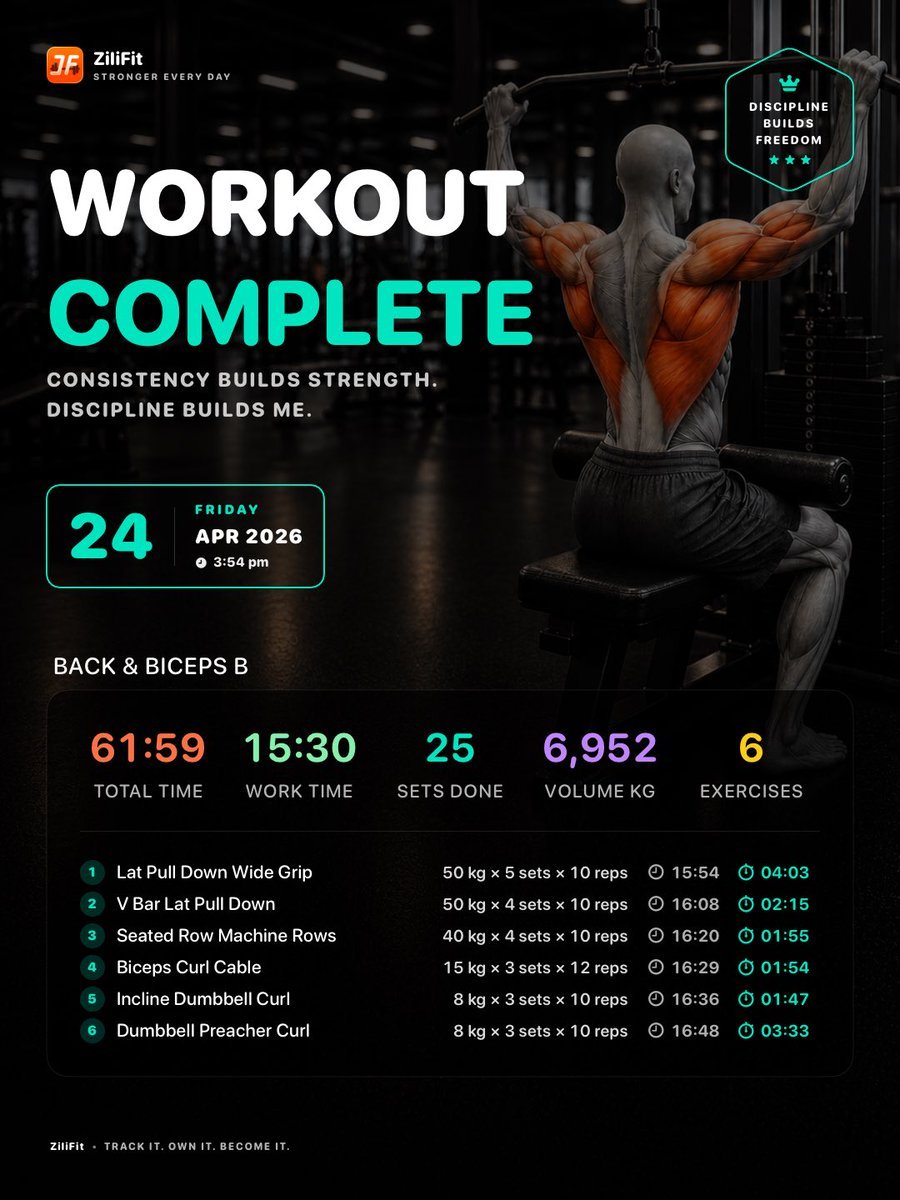
- Prompt included
- Model and format preset
- Free template
The prompt behind this image
Copy the exact prompt behind Workout Complete Fitness Poster, or open it in the studio and make it yours.
- Type
- dark fitness workout completion poster and app-share card
- Format
- vertical 4:5 social media graphic
- Brand › Logo
- small orange rounded-square fitness app icon at top left with white monogram
- Brand › Name
- {argument name="brand name" default="ZiliFit"}
- Brand › Tagline
- STRONGER EVERY DAY
- Background › Scene
- moody black commercial gym interior with blurred lights, cable machine, reflective floor, cinematic shadows
- Background › Main Figure
- hyper-realistic muscular bald male athlete seen from behind doing a wide-grip lat pulldown on a cable machine, seated on a bench, wearing dark shorts; back, shoulders, arms, biceps, lats, and leg muscles shown as anatomical muscle-fiber illustration with orange highlighted muscle groups over grayscale skin
- Background › Lighting
- high contrast, low-key, teal accent glow, dramatic spotlighting, premium sports advertising look
- Typography › Style
- bold rounded sans-serif, all caps, clean app-dashboard typography
- Typography › Primary Colors
- white, bright teal, orange, mint green, purple, yellow
- Typography › Headline › Line 1
- WORKOUT
- Typography › Headline › Line 2
- {argument name="headline text" default="COMPLETE"}
- Typography › Headline › Position
- large left side
- Typography › Headline › Line 1 Color
- white
- Typography › Headline › Line 2 Color
- bright teal
- Typography › Motivational Copy
- {argument name="motivational quote" default="CONSISTENCY BUILDS STRENGTH. DISCIPLINE BUILDS ME."}
- Layout › Top Left Brand
- logo and brand lockup
- Layout › Top Right Badge › Shape
- thin teal outlined hexagonal shield
- Layout › Top Right Badge › Count
- 1
- Layout › Top Right Badge › Contents
- small crown icon, DISCIPLINE BUILDS FREEDOM, three teal stars
- Layout › Date Card › Position
- left middle under quote
- Layout › Date Card › Style
- thin teal rounded rectangle with dark transparent fill
- Layout › Date Card › Contents › Day Number
- {argument name="day number" default="24"}
- Layout › Date Card › Contents › Weekday
- FRIDAY
Raw JSON
{"type":"dark fitness workout completion poster and app-share card","format":"vertical 4:5 social media graphic","brand":{"logo":"small orange rounded-square fitness app icon at top left with white monogram","name":"{argument name=\"brand name\" default=\"ZiliFit\"}","tagline":"STRONGER EVERY DAY"},"background":{"scene":"moody black commercial gym interior with blurred lights, cable machine, reflective floor, cinematic shadows","main_figure":"hyper-realistic muscular bald male athlete seen from behind doing a wide-grip lat pulldown on a cable machine, seated on a bench, wearing dark shorts; back, shoulders, arms, biceps, lats, and leg muscles shown as anatomical muscle-fiber illustration with orange highlighted muscle groups over grayscale skin","lighting":"high contrast, low-key, teal accent glow, dramatic spotlighting, premium sports advertising look"},"typography":{"style":"bold rounded sans-serif, all caps, clean app-dashboard typography","primary_colors":["white","bright teal","orange","mint green","purple","yellow"],"headline":{"line_1":"WORKOUT","line_2":"{argument name=\"headline text\" default=\"COMPLETE\"}","position":"large left side","line_1_color":"white","line_2_color":"bright teal"},"motivational_copy":"{argument name=\"motivational quote\" default=\"CONSISTENCY BUILDS STRENGTH. DISCIPLINE BUILDS ME.\"}"},"layout":{"top_left_brand":"logo and brand lockup","top_right_badge":{"shape":"thin teal outlined hexagonal shield","count":1,"contents":["small crown icon","DISCIPLINE BUILDS FREEDOM","three teal stars"]},"date_card":{"position":"left middle under quote","style":"thin teal rounded rectangle with dark transparent fill","contents":{"day_number":"{argument name=\"day number\" default=\"24\"}","weekday":"FRIDAY","month_year":"APR 2026","time":"3:54 pm"}},"workout_title":{"text":"{argument name=\"workout title\" default=\"BACK & BICEPS B\"}","position":"above stats panel"},"stats_panel":{"position":"bottom half","style":"large translucent black rounded rectangle with subtle border","summary_metrics":{"count":5,"items":[{"label":"TOTAL TIME","value":"61:59","color":"orange"},{"label":"WORK TIME","value":"15:30","color":"mint green"},{"label":"SETS DONE","value":"25","color":"teal"},{"label":"VOLUME KG","value":"6,952","color":"purple"},{"label":"EXERCISES","value":"6","color":"yellow"}]}},"exercise_table":{"count":6,"columns":["number","exercise name","load × sets × reps","clock time","duration"],"rows":[{"number":"1","exercise":"Lat Pull Down Wide Grip","details":"50 kg × 5 sets × 10 reps","clock":"15:54","duration":"04:03"},{"number":"2","exercise":"V Bar Lat Pull Down","details":"50 kg × 4 sets × 10 reps","clock":"16:08","duration":"02:15"},{"number":"3","exercise":"Seated Row Machine Rows","details":"40 kg × 4 sets × 10 reps","clock":"16:20","duration":"01:55"},{"number":"4","exercise":"Biceps Curl Cable","details":"15 kg × 3 sets × 12 reps","clock":"16:29","duration":"01:54"},{"number":"5","exercise":"Incline Dumbbell Curl","details":"8 kg × 3 sets × 10 reps","clock":"16:36","duration":"01:47"},{"number":"6","exercise":"Dumbbell Preacher Curl","details":"8 kg × 3 sets × 10 reps","clock":"16:48","duration":"03:33"}]},"footer":{"position":"bottom left","text":"ZiliFit · TRACK IT. OWN IT. BECOME IT."}},"rendering_instructions":"Create a polished, high-resolution gym progress share image, realistic athlete with anatomical muscle overlay, crisp readable text, dark transparent UI panels, teal neon accents, strong contrast, no clutter, premium fitness app aesthetic."}How to use Workout Complete Fitness Poster in 3 steps
- 1Upload ImagePNG, JPG or paste
Add your photo
Upload the photo the template builds on. The prompt, model and format are already set.
- 2…a portrait of your subject in softgolden-hour light, 85mm…
Personalize
Edit the subject and creative details for your destination.
- 3Generate
Generate
Press Generate — your image is created in PicX Studio, so you can compare it with the original and refine one variable at a time.
More like this
Templates with the same subject, style or setup. Open one to see its prompt.

Japan Travel Brochure Poster

Cartoon TV Show Poster Pack

Trendy Cafe Drink Promo Poster

Urban Fashion Editorial Collage Streetwear Poster

Premium Fashion Editorial Cover Layout System

Polo Ralph Lauren Luxury American Heritage Fashion Campaign

Monochrome Halftone Editorial Fashion Poster

Retro Mirror Luxury Fashion Campaign Poster

Luxury Fashion Campaign Typography Poster System

Premium Fashion Editorial Campaign Poster System

Ultra-Stylized High-Fashion Streetwear Poster

Urban Fashion Editorial Collage Poster
Make it yours
Workout Complete Fitness Poster works as-is. These are the safest ways to change it without losing the look.
Swap the setting
Keep the rest of the prompt and replace the location block. The current setting is “moody black commercial gym interior with blurred lights, cable machine, reflecti”.
Swap the light
One lighting change is enough to compare takes. Current light: “high contrast, low-key, teal accent glow, dramatic spotlighting, premium sports ”.
Change one field
Copy a single group, rewrite it, and generate again so you can see what that field is doing.
| If the result… | Why | Fix |
|---|---|---|
| The result drifts from the preview | Too many fields changed at once. | Reuse Workout Complete Fitness Poster as-is first, then change one group — subject, light, or setting. |
| GPT Image 2 ignores part of the JSON | Some models flatten or skip nested keys. | Keep the same values and paste them as a short paragraph instead. |
More GPT Image 2 templates
Other prompts made for GPT Image 2.

Six VTuber Japanese Logo Sheet

Realistic Portrait of Woman and Deer

The Vista Modular Condo Poster

AI Model Routing Comparison Infographic

2.5D Anime Art Board

Isometric Productivity Desk Scene

New York Double Exposure Poster

Four-Panel AI Landscape Comparison

Japanese Tatami Lifestyle Magazine Cover

NESCAFÉ Coffee Map Poster
More image prompts
Fresh picks from across the catalog.
Candid Lo-Fi Night Photo Editing Instruction
Commercial Juice Box Photography Prompt

ASCII Art with Strawberry
Minimalist Product Photography for Supplement Container

Sweet Japanese-style girl at subway door
Cinematic Product Video for Luxury Perfume
Cinematic Shawarma Rotisserie Shot
Summer Oriental Courtyard Illustration
Luxury Fitness Editorial Layout
Abstract Brand Illustration for Innovation and Clarity
Browse template categories
Workout Complete Fitness Poster questions
How do I use the Workout Complete Fitness Poster template?
Add your photo if the template asks for one, edit the prompt if you like — the template's model and format are already selected — and press Generate. Your version opens in PicX Studio.
Can I customize the Workout Complete Fitness Poster template?
Yes. You can change the subject, setting, lighting, mood, format, and available model controls before creating your image.
Is the Workout Complete Fitness Poster template free?
Opening and editing this template is free. Generating uses credits, shown on the Generate button when you are signed in.
Which AI model should I use?
Start with GPT Image 2, which is the model associated with this template. You can compare another compatible model for a different finish.
Looking for something else? Browse all templates.

Your photo, any look
Thousands of ready templates for every top image and video model, from one credit balance.