How do I use the Kawaii mozuku how-to infographic template?
Edit the prompt in the box under the preview — the template's model and format are already selected — and press Generate. Your version appears right on this page.
This prompt turns a reference photo of packaged mozuku into a colorful Japanese step-by-step cooking infographic poster for recipe guidance or social media sharing.

This template uses your photo — add one with the + button.
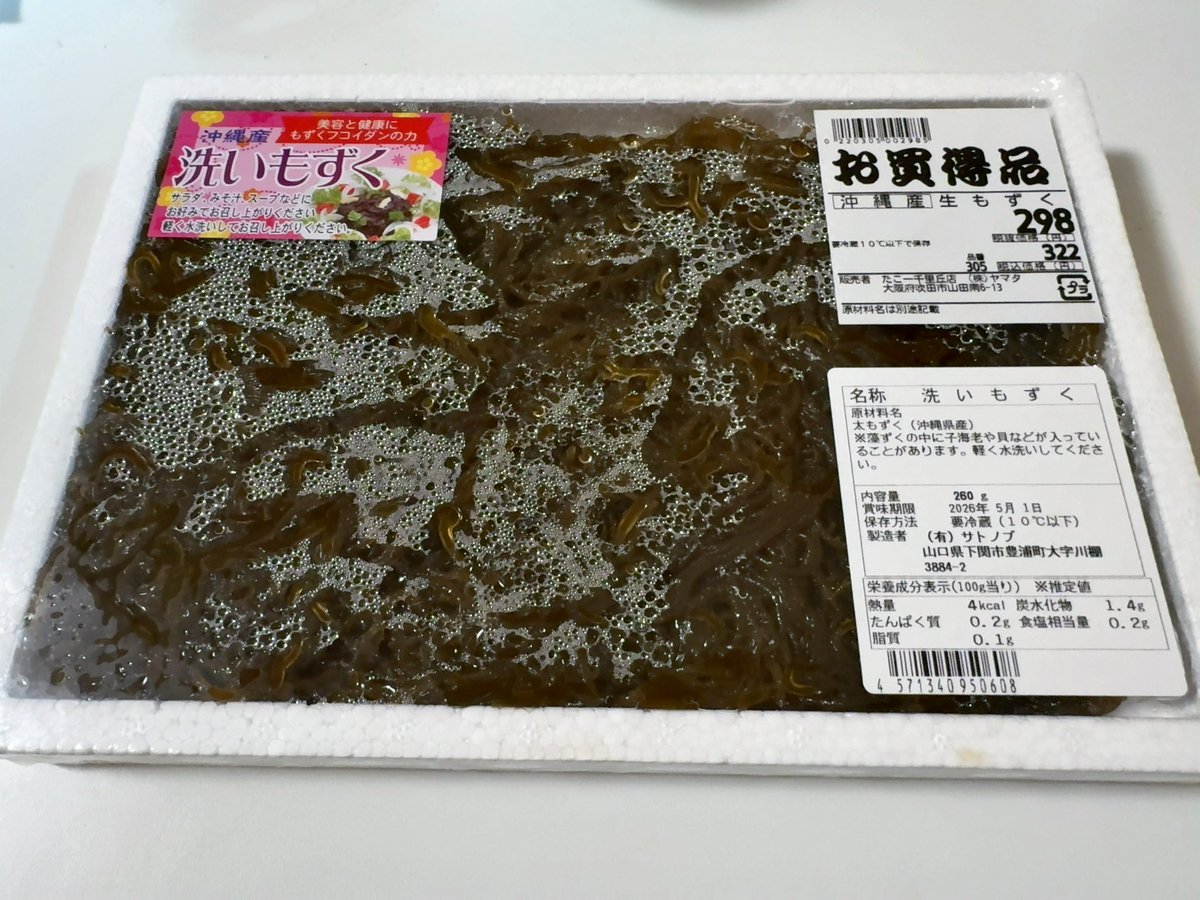
Using the provided reference image of the packaged washed mozuku seaweed, transform it into a cute Japanese recipe infographic poster that teaches how to eat it properly. Keep the actual product recognizable by showing the package photo near the top and reuse the mozuku itself in small food/process photos, but redesign everything else as a bright, clean, blue-and-pink editorial layout. Add a cheerful anime catmaid guide character with pink hair and cat ears appearing multiple times as the instructor. Create a bold Japanese headline at the top: 「洗いもずくを 美味しく食べる手順書」 and a worker/name tag reading 「作業者:きらりあ・ネオン」. Build a 6-step vertical instruction flow on the left/middle with numbered circles 1 through 6 and arrows between them. The 6 step titles should be: 1「状態確認」 2「軽く水洗い」 3「水気を切る」 4「食べやすくカット」 5「味付け」 6「盛り付けて完成」. For each step, include a short Japanese explanation and a supporting image/illustration showing the mozuku at that stage; specifically include 1 package/close-up state check image, 1 rinsing-in-colander image, 1 draining colander image, 1 cutting-with-kitchen-scissors image, 3 seasoning option mini-boxes under step 5, and 1 finished bowl image under step 6. Add a right-side panel titled 「おすすめ具材」 with exactly 7 ingredients shown as small labeled illustrations: きゅうり, 長芋, オクラ, みょうが, 大葉, しらす, 豆腐. Add another right-side recommendation panel titled 「ネオンちゃんおすすめ」 containing exactly 2 dish cards labeled A and B: A「もずく酢きゅうり」 and B「もずくスープ」, each with a bowl image and ingredient list in Japanese. Add a bottom-right caution box titled 「注意」 with exactly 3 bullet points: 「洗いすぎない」「水気をしっかり切る」「開封後は早めに食べる」. Add a friendly footer banner in Japanese encouraging enjoyment of mozuku. Style it like a highly readable supermarket handout / cooking guide infographic with rounded boxes, glossy accents, clear hierarchy, and vibrant kawaii appeal.
Using the provided reference image of the packaged washed mozuku seaweed, transform it into a cute Japanese recipe infographic poster that teaches how to eat it properly. Keep the actual product recognizable by showing the package photo near the top and reuse the mozuku itself in small food/process photos, but redesign everything else as a bright, clean, blue-and-pink editorial layout. Add a cheerful anime catmaid guide character with pink hair and cat ears appearing multiple times as the instructor. Create a bold Japanese headline at the top: 「洗いもずくを 美味しく食べる手順書」 and a worker/name tag reading 「作業者:きらりあ・ネオン」. Build a 6-step vertical instruction flow on the left/middle with numbered circles 1 through 6 and arrows between them. The 6 step titles should be: 1「状態確認」 2「軽く水洗い」 3「水気を切る」 4「食べやすくカット」 5「味付け」 6「盛り付けて完成」. For each step, include a short Japanese explanation and a supporting image/illustration showing the mozuku at that stage; specifically include 1 package/close-up state check image, 1 rinsing-in-colander image, 1 draining colander image, 1 cutting-with-kitchen-scissors image, 3 seasoning option mini-boxes under step 5, and 1 finished bowl image under step 6. Add a right-side panel titled 「おすすめ具材」 with exactly 7 ingredients shown as small labeled illustrations: きゅうり, 長芋, オクラ, みょうが, 大葉, しらす, 豆腐. Add another right-side recommendation panel titled 「ネオンちゃんおすすめ」 containing exactly 2 dish cards labeled A and B: A「もずく酢きゅうり」 and B「もずくスープ」, each with a bowl image and ingredient list in Japanese. Add a bottom-right caution box titled 「注意」 with exactly 3 bullet points: 「洗いすぎない」「水気をしっかり切る」「開封後は早めに食べる」. Add a friendly footer banner in Japanese encouraging enjoyment of mozuku. Style it like a highly readable supermarket handout / cooking guide infographic with rounded boxes, glossy accents, clear hierarchy, and vibrant kawaii appeal.
Kawaii mozuku how-to infographic needs input media to work. Open it in the studio and these load alongside the prompt — pick whichever ones your chosen model can take.
Edit the prompt in the box under the preview — the template's model and format are already selected — and press Generate. Your version appears right on this page.
Yes. You can change the subject, setting, lighting, mood, format, and available model controls before creating your image.
Opening and editing this template is free. Generating uses credits, shown on the Generate button when you are signed in.
Start with GPT Image 2, which is the model associated with this template. You can compare another compatible model for a different finish.
Follow a topic to a crawlable collection of related PicX Studio templates.