How do I use the Glossier Skin Serum Product Shoot template?
Choose the primary action to open PicX Studio with the available template settings. Review the model and format, personalize the creative direction, and generate when ready.
A ready image prompt for PicX Studio. Change the subject, setting, or lighting one variable at a time.
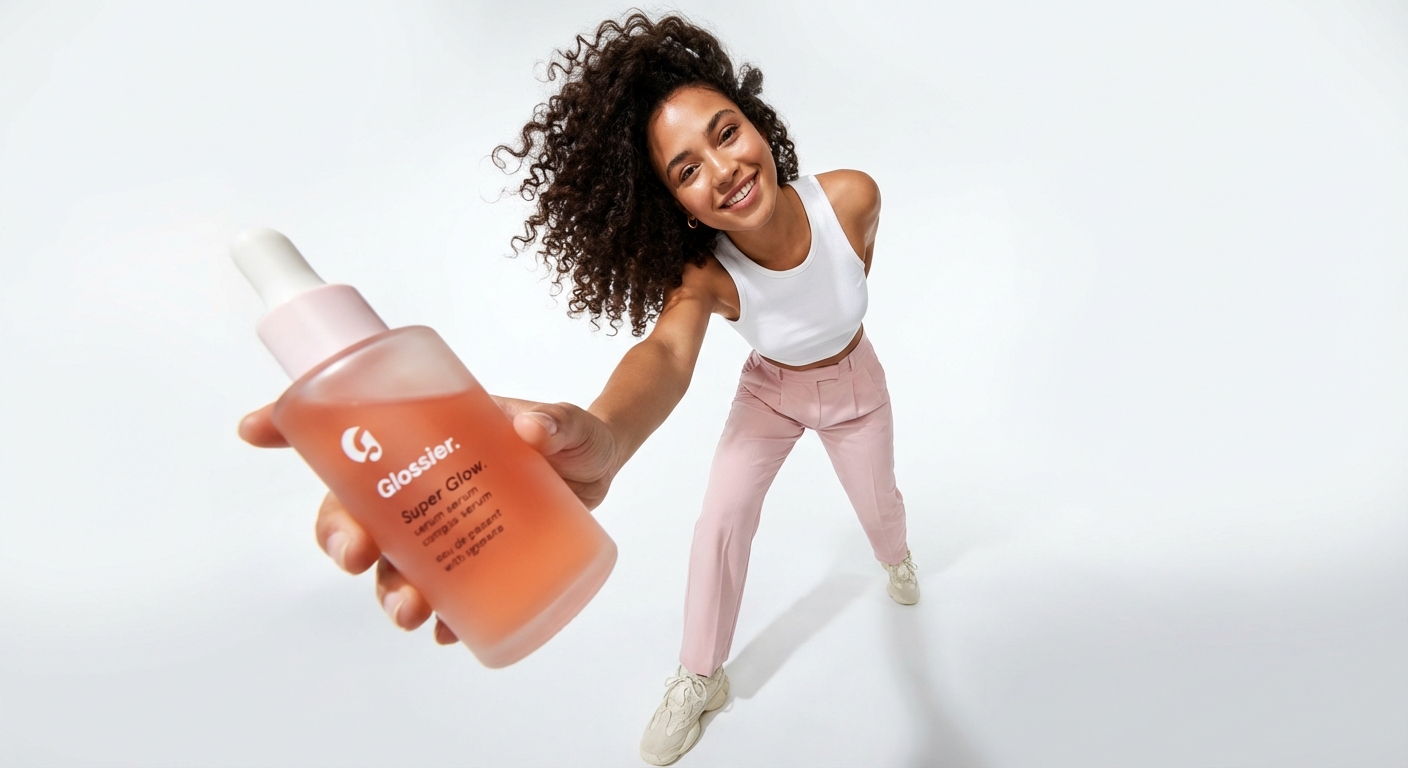
Low-angle, wide-lens lifestyle beauty shot of a confident female model wearing pastel pink trousers and chunky white sneakers, standing against a pure white seamless studio background. The model extends her arm toward the camera, holding a Glossier facial serum bottle in the foreground, making the product appear oversized due to forced perspective. The bottle features rounded edges, frosted translucent plastic, soft coral-orange liquid inside, minimal Glossier typography. The model’s face is slightly out of focus, natural makeup, curly hair flowing freely. Bright, clean studio lighting with soft shadows, modern Gen-Z skincare branding vibe, dynamic pose, energetic composition, ultra-sharp product focus, fashion-editorial beauty photography, photorealistic.
Choose the primary action to open PicX Studio with the available template settings. Review the model and format, personalize the creative direction, and generate when ready.
Yes. You can change the subject, setting, lighting, mood, format, and available model controls before creating your image.
This template is free to open and customize. Generation usage is shown in PicX Studio before you create.
Choose a compatible model in PicX Studio based on the style, speed, and output controls your project needs.
© 2026 PicX Studio. All rights reserved.

Follow a topic to a crawlable collection of related PicX Studio templates.
43,474 public templates available. Verified via the PicX Studio public templates API; refreshed hourly.



![Brand Ice Sculpture Product Photography — [BRAND NAME] luxury product still life. A large three-dimensional ice sculpture in the exact shape of the [BRAND NAME]](/_next/image?url=https%3A%2F%2Fcdn.picxstudio.com%2Fuploads%2Fmeigen_907cd03b2295_0e348d56-7cfb-4634-969d-dd59d09e75ca.jpg&w=828&q=100)
![Playful Futuristic Brand Kit Board — Create a polished multi-page (multiple images) brand kit for a company called [YOYOYO]. The brand sh…](/_next/image?url=https%3A%2F%2Fcdn.picxstudio.com%2Fuploads%2Fmeigen_35482e665691_a87e3ac0-b1e5-4a95-a750-7378b7788369.jpg&w=828&q=100)
![Low Angle Product Fashion Campaign — Low-angle fashion campaign photograph of a confident model holding a large [product name] very close…](/_next/image?url=https%3A%2F%2Fcdn.picxstudio.com%2Fuploads%2Fmeigen_4c03edc4df35_6f63201c-902b-410c-8eaa-7760408114bb.jpg&w=828&q=100)
![Moss Logo Minimalist Brand Flat Lay — [BRAND NAME]: Enter the brand name here.
Goal: Generate a minimalist organic image where a stylized logo icon of [BRAND NA](/_next/image?url=https%3A%2F%2Fcdn.picxstudio.com%2Fuploads%2Fmeigen_c099b4a510e0_2c38b884-72c5-4839-8374-99d9fab74c05.jpg&w=828&q=100)

![Exploded Product Mechanics Advertising — [product], high-end product advertising, white seamless background, exploded view with inner mechanics revealed, outer](/_next/image?url=https%3A%2F%2Fcdn.picxstudio.com%2Fuploads%2Fmeigen_c33c116d1a53_fd77a4a5-4e6d-4870-b188-769ecf2f74d1.jpg&w=828&q=100)
![Oversized Hero Product Fashion Editorial — [person], [pose], oversized product as main hero prop, playful fun energy, fashion editorial styling, clean minimal b](/_next/image?url=https%3A%2F%2Fcdn.picxstudio.com%2Fuploads%2Fmeigen_43b3d6f04208_a5c18968-9001-4977-a6d2-83d92ba0940f.jpg&w=828&q=100)



![Luxury Dessert Logo Product Photography — Minimalist luxury product photography of an edible sculpture inspired by the [brand name] logo. Logo transformed into](/_next/image?url=https%3A%2F%2Fcdn.picxstudio.com%2Fuploads%2Fmeigen_a9d271403edd_04fd5565-6f29-4349-9b66-e8e43523ac87.jpg&w=828&q=100)