

How do I use the Golden Hour Beach Portrait template?
Choose the primary action to open PicX Studio with the available template settings. Review the model and format, personalize the creative direction, and generate when ready.
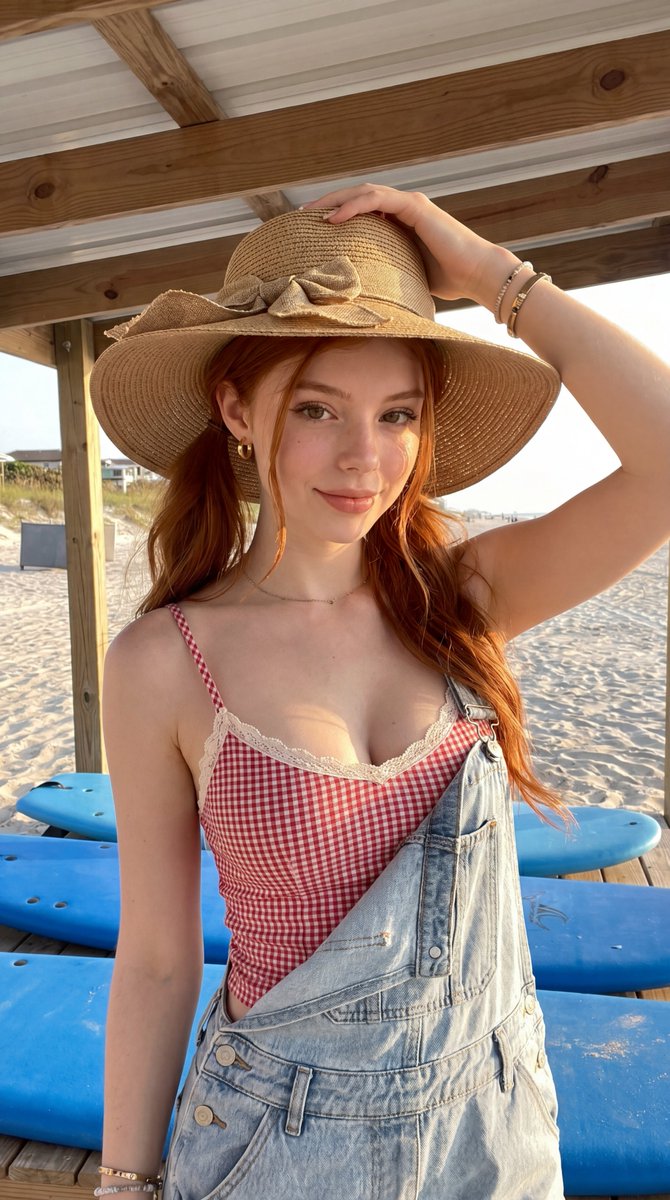
A warm, photorealistic prompt for a woman at the beach during golden hour, wearing gingham and denim near a surfboard display. (free to use) — Free AI image template on PicX Studio.
Ultra-realistic summer beach portrait of a young woman with long wavy copper-red hair standing beneath a wooden beach pavilion during golden hour. Wearing a wide-brim woven straw sunhat with a decorative bow, small gold hoop earrings, delicate bracelets, and a subtle gold necklace. She wears a red-and-white gingham camisole with lace trim layered beneath light-wash denim overalls worn with one strap casually undone. Warm smile, natural freckles, luminous skin, soft natural makeup, and bright expressive eyes. Behind her are stacked blue surfboards, white sand dunes, beach grass, and a sunlit coastline. Golden-hour sunlight creates warm highlights in her hair and soft shadows across the scene. Coastal cottage aesthetic, beach vacation fashion, lifestyle editorial photography, realistic skin texture, photorealistic, highly detailed, premium travel campaign, wholesome summer atmosphere, natural color grading, 8K quality. Style: photorealistic. Camera: full-frame mirrorless, 50mm lens, f/2.0 aperture, ISO 100, eye-level lifestyle portrait, shallow depth of field. Lighting: golden hour natural sunlight, soft front-side illumination, warm, cheerful, coastal summer mood. Composition: vertical portrait framing, subject centered beneath beach pavilion, background with blue surfboards, sandy beach, dunes, and oceanfront scenery. Quality: 8k resolution, ultra high detail, maximum realism. Negative prompt: blurry, low quality, low resolution, distorted anatomy, extra limbs, extra fingers, unrealistic proportions, plastic skin, excessive retouching, cartoon, anime, CGI, painting, watermark, text, logo, malformed hands, duplicate surfboards, cluttered background, overexposed highlights, harsh shadows, noisy image.
Use Golden Hour Beach Portrait to plan an AI image around nano-banana-2 generation. Match the preview's composition first, then personalize the subject, setting, and mood for your own project.
Use the primary action to load the template settings in PicX Studio.
Adjust the subject and creative details for your destination.
Create the image, compare the result with the preview, and refine one variable at a time.
A continuous mix — similar concepts first, woven with same-model prompts and fresh picks from the catalog.
Choose the primary action to open PicX Studio with the available template settings. Review the model and format, personalize the creative direction, and generate when ready.
Yes. You can change the subject, setting, lighting, mood, format, and available model controls before creating your image.
This template is free to open and customize. Generation usage is shown in PicX Studio before you create.
Start with nano-banana-2, which is the model associated with this template. You can compare another compatible model for a different finish.
A continuous mix — similar concepts first, woven with same-model prompts and fresh picks from the catalog.
Follow a topic to a crawlable collection of related PicX Studio templates.
32,032 public templates available. Verified via the PicX Studio public templates API; refreshed hourly.


