How do I use the Japanese Design Magazine Poster template?
Choose the primary action to open PicX Studio with the available template settings. Review the model and format, personalize the creative direction, and generate when ready.
A minimalist Japanese editorial poster layout for promoting a design-intelligence service or magazine issue.
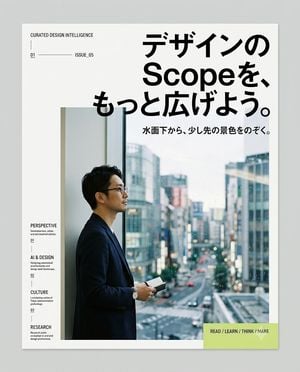
Create a clean editorial magazine poster for a Japanese design-intelligence service. Canvas: portrait poster on a light gray background, with a white page centered and a subtle drop shadow, about 4:5 ratio. Visual style: minimalist modern Swiss/Japanese editorial layout, lots of white space, sharp black typography, thin divider lines, small uppercase English microcopy, high-end design magazine feel. Main headline: large bold black Japanese type in the upper right, reading {argument name="headline text" default="デザインの Scopeを、もっと広げよう。"}, with “Scope” in Latin letters, arranged across 3 stacked lines and overlapping slightly above the photo area. Subheadline: smaller bold Japanese line below the headline, reading {argument name="subheadline text" default="水面下から、少し先の景色をのぞく。"}. Hero image: large rectangular photo occupying the lower center/right, showing {argument name="main subject" default="a Japanese businessman in a dark navy blazer and glasses standing in profile by a tall window, holding a small notebook or phone, looking out over a rainy modern city street with blurred buildings and traffic"}; cool blue-gray city tones, shallow depth of field, realistic photography. Left margin editorial column: at top left, small uppercase text “CURATED DESIGN INTELLIGENCE”, a thin vertical line beneath, then a small issue row with “01”, a long horizontal rule, and “ISSUE_05”. Along the lower left margin, create exactly 4 stacked navigation items with small labels and descriptions: 1) “PERSPECTIVE” with “Stream / culture, urban, and new synthifications.” and number “01”; 2) “AI & DESIGN” with “Designing conversational architectures and design-agent landscape.” and number “02”; 3) “CULTURE” with “Locomoting nation of Tokyo, extensionism, privileges.” and number “03”; 4) “RESEARCH” with “Research unitile evolution in art and design professions.” Use tiny black type with thin vertical separators between items. Bottom right call-to-action: a pale lime rectangle overlaying the lower-right corner of the photo/page, containing bold uppercase text {argument name="call to action" default="READ / LEARN / THINK / MAKE"} and a faint white downward triangle/arrow icon. Constraints: keep the composition simple and premium, use only black, white, gray, cool photo colors, and pale lime accent; no logos, no extra text, no decorative clutter.
Choose the primary action to open PicX Studio with the available template settings. Review the model and format, personalize the creative direction, and generate when ready.
Yes. You can change the subject, setting, lighting, mood, format, and available model controls before creating your image.
This template is free to open and customize. Generation usage is shown in PicX Studio before you create.
Start with GPT Image 2, which is the model associated with this template. You can compare another compatible model for a different finish.
Follow a topic to a crawlable collection of related PicX Studio templates.