How do I use the Photorealistic Manga Bookstore Editorial template?
Choose the primary action to open PicX Studio with the available template settings. Review the model and format, personalize the creative direction, and generate when ready.
A highly detailed fashion editorial prompt for generating realistic images of a woman browsing a crowded Japanese manga bookstore, with specific instructions fo
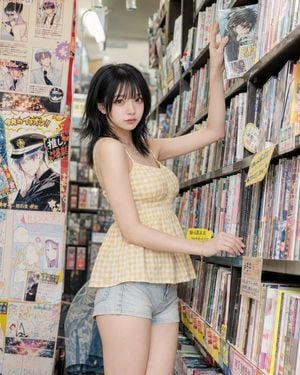
Pose-first photorealistic fashion editorial photo: {argument name="subject" default="a clearly adult woman in her twenties"} reaching for a manga volume or art book from a high shelf inside {argument name="location" default="a narrow pop-culture bookstore"}. The pose is created by the reach, not by posing.\n\nPose lock: one arm reaches upward toward a high shelf, elbow softly bent, fingers touching the edge of a book. The other hand rests near the waist, side seam, or lower shelf for balance. Her weight stays mostly on one leg, with the opposite knee softly bent and angled inward. Hips shift slightly away from the shelf while the ribcage lengthens upward, creating a natural long body line. Torso turns in a soft three-quarter angle, shoulders uneven but relaxed. The raised arm must look like a real reach, not a glamour pose.\n\nBackground built for the pose: {argument name="background" default="a cramped Japanese pop-culture bookstore aisle with tall manga shelves, fictional anime posters, colorful release flyers, handwritten recommendation cards, sticker labels, narrow fluorescent lighting, stacked art books, and small capsule-toy ads near the shelf edges"}. The background should feel specific, crowded, and visually lively, but still photorealistic.\n\nComposition lock: vertical 4:5 fashion editorial crop, waist-to-head or upper-thigh-to-head. The raised arm, shelf line, waist curve, hand on book, and face carry the image. The posters and manga shelves frame the subject without covering her face or torso.\n\nGaze lock: direct eye contact is allowed if her head turns back toward the camera mid-reach. Alternatively, her eyes may focus clearly on the book she is pulling, but not vaguely off-camera.\n\nAvoid: anime style, illustration style, CGI look, real anime characters, readable brand text, random arm-over-head pose, plain standing, tourist bookstore snapshot, stiff catalog posture, background clutter covering the face.
Choose the primary action to open PicX Studio with the available template settings. Review the model and format, personalize the creative direction, and generate when ready.
Yes. You can change the subject, setting, lighting, mood, format, and available model controls before creating your image.
This template is free to open and customize. Generation usage is shown in PicX Studio before you create.
Start with GPT Image 2, which is the model associated with this template. You can compare another compatible model for a different finish.
Follow a topic to a crawlable collection of related PicX Studio templates.