How do I use the Yokohama Three Men Splash Art template?
Choose the primary action to open PicX Studio with the available template settings. Review the model and format, personalize the creative direction, and generate when ready.
A cinematic anime poster of three suited men at Yokohama harbor with energetic red and blue paint splatter styling.
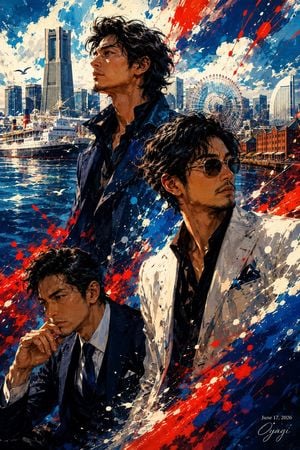
Create a dynamic vertical anime-style illustration titled {argument name="artwork title" default="Yokohama and Three Men"}: three stylish adult men in the foreground against Yokohama harbor at sunset or early evening. Use a dramatic painterly manga / splash-art aesthetic with thick ink-like shadows, expressive brush strokes, high contrast, and energetic red, blue, and white paint splatters sweeping diagonally across the composition. Canvas is portrait 2:3. Background: recognizable Yokohama waterfront with the Landmark Tower on the left, harbor buildings, a large white passenger ship on the water, sparkling blue reflections, seagulls, the Cosmo Clock Ferris wheel near the center-right, and red brick warehouse buildings on the right. Foreground contains exactly 3 men: one tall central-left man standing upright in a dark navy open-collar shirt and jacket, messy wavy black hair, looking off to the side; one right-side man in a white blazer over a black shirt with a blue pocket square, leaning forward slightly, messy black hair, intense posture; one lower-left seated or crouching man in a dark navy suit, white shirt, and tie, hand raised near his mouth as if thinking or holding a cigarette, head angled downward. Faces should be obscured by solid rectangular censor blocks in dark brown tones, one rectangle covering each man’s face, exactly 3 censor rectangles. Add vivid red and cobalt-blue splashes across clothing and sky, with white paint flecks throughout. Include a small elegant signature and date in the bottom-right corner reading {argument name="date text" default="June 17, 2026"} and {argument name="signature text" default="Oyagi"}. Make the image polished, cinematic, and poster-like, with no other readable text, no logo, no watermark, and no extra people.
Choose the primary action to open PicX Studio with the available template settings. Review the model and format, personalize the creative direction, and generate when ready.
Yes. You can change the subject, setting, lighting, mood, format, and available model controls before creating your image.
This template is free to open and customize. Generation usage is shown in PicX Studio before you create.
Start with GPT Image 2, which is the model associated with this template. You can compare another compatible model for a different finish.
Follow a topic to a crawlable collection of related PicX Studio templates.