How do I use the Summer Morning Glory Poster template?
Choose the primary action to open PicX Studio with the available template settings. Review the model and format, personalize the creative direction, and generate when ready.
A delicate vertical Chinese summer greeting poster with watercolor morning glory vines, pastel blossoms, and elegant vertical typography.
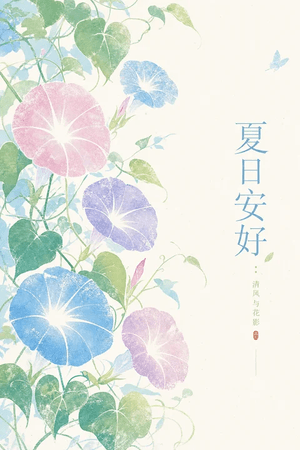
Create a vertical Chinese aesthetic summer poster in a soft watercolor / mineral-pigment print style. Canvas: portrait 2:3 ratio, warm ivory rice-paper background with ample negative space on the right. Composition: the left two-thirds are filled with winding morning glory vines rising diagonally from bottom left to upper left, with translucent green heart-shaped leaves, thin curling tendrils, pale stems, and a few unopened buds; the right third remains mostly blank for vertical typography. Include exactly 5 prominent morning glory blossoms: 1 large pale pink blossom in the upper-left center, 1 small light blue blossom near the upper center, 1 medium lavender-purple blossom in the middle, 1 large sky-blue blossom in the lower-left center, and 1 small pale pink-lavender blossom in the lower-right of the vine cluster. Each blossom has a glowing white star-shaped center and delicate radial vein lines. Add exactly 1 tiny pale blue butterfly near the upper-right text area. Typography: place large vertical Chinese title text on the right reading {argument name="main title" default="夏日安好"}, in elegant thin Song-style calligraphy, colored muted sky blue. To the lower right of the title, add smaller vertical text reading {argument name="subtitle" default="清风与花影"} in muted olive green, with a small red seal stamp beneath it and a very thin vertical divider line below. Visual style: airy, refined, vintage East Asian botanical illustration, soft granulation, faded pastel palette of blue, pink, lavender, sage, and teal, gentle ink texture, no hard outlines, no modern objects. Constraints: keep the design calm and uncluttered, preserve the broad blank ivory space on the right, avoid photorealism, avoid extra text, avoid borders or watermark.
Choose the primary action to open PicX Studio with the available template settings. Review the model and format, personalize the creative direction, and generate when ready.
Yes. You can change the subject, setting, lighting, mood, format, and available model controls before creating your image.
This template is free to open and customize. Generation usage is shown in PicX Studio before you create.
Start with GPT Image 2, which is the model associated with this template. You can compare another compatible model for a different finish.
Follow a topic to a crawlable collection of related PicX Studio templates.