How do I use the Neon Sunset Kimono Girl template?
Choose the primary action to open PicX Studio with the available template settings. Review the model and format, personalize the creative direction, and generate when ready.
A cinematic anime key visual of a kimono-clad girl in a neon-lit Japanese corridor overlooking a dramatic sunset landscape.
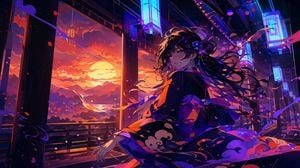
Create a cinematic anime illustration of {argument name="character name" default="a young Japanese woman"} in an open-air traditional corridor at sunset, turning back over her shoulder with a gentle sleepy smile as if saying good night. She wears an elegant dark navy-black kimono with vivid orange lining and stylized cloud patterns, tied with a large obi bow, with long flowing {argument name="hair color" default="black"} hair swept dramatically by the wind and decorated with small blue-purple flowers. The scene is a fusion of traditional Japanese architecture and neon cyberpunk lighting: wooden pillars and railings frame a wide view of a huge orange sun setting behind layered mountains, clouds, and a reflective river or bay, while glowing cyan-blue rectangular lantern signs hang overhead along the corridor. Use a wide 16:9 composition, dynamic diagonal perspective, the character positioned slightly right of center, her kimono sleeves and ribbons spreading across the foreground. Fill the air with exactly three visible types of windblown decorative elements: pink flower petals, red-orange leaf-like fragments, and long purple ribbon streamers. Lighting should be highly dramatic with warm sunset orange from the left and cool electric blue-magenta neon from above and right, creating glossy highlights, deep shadows, rim light on hair strands, and saturated color contrast. Style: ultra-detailed Japanese anime key visual, painterly digital art, sharp linework mixed with atmospheric brush texture, high contrast, luminous glow, romantic nocturne mood, no text, no watermark, no modern signage lettering.
Choose the primary action to open PicX Studio with the available template settings. Review the model and format, personalize the creative direction, and generate when ready.
Yes. You can change the subject, setting, lighting, mood, format, and available model controls before creating your image.
This template is free to open and customize. Generation usage is shown in PicX Studio before you create.
Start with GPT Image 2, which is the model associated with this template. You can compare another compatible model for a different finish.
Follow a topic to a crawlable collection of related PicX Studio templates.