How do I use the Retro Blonde Magazine Portrait template?
Choose the primary action to open PicX Studio with the available template settings. Review the model and format, personalize the creative direction, and generate when ready.
Generates a vintage 1950s-style illustrated portrait of a blonde woman in a colorful sweater with retro room details and aged print texture.
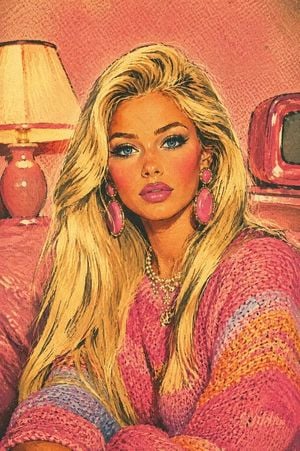
Create a vertical mid-century American beauty magazine illustration of {argument name="subject" default="a glamorous blonde woman seated indoors"}, shown from the chest up in a cozy retro room. Preserve a close portrait composition: the woman fills most of the frame, leaning slightly forward with both arms crossed or resting at the bottom edge, long voluminous platinum-blonde hair sweeping over both shoulders, face area intentionally covered by a centered opaque warm tan rectangular block. She wears oversized pink dangling earrings, layered pearl necklaces, and a chunky knitted sweater in {argument name="sweater colors" default="hot pink, coral, orange, lavender, and pale blue stripes"}. Background: a salmon-pink textured wall, a glowing cream lampshade on a coral table lamp on the left, and a small red vintage television on the right. Render the entire image as an authentic 1950s–1960s romance comic / vintage beauty advertisement: bold black ink outlines, hand-painted cel shading, simplified elegant forms, glamorous pin-up styling, warm rosy skin tones, vibrant pastel palette of {argument name="color palette" default="bubblegum pink, coral, turquoise accents, cream, pale yellow, lavender, and warm ivory"}. Add visible halftone dots, aged paper grain, faded ink edges, subtle color misregistration, screen-print texture, and minor offset-print imperfections so it looks like a preserved vintage magazine page. Use no captions, no typography, no watermark, and keep the tan face-covering rectangle perfectly flat and untextured.
Choose the primary action to open PicX Studio with the available template settings. Review the model and format, personalize the creative direction, and generate when ready.
Yes. You can change the subject, setting, lighting, mood, format, and available model controls before creating your image.
This template is free to open and customize. Generation usage is shown in PicX Studio before you create.
Start with GPT Image 2, which is the model associated with this template. You can compare another compatible model for a different finish.
Follow a topic to a crawlable collection of related PicX Studio templates.