How do I use the Cyberpunk Dragon Warrior Character template?
Choose the primary action to open PicX Studio with the available template settings. Review the model and format, personalize the creative direction, and generate when ready.
A full-body anime-style cyberpunk reptilian warrior character concept suitable for game art, avatars, or character design references.
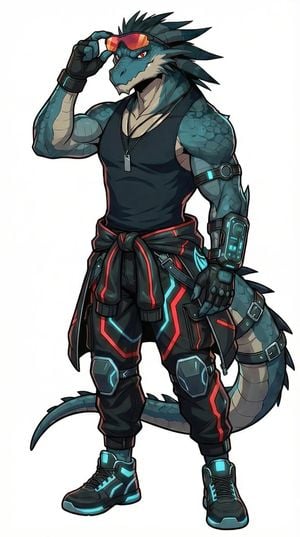
Create a full-body anime character concept illustration of an anthropomorphic cyberpunk dragon/lizard warrior, centered on a clean white background. The character is a tall, muscular male reptilian humanoid with teal-blue scales, darker mottled scale patches, a cream-colored lower jaw, throat, chest accents, inner arm plates, and segmented belly scales along a thick curving tail. Give him a confident smirk with sharp teeth, angular red eyes, and multiple long dark teal head spines sweeping backward. He wears reflective orange-red visor sunglasses and is lifting one side of the visor with his right hand in a cool pose. Outfit: black sleeveless athletic tank top, black fingerless tech gloves, a thin necklace with a rectangular dog tag, a black jacket tied around the waist with red trim, loose black cyberpunk cargo pants with glowing cyan and red neon panel lines, knee armor, straps, buckles, and futuristic high-top sneakers with cyan glowing accents. Add high-tech gear on his arms: one upper-arm band with a glowing cyan module, one large wrist-mounted device on the left forearm with small screen details, and armored glove plates. The tail emerges behind him, thick and segmented, with dark dorsal spikes and strap-like bands. Style should be polished Japanese anime / game character key art with crisp black linework, cel-shaded rendering, subtle gradients, strong silhouette, detailed futuristic streetwear, and no text, logo, watermark, or background scenery.
Choose the primary action to open PicX Studio with the available template settings. Review the model and format, personalize the creative direction, and generate when ready.
Yes. You can change the subject, setting, lighting, mood, format, and available model controls before creating your image.
This template is free to open and customize. Generation usage is shown in PicX Studio before you create.
Start with GPT Image 2, which is the model associated with this template. You can compare another compatible model for a different finish.
Follow a topic to a crawlable collection of related PicX Studio templates.