How do I use the Schoolgirl in Organic Cocoon template?
Choose the primary action to open PicX Studio with the available template settings. Review the model and format, personalize the creative direction, and generate when ready.
A surreal photorealistic fine-art scene of a shy schoolgirl curled inside a giant soft flesh-like cocoon in a quiet Japanese room.
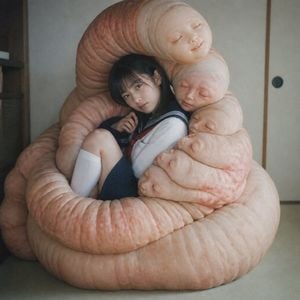
Create a square, photorealistic surreal fine-art image of {argument name="character description" default="a shy Japanese schoolgirl in a navy sailor uniform with a red necktie, white blouse, navy skirt, and knee-high white socks"} sitting curled up indoors, half-hidden and gently embraced by an enormous soft organic cocoon. The cocoon should look like {argument name="cocoon material" default="pale peach human-skin-like plush flesh"}: thick tubular folds coiling around her body like an oversized living cushion, with wrinkled creases, subtle red mottling, pores, and rounded sagging forms, conveying warmth, protection, and unease rather than horror. The girl is seated with one knee raised, one hand near her mouth, dark straight hair falling around her face, her expression obscured by a soft rectangular blur or featureless shadow for anonymity. Compose the cocoon as the dominant subject, filling most of the frame in layered spiral loops around her. Set the scene in {argument name="room setting" default="a quiet traditional Japanese tatami room with beige sliding fusuma doors, wooden trim, and a dark shelving edge on the left"}. Use muted natural indoor light, shallow depth of field, film-grain texture, subdued colors, and a melancholic intimate mood inspired by the phrase {argument name="mood phrase" default="buried in kindness"}. Keep the image nonsexual, emotionally protective, strange, and tender, with no visible text, no gore, and no extra characters.
Choose the primary action to open PicX Studio with the available template settings. Review the model and format, personalize the creative direction, and generate when ready.
Yes. You can change the subject, setting, lighting, mood, format, and available model controls before creating your image.
This template is free to open and customize. Generation usage is shown in PicX Studio before you create.
Start with GPT Image 2, which is the model associated with this template. You can compare another compatible model for a different finish.
Follow a topic to a crawlable collection of related PicX Studio templates.