How do I use the Watercolor Elf Girl on Sunlit Bed template?
Choose the primary action to open PicX Studio with the available template settings. Review the model and format, personalize the creative direction, and generate when ready.
This prompt generates a dreamy watercolor anime portrait of an elf girl seated on a bed, ideal for fantasy character art, soft illustration prints, or mood-piec
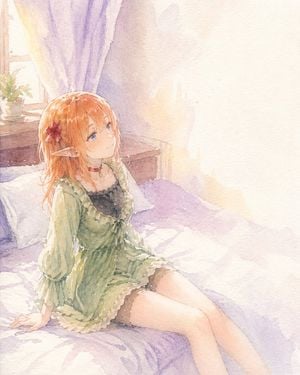
A soft pastel watercolor anime illustration of a young elf girl sitting on a bed in a quiet sunlit bedroom, viewed from a slightly elevated three-quarter angle. She has {argument name="hair color" default="warm orange"} shoulder-length hair with soft layered strands, large blue eyes, pale skin, and long pointed elf ears. A red flower hair clip decorates the left side of her hair. Her expression is calm and dreamy as she gazes upward toward the bright light on the right side of the image. She wears a loose sage-green chiffon dress with ruffled trim, sheer puffed long sleeves, gathered ribbon details at the chest, and a black lace camisole visible underneath, plus a thin red choker with a small pendant and dark thigh-high stockings. She is posed seated near the edge of a lavender bedspread, leaning back with both hands resting on the mattress behind her, legs extended diagonally toward the lower right. The room is delicate and minimal: 1 bed with 2 white pillows, 1 wooden headboard or bedside surface behind her, 1 window on the left, 1 small potted plant on the windowsill, and flowing lavender curtains. Strong warm sunlight floods the scene from the right, creating a large glowing white area and gentle washed-out highlights. Use an airy handmade watercolor look with visible paper grain, soft bleeding edges, pastel lilac and cream shadows, subtle sparkled pigment texture, and a serene fantasy slice-of-life mood.
Choose the primary action to open PicX Studio with the available template settings. Review the model and format, personalize the creative direction, and generate when ready.
Yes. You can change the subject, setting, lighting, mood, format, and available model controls before creating your image.
This template is free to open and customize. Generation usage is shown in PicX Studio before you create.
Start with GPT Image 2, which is the model associated with this template. You can compare another compatible model for a different finish.
Follow a topic to a crawlable collection of related PicX Studio templates.