How do I use the Editorial Black and White Fashion Portrait template?
Choose the primary action to open PicX Studio with the available template settings. Review the model and format, personalize the creative direction, and generate when ready.
A high-fashion monochrome prompt for creating elegant studio portraits with sophisticated lighting and diamond jewelry details.
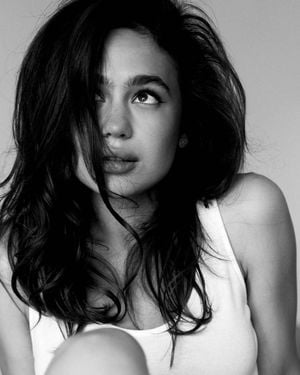
Ultra-realistic black-and-white editorial fashion portrait of a young woman with long, voluminous dark hair, thick natural eyebrows, luminous skin, and subtle winged eyeliner. High-fashion luxury magazine aesthetic, photographed in a minimalist studio with a {argument name="background" default="soft light gray background"}. Soft diffused window lighting, gentle shadows, high dynamic range, rich grayscale tones, crisp facial details, shallow depth of field, 85mm lens, f/1.8. Shot 1: She wears a {argument name="top" default="fitted white ribbed tank top"}. Hair partially covers one eye in an effortless, windswept style. She gazes upward with slightly parted lips, creating a candid, dreamy expression. Loose curls frame her face. Close-up composition from chest up. Shot 2: She wears a {argument name="luxury accessories" default="delicate black spaghetti-strap top with elegant diamond jewelry"} (bracelet, watch, earrings). Chin resting on her hand, warm genuine smile, eyes looking slightly to the side. Hair flowing naturally as if moved by a light fan. Intimate close-up portrait with relaxed luxury fashion vibes. Photography style: Vogue editorial, Harper's Bazaar, luxury beauty campaign, timeless elegance, cinematic monochrome, clean composition, natural skin texture, ultra-detailed eyes, soft contrast, film-like grain, premium fashion photography, high-end retouching, photorealistic, 8K.
Choose the primary action to open PicX Studio with the available template settings. Review the model and format, personalize the creative direction, and generate when ready.
Yes. You can change the subject, setting, lighting, mood, format, and available model controls before creating your image.
This template is free to open and customize. Generation usage is shown in PicX Studio before you create.
Start with GPT Image 2, which is the model associated with this template. You can compare another compatible model for a different finish.
Follow a topic to a crawlable collection of related PicX Studio templates.