How do I use the Cyberpunk Laser Eye Editorial Portrait template?
Choose the primary action to open PicX Studio with the available template settings. Review the model and format, personalize the creative direction, and generate when ready.
A moody cyberpunk-inspired portrait featuring a laser light effect across the subject's eyes in a studio setting.
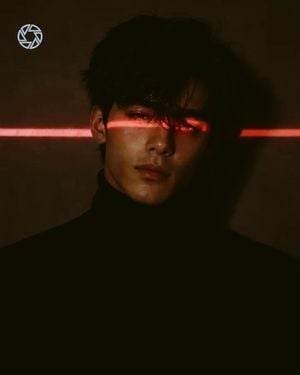
Ultra-realistic cinematic portrait of a {argument name="subject" default="young East Asian woman/man"} wearing a {argument name="clothing" default="black fitted turtleneck sweater"}, standing against a dark charcoal-gray background. A {argument name="laser light color" default="bright horizontal red"} laser light passes perfectly across both eyes, casting a vivid crimson glow on the eyes, eyelids, and surrounding skin while the rest of the face remains softly shadowed. Neutral, calm expression, direct eye contact with the camera, flawless smooth skin, natural facial features, slightly tousled black hair with a few strands falling over the forehead, dramatic low-key lighting, high contrast, deep blacks, subtle skin texture, moody cyberpunk atmosphere, minimal composition, centered framing, shallow depth of field, ultra-photorealistic, cinematic color grading, HDR, 8K, extremely detailed, sharp focus, editorial fashion photography, no accessories, no jewelry, no text, no watermark, no logo. Negative Prompt: low quality, blurry, cartoon, anime, CGI, 3D render, oversaturated, overexposed, extra eyes, extra limbs, deformed face, distorted anatomy, noisy image, watermark, logo, text, glasses, hat, earrings, necklace, smile, open mouth.
Choose the primary action to open PicX Studio with the available template settings. Review the model and format, personalize the creative direction, and generate when ready.
Yes. You can change the subject, setting, lighting, mood, format, and available model controls before creating your image.
This template is free to open and customize. Generation usage is shown in PicX Studio before you create.
Start with GPT Image 2, which is the model associated with this template. You can compare another compatible model for a different finish.
Follow a topic to a crawlable collection of related PicX Studio templates.