
Panel Animal Infographic Grid
Generates a 2x2 grid of animal infographics, each featuring a photo, detailed text facts, and four descriptive icons.
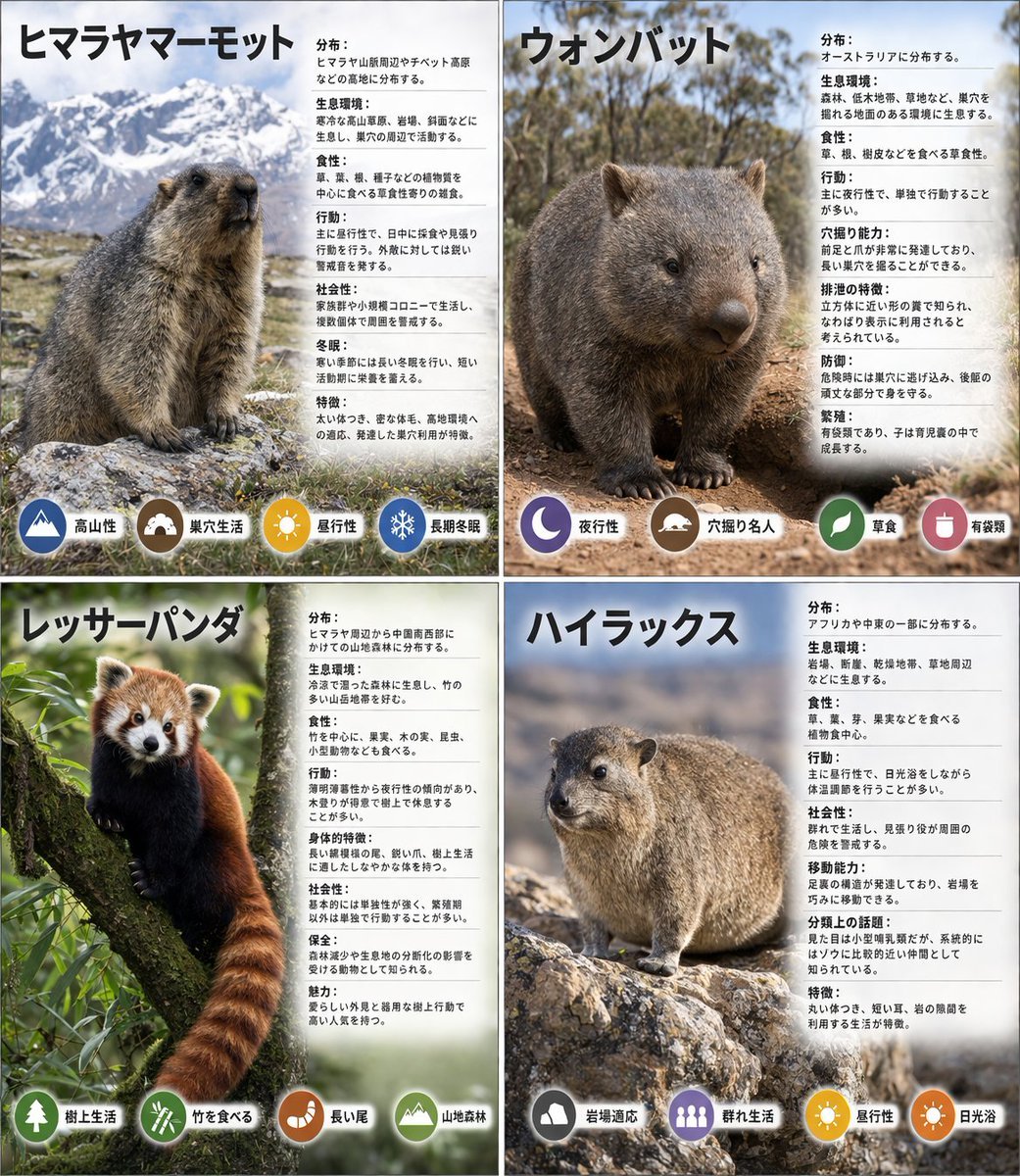
- Prompt included
- Model and format preset
- Free template
The prompt behind this image
Copy the exact prompt behind Panel Animal Infographic Grid, or open it in the studio and make it yours.
- Type
- {argument name="layout style" default="2x2 grid infographic"}
- Panels › 0 › Position
- top-left
- Panels › 0 › Title
- {argument name="animal one" default="ヒマラヤマーモット"}
- Panels › 0 › Image Description
- Himalayan marmot sitting on rocks with a snowy mountain background
- Panels › 0 › Text Content
- Detailed biological facts including distribution, habitat, diet, behavior, sociality, hibernation, and characteristics
- Panels › 0 › Icon Count
- 4
- Panels › 0 › Icons › 0 › Color
- blue
- Panels › 0 › Icons › 0 › Symbol
- mountain
- Panels › 0 › Icons › 0 › Label
- 高山性
- Panels › 0 › Icons › 1 › Color
- brown
- Panels › 0 › Icons › 1 › Symbol
- cave
- Panels › 0 › Icons › 1 › Label
- 巣穴生活
- Panels › 0 › Icons › 2 › Color
- yellow
- Panels › 0 › Icons › 2 › Symbol
- sun
- Panels › 0 › Icons › 2 › Label
- 昼行性
- Panels › 0 › Icons › 3 › Color
- blue
- Panels › 0 › Icons › 3 › Symbol
- snowflake
- Panels › 0 › Icons › 3 › Label
- 長期冬眠
- Panels › 1 › Position
- top-right
- Panels › 1 › Title
- {argument name="animal two" default="ウォンバット"}
- Panels › 1 › Image Description
- Wombat standing on dirt ground
- Panels › 1 › Text Content
- Detailed biological facts including distribution, habitat, diet, behavior, digging ability, excretion, defense, and reproduction
- Panels › 1 › Icon Count
- 4
- Panels › 1 › Icons › 0 › Color
- purple
Raw JSON
{
  "type": "{argument name=\"layout style\" default=\"2x2 grid infographic\"}",
  "panels": [
    {
      "position": "top-left",
      "title": "{argument name=\"animal one\" default=\"ヒマラヤマーモット\"}",
      "image_description": "Himalayan marmot sitting on rocks with a snowy mountain background",
      "text_content": "Detailed biological facts including distribution, habitat, diet, behavior, sociality, hibernation, and characteristics",
      "icon_count": 4,
      "icons": [
        {"color": "blue", "symbol": "mountain", "label": "高山性"},
        {"color": "brown", "symbol": "cave", "label": "巣穴生活"},
        {"color": "yellow", "symbol": "sun", "label": "昼行性"},
        {"color": "blue", "symbol": "snowflake", "label": "長期冬眠"}
      ]
    },
    {
      "position": "top-right",
      "title": "{argument name=\"animal two\" default=\"ウォンバット\"}",
      "image_description": "Wombat standing on dirt ground",
      "text_content": "Detailed biological facts including distribution, habitat, diet, behavior, digging ability, excretion, defense, and reproduction",
      "icon_count": 4,
      "icons": [
        {"color": "purple", "symbol": "moon", "label": "夜行性"},
        {"color": "brown", "symbol": "digging animal", "label": "穴掘り名人"},
        {"color": "green", "symbol": "leaf", "label": "草食"},
        {"color": "brown", "symbol": "acorn", "label": "有袋類"}
      ]
    },
    {
      "position": "bottom-left",
      "title": "{argument name=\"animal three\" default=\"レッサーパンダ\"}",
      "image_description": "Red panda resting on a mossy tree branch",
      "text_content": "Detailed biological facts including distribution, habitat, diet, behavior, physical characteristics, sociality, conservation, and charm",
      "icon_count": 4,
      "icons": [
        {"color": "green", "symbol": "tree", "label": "樹上生活"},
        {"color": "green", "symbol": "bamboo", "label": "竹を食べる"},
        {"color": "orange", "symbol": "tail", "label": "長い尾"},
        {"color": "green", "symbol": "mountain", "label": "山地森林"}
      ]
    },
    {
      "position": "bottom-right",
      "title": "{argument name=\"animal four\" default=\"ハイラックス\"}",
      "image_description": "Rock hyrax standing on a rocky outcrop",
      "text_content": "Detailed biological facts including distribution, habitat, diet, behavior, sociality, mobility, taxonomy, and characteristics",
      "icon_count": 4,
      "icons": [
        {"color": "grey", "symbol": "rock", "label": "岩場適応"},
        {"color": "purple", "symbol": "group of people", "label": "群れ生活"},
        {"color": "yellow", "symbol": "sun", "label": "昼行性"},
        {"color": "orange", "symbol": "sun", "label": "日光浴"}
      ]
    }
  ],
  "styling": {
    "layout": "4 equal quadrants separated by white borders",
    "text_panel": "Semi-transparent white vertical rectangle on the right side of each quadrant",
    "typography": "Large bold Japanese title at the top left of each quadrant, dense informational text in the white panel",
    "icon_style": "Row of 4 circular colored icons with white silhouettes and black text labels placed at the bottom edge of each quadrant"
  }
}How to use Panel Animal Infographic Grid in 3 steps
- 1Upload ImagePNG, JPG or paste
Add your photo
Upload the photo the template builds on. The prompt, model and format are already set.
- 2…a portrait of your subject in softgolden-hour light, 85mm…
Personalize
Edit the subject and creative details for your destination.
- 3Generate
Generate
Press Generate — your image is created in PicX Studio, so you can compare it with the original and refine one variable at a time.
More like this
Templates with the same subject, style or setup. Open one to see its prompt.

Pixar 6-Panel Streethero Expression Grid

Headphones Lifestyle Nine Panel Grid

Panel Self-Care Infographic Grid

Japan Travel Brochure Poster

Korean Luxury Fashion Editorial 2x2 Grid Series

Minimalist Fashion Editorial Split Layout

Ultra-Realistic Vogue-Style Editorial Fashion Grid

Isometric Process Educational Diorama

Isometric Vehicle Teardown Infographic Template
Multi-Panel Emotional State Grid

Panel Japanese Advertising Concept Grid

4x4 Grid - Candid Nostalgic Vacation Selfies
Make it yours
Panel Animal Infographic Grid works as-is. These are the safest ways to change it without losing the look.
Change one field
Copy a single group, rewrite it, and generate again so you can see what that field is doing.
Keep the frame, change the subject
Hold the composition and light of 4-Panel Animal Infographic Grid, then swap wardrobe, props or the person for a new take.
| If the result… | Why | Fix |
|---|---|---|
| The result drifts from the preview | Too many fields changed at once. | Reuse 4-Panel Animal Infographic Grid as-is first, then change one group — subject, light, or setting. |
| GPT Image 2 ignores part of the JSON | Some models flatten or skip nested keys. | Keep the same values and paste them as a short paragraph instead. |
More GPT Image 2 templates
Other prompts made for GPT Image 2.

Six VTuber Japanese Logo Sheet

Realistic Portrait of Woman and Deer

The Vista Modular Condo Poster

AI Model Routing Comparison Infographic

2.5D Anime Art Board

Isometric Productivity Desk Scene

New York Double Exposure Poster

Four-Panel AI Landscape Comparison

Japanese Tatami Lifestyle Magazine Cover

NESCAFÉ Coffee Map Poster
More image prompts
Fresh picks from across the catalog.

Attempting to Recreate a BeautyPlus Prompt

Christmas Photo Prompt for Gemini Nano Banana
Monochrome Rebellion Streetwear Poster

Premium Beverage Commercial Poster
Reframe dinosaur scene to show full body with tilt
Scarlet Street Serenity
Photoreal ML Developer Desktop

Neon Anime Streetwear Portrait
Hard-Boiled Noir Manga Woman Page
Geometric Mathematician Visualization
Browse template categories
Panel Animal Infographic Grid questions
How do I use the 4-Panel Animal Infographic Grid template?
Add your photo if the template asks for one, edit the prompt if you like — the template's model and format are already selected — and press Generate. Your version opens in PicX Studio.
Can I customize the 4-Panel Animal Infographic Grid template?
Yes. You can change the subject, setting, lighting, mood, format, and available model controls before creating your image.
Is the 4-Panel Animal Infographic Grid template free?
Opening and editing this template is free. Generating uses credits, shown on the Generate button when you are signed in.
Which AI model should I use?
Start with GPT Image 2, which is the model associated with this template. You can compare another compatible model for a different finish.
Looking for something else? Browse all templates.

Your photo, any look
Thousands of ready templates for every top image and video model, from one credit balance.