How do I use the 1970s Monochrome Close-up Portrait template?
Choose the primary action to open PicX Studio with the available template settings. Review the model and format, personalize the creative direction, and generate when ready.
A cinematic prompt for generating 1970s style black-and-white portraits with heavy film grain and high-contrast lighting.
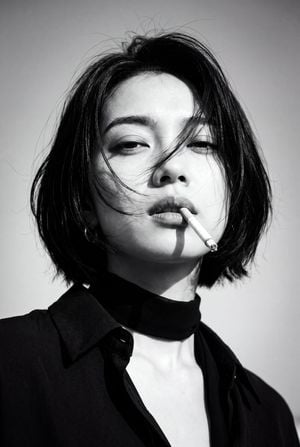
Create a 1970s black-and-white close-up portrait in a {argument name="setting" default="windswept outdoor setting"}, black and white noise . Camera/look: eye-level, front ¾ view (~30° off-axis); 85–105 mm portrait perspective; vertical 2:3, tight head-and-shoulders crop; shallow DoF f/2.8–f/4; subject centered . Lighting: {argument name="lighting" default="hard natural sunlight from upper camera-left"} with minimal fill; crisp shadows; subtle rim on hair; sky as bright mid-tone background; no blown highlights.Pose & expression: subject faces camera, chin slightly down, lips parted with a {argument name="prop" default="cigarette"} held between them; gaze relaxed/half-lidded; hair blown across the face by wind, partially covering one eye.Wardrobe & styling: dark collared shirt with open neck; thin black neck scarf tied loosely; no logos/jewelry.Grade: high-contrast monochrome with rich blacks, bright highlights, medium–heavy film grain (Tri-X/HP5 vibe), slight halation, faint vignette; keep skin texture natural (no plastic smoothing).Composition: simple sky background, no extra props; clean verticals; ensure sharp focus on near eye and cigarette.Output: high-resolution, editorial/classic cinema mood; no text or watermarks.
Choose the primary action to open PicX Studio with the available template settings. Review the model and format, personalize the creative direction, and generate when ready.
Yes. You can change the subject, setting, lighting, mood, format, and available model controls before creating your image.
This template is free to open and customize. Generation usage is shown in PicX Studio before you create.
Start with GPT Image 2, which is the model associated with this template. You can compare another compatible model for a different finish.
Follow a topic to a crawlable collection of related PicX Studio templates.