How do I use the Confident Formal Studio Portrait template?
Choose the primary action to open PicX Studio with the available template settings. Review the model and format, personalize the creative direction, and generate when ready.
Generates a high-end editorial men’s fashion portrait with a white tuxedo jacket against a warm terracotta studio backdrop.
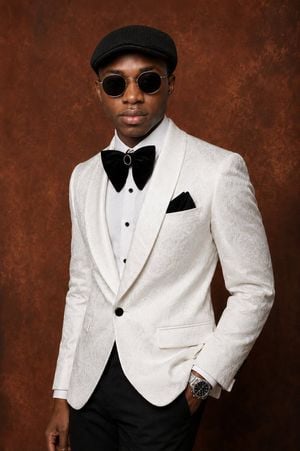
Create a polished studio fashion portrait of a confident {argument name="subject" default="young Black man"} standing in a 3/4 pose against a rich warm burnt-sienna and terracotta textured studio backdrop. Frame him from mid-thigh upward in a vertical portrait composition, body angled slightly to the viewer’s left, shoulders relaxed, one hand tucked into his trouser pocket and the other arm resting naturally at his side. He wears a sophisticated formal outfit: an ivory-white jacquard dinner jacket with subtle floral paisley texture, wide shawl lapels, a single black button, flap pockets, crisp white dress shirt with black studs, oversized black velvet bow tie with a small gold-and-black oval brooch at the center, black pocket square, fitted black trousers, a silver wristwatch, and a textured black flat cap. Use soft directional studio lighting from the front-left to reveal the jacket texture and create gentle shadows, with realistic skin tone, refined tailoring, high-end editorial styling, shallow depth of field, sharp focus on clothing details, and a premium magazine portrait mood. Keep the background plain except for painterly texture, no text, no logos, no props, no extra people.
Choose the primary action to open PicX Studio with the available template settings. Review the model and format, personalize the creative direction, and generate when ready.
Yes. You can change the subject, setting, lighting, mood, format, and available model controls before creating your image.
This template is free to open and customize. Generation usage is shown in PicX Studio before you create.
Start with GPT Image 2, which is the model associated with this template. You can compare another compatible model for a different finish.
Follow a topic to a crawlable collection of related PicX Studio templates.